Emoji Battery Status Bar
Actualizada
Versión actual
1.0.1
Ofrecida por

Deje de preocuparse por los recargos cuando use Emoji Battery Status Bar en su teléfono celular, libérese de la pequeña pantalla y disfrute usando la aplicación en una pantalla mucho más grande. A partir de ahora, obtenga una experiencia de pantalla completa de su aplicación con teclado y mouse. MEmu le ofrece todas las características sorprendentes que esperaba: instalación rápida y configuración fácil, controles intuitivos, no más limitaciones de batería, datos móviles y llamadas molestas. El nuevo MEmu 9 es la mejor opción para usar Emoji Battery Status Bar en su computadora. Codificado con nuestra absorción, el administrador de instancias múltiples hace posible abrir 2 o más cuentas al mismo tiempo. Y lo más importante, nuestro exclusivo motor de emulación puede liberar todo el potencial de su PC, hacer que todo sea fluido y agradable.
Más detalles
Disfruta de una experiencia increíble usando Emoji Battery Status Bar en tu PC con MEmu Play. Es un potente emulador de Android gratuito que te ofrece miles de aplicaciones de Android en su versión de escritorio. ¡Conéctate con tus amigos y optimiza tu trabajo! ¿Cansado del mismo icono de batería predeterminado?
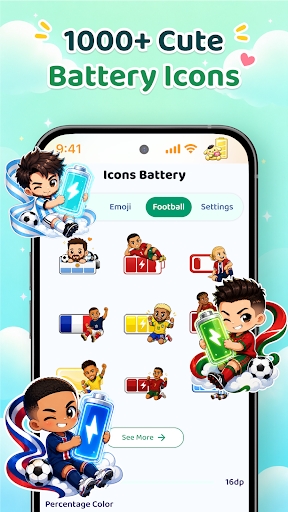
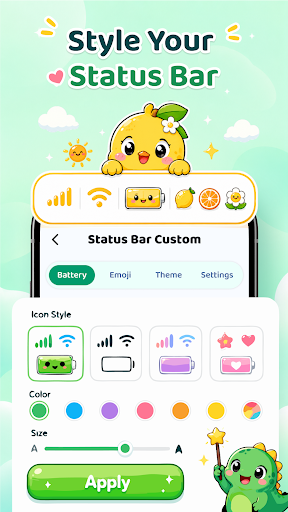
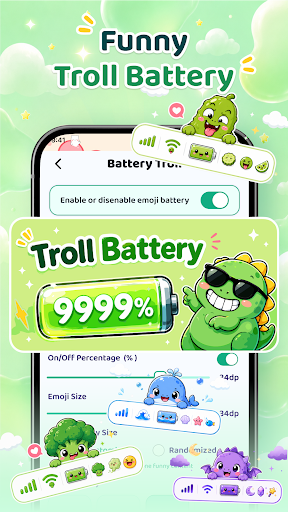
¿Cansado del mismo icono de batería predeterminado?
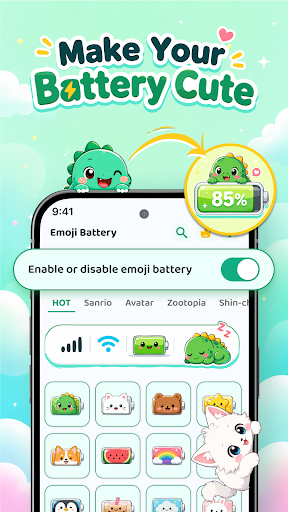
Dale a tu barra de estado un toque divertido con un icono de batería personalizado con emojis, stickers animados, detalles coloridos y adorables mascotas virtuales.
CARACTERÍSTICAS PRINCIPALES
Icono de batería con emojis
Personaliza el nivel de batería con un estilo único. Combina el porcentaje de batería, emojis, colores, símbolos y texto personalizado para crear diseños divertidos.
Barra de estado personalizada
Ajusta el icono de batería, el tamaño de los emojis, la altura, la alineación, el color del tema y el tamaño o color de los iconos disponibles.
Stickers y emojis animados
Añade stickers animados y emojis para darle más vida a tu barra de estado. Coloca hasta cinco stickers, luego cambia su tamaño, gíralos, muévelos y previsualízalos antes de aplicarlos.
Adorables mascotas virtuales
Añade divertidas mascotas virtuales que se mueven por la pantalla mientras usas el teléfono. Arrástralas a una nueva posición, cambia su tamaño y velocidad, o usa el modo fantasma para un efecto transparente.
Estilos de muesca personalizados
Renueva la parte superior de tu pantalla con diseños de muesca clásicos, redondeados, en forma de corazón, dinámicos u ocultos.
Estilos de batería divertidos y emoticonos
Crea indicadores de batería graciosos con emojis, texto personalizado, símbolos, niveles de batería reales o combinaciones aleatorias.
Iconos de la barra de estado
Personaliza los iconos de Wi-Fi disponible, datos móviles, señal, modo avión, punto de acceso, tono de llamada, carga, fecha y hora con tamaños y colores personalizados.
Plantillas, búsqueda y favoritos
Explora estilos de batería y pantalla por categoría, busca por nombre o etiqueta, revisa los diseños usados recientemente y guarda tus favoritos para más tarde.
Elige un estilo de batería con emojis, previsualiza el resultado, ajusta los colores y detalles, y aplica el estilo que mejor se adapte a tu estado de ánimo. Puedes activar o desactivar tu indicador de batería personalizado cuando quieras cambiar la configuración.
PERMISOS Y PRIVACIDAD
El permiso de accesibilidad se utiliza para admitir el icono de batería personalizado, la visualización de la barra de estado y las funciones de gestos compatibles. El permiso para mostrar sobre otras aplicaciones puede utilizarse para que las mascotas de pantalla permanezcan visibles mientras usas tu teléfono. No recopilamos, almacenamos ni compartimos información personal o confidencial. Puedes activar o desactivar este permiso en cualquier momento en la configuración del dispositivo.
Transforma tu barra de estado en un espacio divertido y atractivo que refleje tu personalidad.
Más detalles

1. Descargar el instalador de MEmu y finalice la instalación

2. Iniciar MEmu y abrir Google Play en la página de inicio

3. Buscar Emoji Battery Status Bar en Google Play
Install
4. Descargar y instalar Emoji Battery Status Bar
5. Hacer click al icono para iniciar

6. Experiencia Emoji Battery Status Bar en PC con MEmu
MEmu App Player es el mejor emulador de Android gratuito y 50 millones de personas ya están disfrutando su magnífica experiencia de aplicación en Android. La tecnología de virtualización de MEmu te permite jugar a miles de aplicaciones Android suavemente en tu PC, incluso los más intensivos gráficamente.
Pantalla más grande con mejores gráficos; Larga duración, sin limitación de batería o datos móviles.
Soporte completo de keymapping para un control preciso del teclado y el mouse o gamepad.
Múltiples cuentas de juegos o tareas en una sola PC a la vez con el administrador de instancias múltiples.
Use Emoji Battery Status Bar on PC by following steps: