Emoji Keyboard, Fonts - Zomj
Actualizada
Versión actual
3.5.31
Ofrecida por

Deje de preocuparse por los recargos cuando use Emoji Keyboard, Fonts - Zomj en su teléfono celular, libérese de la pequeña pantalla y disfrute usando la aplicación en una pantalla mucho más grande. A partir de ahora, obtenga una experiencia de pantalla completa de su aplicación con teclado y mouse. MEmu le ofrece todas las características sorprendentes que esperaba: instalación rápida y configuración fácil, controles intuitivos, no más limitaciones de batería, datos móviles y llamadas molestas. El nuevo MEmu 9 es la mejor opción para usar Emoji Keyboard, Fonts - Zomj en su computadora. Codificado con nuestra absorción, el administrador de instancias múltiples hace posible abrir 2 o más cuentas al mismo tiempo. Y lo más importante, nuestro exclusivo motor de emulación puede liberar todo el potencial de su PC, hacer que todo sea fluido y agradable.
Más detalles
Descargar Emoji Keyboard, Fonts - Zomj en PC con MEmu Android Emulador. Disfruta jugando en la pentalla grande. Zomj: Emoji Keyboard & Font Keyboard for 2025 - Over 150,000 Emojis, GIFs, Symbols, Stickers, and Fonts.
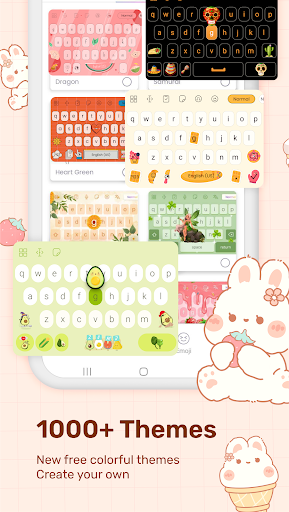
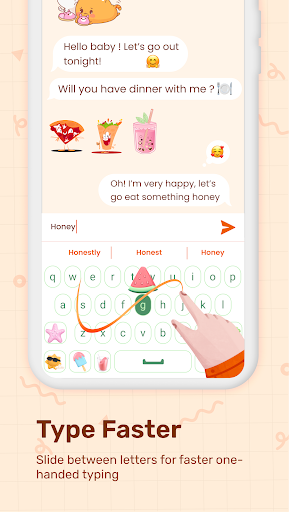
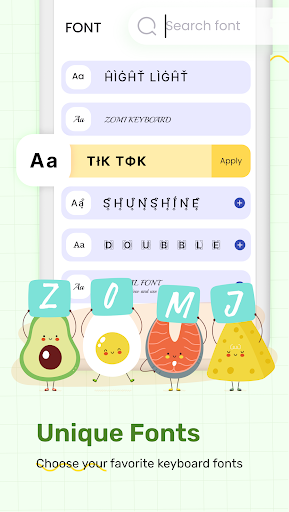
Zomj: Emoji Keyboard & Font Keyboard for 2025 - Over 150,000 Emojis, GIFs, Symbols, Stickers, and Fonts
Tired of the boring and monotonous default keyboard? It's time to upgrade to Zomj, the most beautiful, smarter, and more colorful keyboard app. Say goodbye to the default keyboard and experience a new level of customization with Zomj, offering everything you need—from word suggestions to unique keyboard layouts like QWERTY, AZERTY, QWERTZ, and more. Personalize your typing experience with real-time color-changing effects and a wide variety of themes!
Key Features:
- Fast Typing & Swipe to Text: Enjoy lightning-fast typing with swipe-to-text functionality and word suggestions for a smoother experience.
- Voice Typing: Speak to text effortlessly with voice typing support.
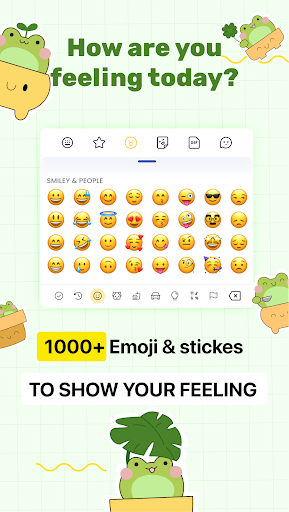
- Over 50,000+ Emojis, Stickers, GIFs, and Symbols: Express yourself with a huge selection of emojis, fun stickers, and dynamic GIFs to make your conversations more exciting.
- Beautiful LED Lighting: Customize your keyboard with over 10 billion color options and stunning LED lighting effects, perfect for adding a personal touch to your device.
- New Stickers & Themes: Access trendy new stickers and themes, including backlit background effects, making every typing experience unique.
- Multiple Keyboard Layouts: Choose from various layouts like QWERTY, AZERTY, QWERTZ, PC, Dvorak, and Colemak for a layout that fits your typing style.
- Glide Typing: Write smoothly with Glide Typing, a fast and intuitive way to type by swiping across the keyboard.
- Emoji Suggestions: Get emoji suggestions based on the emotion you're typing, making it easier to express yourself.
- Multiple Languages Supported: Use the app in several languages to cater to your communication needs.
- Real-Time Color Effects: Enjoy vibrant, changing colors in the background, perfect for adding flair to your keyboard.
- 8-Bit & Glitch Emojis: Choose from unique 8-bit keyboard designs and fun glitch emojis for a fresh, modern look.
Why Choose Zomj?
- The Zomj Keyboard is designed to be both functional and beautiful, offering high-precision features like word prediction, real-time emoji suggestions, and more.
- With Zomj, you get access to an extensive collection of emojis, stickers, and GIFs to express every emotion, all from one app.
- Customize your keyboard layout and background, and enjoy an immersive experience with smooth typing and real-time LED effects.
Privacy Notice:
When installing the app, Android may warn you about collecting data, as this app is a keyboard app that handles text input. This warning applies to all keyboard apps, not just Zomj. Rest assured, we do not collect any personal user data. We are committed to safeguarding your privacy.
Get Zomj now and experience the most beautiful and functional emoji keyboard with LED lighting, dynamic effects, and over 150,000 emojis, stickers, and GIFs! Transform your typing experience in 2025 and beyond.
We continuously improve the app to bring you the latest features and updates. If you have any suggestions, feel free to reach out via the provided contact email.
Thank you for choosing Zomj!
Más detalles

1. Descargar el instalador de MEmu y finalice la instalación

2. Iniciar MEmu y abrir Google Play en la página de inicio

3. Buscar Emoji Keyboard, Fonts - Zomj en Google Play
Install
4. Descargar y instalar Emoji Keyboard, Fonts - Zomj
5. Hacer click al icono para iniciar

6. Experiencia Emoji Keyboard, Fonts - Zomj en PC con MEmu
MEmu App Player es el mejor emulador de Android gratuito y 50 millones de personas ya están disfrutando su magnífica experiencia de aplicación en Android. La tecnología de virtualización de MEmu te permite jugar a miles de aplicaciones Android suavemente en tu PC, incluso los más intensivos gráficamente.
Pantalla más grande con mejores gráficos; Larga duración, sin limitación de batería o datos móviles.
Soporte completo de keymapping para un control preciso del teclado y el mouse o gamepad.
Múltiples cuentas de juegos o tareas en una sola PC a la vez con el administrador de instancias múltiples.
Use Emoji Keyboard, Fonts - Zomj on PC by following steps: