Find my Phone
Actualizada
Versión actual
2.5.7
Ofrecida por

Deje de preocuparse por los recargos cuando use Find my Phone en su teléfono celular, libérese de la pequeña pantalla y disfrute usando la aplicación en una pantalla mucho más grande. A partir de ahora, obtenga una experiencia de pantalla completa de su aplicación con teclado y mouse. MEmu le ofrece todas las características sorprendentes que esperaba: instalación rápida y configuración fácil, controles intuitivos, no más limitaciones de batería, datos móviles y llamadas molestas. El nuevo MEmu 9 es la mejor opción para usar Find my Phone en su computadora. Codificado con nuestra absorción, el administrador de instancias múltiples hace posible abrir 2 o más cuentas al mismo tiempo. Y lo más importante, nuestro exclusivo motor de emulación puede liberar todo el potencial de su PC, hacer que todo sea fluido y agradable.
Más detalles
Descargar Find my Phone en PC con MEmu Android Emulador. Disfruta jugando en la pentalla grande. This phone finder is the simplest way if you want to find out where is my phone to find location of any android or iphone.
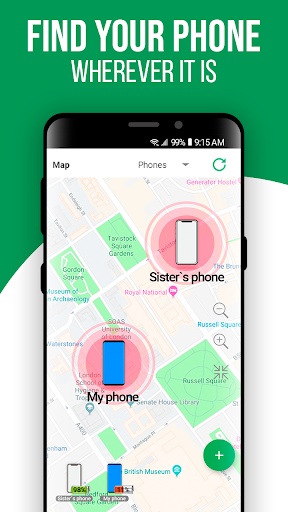
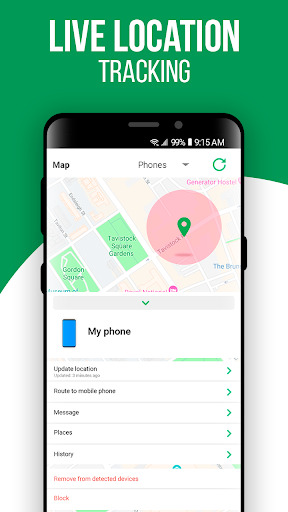
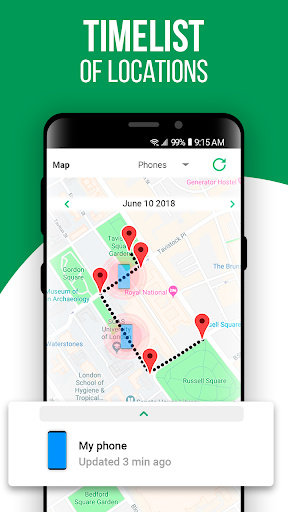
This phone finder is the simplest way if you want to find out where is my phone to find location of any android or iphone.
Install Find my Phone to find phone: iPhone or Android and make sure you never lose them!
Determining the location of the mobile has never been so easy. It's as simple as one two three:
To find location:
1. Install the app and sign up using your phone number or email address
2. Install the app on another device of yours.
3. Pair devices with each other in a private network so you can locate both of them instantly.
4. Use the app as kids tracker to get a peace of mind
The main function of our app is the ability to instantly find my phone:
• Keep an eye on a lost or missing device with real time location updates. When the missing or stolen cellular is moved, its position is updated instantly on the app’s map and on our website.
• You can even track & locate Android tablets, or an iPad.
• Find a lost, stolen or missing device whether it belongs to you, your spouse or your child
Find my Phone app is intended for family safety and parental control only. The app does not have installed on the phone secretly, its use is possible only with the explicit consent of the child. Personal data is stored in strict accordance with legislation and GDPR policies.
How does cell phone location technology work?
Cellular campaigns know the distance from your device to the cell towers. They share this data only if the owner of the device has allowed to determine their location. Our application securely stores this data so that you can view it from devices that you have given permission to track the location of the phone, or other devices.
Аnd the campaigns can find my phone on android, and they can find a iPhone as well.
It is very convenient to understand where your children are at the moment, view the history of their movements – see where the phone was during the day!
Receive alerts when your children come to school, section, home, or any other place you set.
Our company has been innovating upon GPS tracker technologies for more than 10 years. We have managed to achieve maximum accuracy and speed of locating for any phones running on Android and iPhone technologies.
We rightfully have the right to be proud of our application, as evidenced by the numerous positive reviews of our users.
Find Phone app is intended for family safety and parental control only. The app cannot be installed on the phone secretly, the use is available only with the explicit consent of the child. Personal data is stored in strict accordance with legislation and GDPR policies.
Privacy policy - http://findmydroid.online/privacypolice.html
Get acquainted to the Terms of Use you can on the link below: http://findmydroid.online/terms.html
If you have any suggestions or questions about our application, please contact us support@findmydroid.online
Más detalles

1. Descargar el instalador de MEmu y finalice la instalación

2. Iniciar MEmu y abrir Google Play en la página de inicio

3. Buscar Find my Phone en Google Play
Install
4. Descargar y instalar Find my Phone
5. Hacer click al icono para iniciar

6. Experiencia Find my Phone en PC con MEmu
MEmu App Player es el mejor emulador de Android gratuito y 50 millones de personas ya están disfrutando su magnífica experiencia de aplicación en Android. La tecnología de virtualización de MEmu te permite jugar a miles de aplicaciones Android suavemente en tu PC, incluso los más intensivos gráficamente.
Pantalla más grande con mejores gráficos; Larga duración, sin limitación de batería o datos móviles.
Soporte completo de keymapping para un control preciso del teclado y el mouse o gamepad.
Múltiples cuentas de juegos o tareas en una sola PC a la vez con el administrador de instancias múltiples.
Use Find my Phone on PC by following steps: