
Grammar Check by AI Writing
Actualizada
Versión actual
1.9.7
Ofrecida por

Deje de preocuparse por los recargos cuando use Grammar Check by AI Writing en su teléfono celular, libérese de la pequeña pantalla y disfrute usando la aplicación en una pantalla mucho más grande. A partir de ahora, obtenga una experiencia de pantalla completa de su aplicación con teclado y mouse. MEmu le ofrece todas las características sorprendentes que esperaba: instalación rápida y configuración fácil, controles intuitivos, no más limitaciones de batería, datos móviles y llamadas molestas. El nuevo MEmu 9 es la mejor opción para usar Grammar Check by AI Writing en su computadora. Codificado con nuestra absorción, el administrador de instancias múltiples hace posible abrir 2 o más cuentas al mismo tiempo. Y lo más importante, nuestro exclusivo motor de emulación puede liberar todo el potencial de su PC, hacer que todo sea fluido y agradable.
Más detalles
Descargar Grammar Check by AI Writing en PC con MEmu Android Emulador. Disfruta jugando en la pentalla grande. Enhance your writing skills with the assistance of Grammar Check by AI Writing, a comprehensive grammar, spelling, and paraphrasing tool, all built on AI.
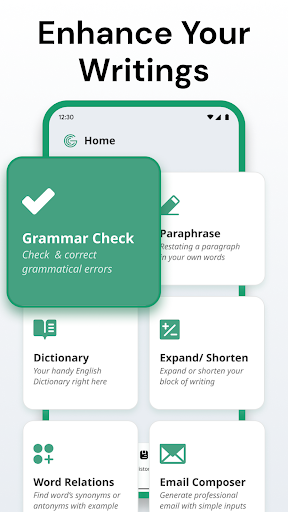
Enhance your writing skills with the assistance of Grammar Check by AI Writing, a comprehensive grammar, spelling, and paraphrasing tool, all built on AI. This app will aid you in all your writing tasks.
Grammar Check by AI Writing is the ultimate writing assistant application, utilizing cutting-edge technology to elevate your writing proficiency. With our latest features, including a Dictionary, you can now refine your English within a single app seamlessly.
Imagine you have a sentence that needs refinement; you start with Grammar Check. Copy the corrected version generated by AI and utilize the Paraphrase feature to find the best choice. Furthermore, you can use our Dictionary to enhance your understanding of unfamiliar words.
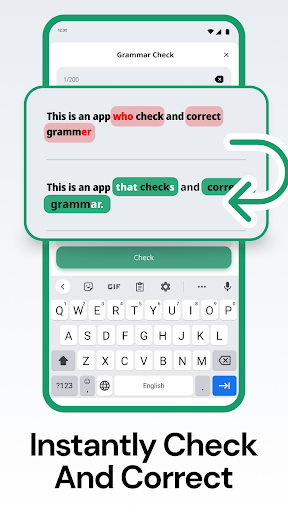
Experience instant results through an intuitive interface, making it effortless to correct English grammar and rectify errors, rephrase paragraphs in various tones, and compose professional emails.
Why this app is outstanding in the market?
✅ Real-time grammar check and auto-correction: Say goodbye to red squiggly lines, as our app automatically detects and rectifies grammar and spelling mistakes in real-time, allowing you to focus on expressing yourself effectively.
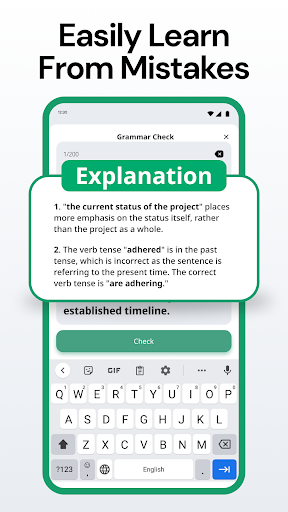
✅ Grammar Explanation: Following the grammar check, a detailed description of your mistakes is provided, enabling you to thoroughly understand and learn from your errors for the future.
✅ Dictionary: Deepen your understanding of English words with our comprehensive dictionary, which includes word types, IPA, and examples to help you master each word.
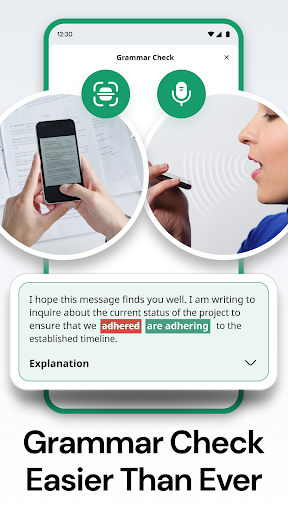
✅ Enhanced Input Options: In addition to traditional typing, our app offers the convenience of text scanning through your camera or inserting pictures. Furthermore, you can even use your voice for text input.
✅ Word Relations: This feature is designed to enrich your text by suggesting alternative words and expressions, enhancing the quality of your writing with a variety of vocabulary options.
✅ Tone Transformation: Easily adjust the tone of your writing to suit any situation. Whether you need your essay to sound professional or wish to write a casual email to a friend, it's easily accomplished.
✅ Email Composition: Whether you're sending a crucial work email or catching up with friends, Grammar Check by AI Writing has you covered. Our AI can craft emails aligning with your objectives, ensuring your messages are clear, concise, and error-free. You can have confidence in the professionalism and effectiveness of your emails.
Whether you're a student, professional, or simply aiming to enhance your writing skills, this app is the perfect writing assistant to help you achieve your goals. With real-time grammar checks and corrections, you can be confident that your writing is both clear and effective.
Privacy Policy: https://metaverselabs.ai/privacy-policy/
Terms of use: https://metaverselabs.ai/terms-of-use/
You are welcome to contact us at support@metaverselabs.ai
Más detalles

1. Descargar el instalador de MEmu y finalice la instalación

2. Iniciar MEmu y abrir Google Play en la página de inicio

3. Buscar Grammar Check by AI Writing en Google Play
Install
4. Descargar y instalar Grammar Check by AI Writing
5. Hacer click al icono para iniciar

6. Experiencia Grammar Check by AI Writing en PC con MEmu
MEmu App Player es el mejor emulador de Android gratuito y 50 millones de personas ya están disfrutando su magnífica experiencia de aplicación en Android. La tecnología de virtualización de MEmu te permite jugar a miles de aplicaciones Android suavemente en tu PC, incluso los más intensivos gráficamente.
Pantalla más grande con mejores gráficos; Larga duración, sin limitación de batería o datos móviles.
Soporte completo de keymapping para un control preciso del teclado y el mouse o gamepad.
Múltiples cuentas de juegos o tareas en una sola PC a la vez con el administrador de instancias múltiples.
Use Grammar Check by AI Writing on PC by following steps: