Guitar Tuner, GuitarTunio
Actualizada
Versión actual
2.3.0
Ofrecida por

Deje de preocuparse por los recargos cuando use Guitar Tuner, GuitarTunio en su teléfono celular, libérese de la pequeña pantalla y disfrute usando la aplicación en una pantalla mucho más grande. A partir de ahora, obtenga una experiencia de pantalla completa de su aplicación con teclado y mouse. MEmu le ofrece todas las características sorprendentes que esperaba: instalación rápida y configuración fácil, controles intuitivos, no más limitaciones de batería, datos móviles y llamadas molestas. El nuevo MEmu 9 es la mejor opción para usar Guitar Tuner, GuitarTunio en su computadora. Codificado con nuestra absorción, el administrador de instancias múltiples hace posible abrir 2 o más cuentas al mismo tiempo. Y lo más importante, nuestro exclusivo motor de emulación puede liberar todo el potencial de su PC, hacer que todo sea fluido y agradable.
Más detalles
Descargar Guitar Tuner, GuitarTunio en PC con MEmu Android Emulador. Disfruta jugando en la pentalla grande. GuitarTunio – Guitar Tuner is an incredibly powerful tuning application for string instruments.
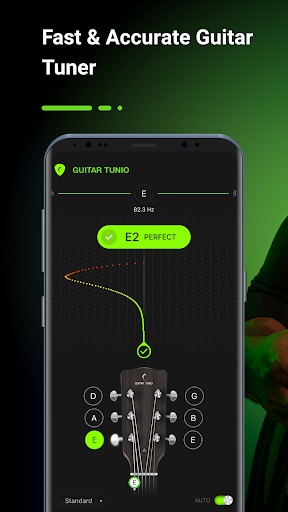
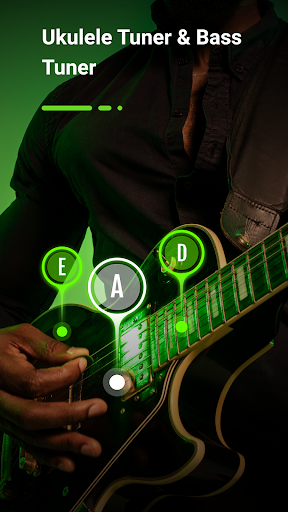
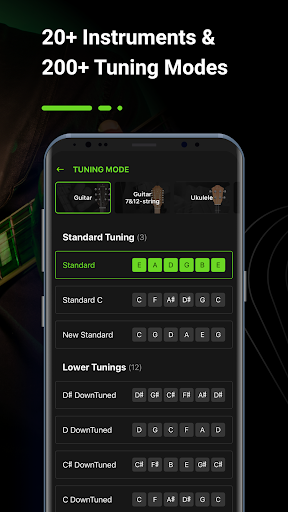
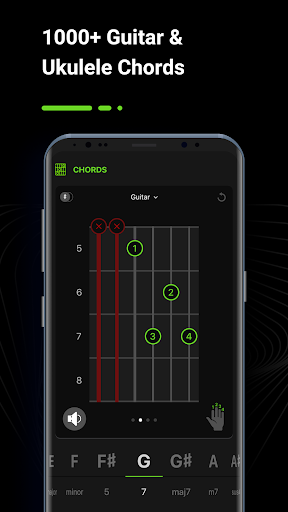
GuitarTunio – Guitar Tuner is an incredibly powerful tuning application for string instruments. It is one of the best and most user-friendly tuners available for Android users today with many smart, handy and high performance features such as instrument tuner, digital metronome and chords. GuitarTunio is fast, easy-to-use, accurate and perfect for both beginners and experts.
GuitarTunio provides its users an ultimate tuner that works well with a variety of string instruments. It offers over 200 different tunings for more than 20 instrument, including:
GUITAR TUNER - Guitar Tunings:
+ Standard
+ Lower, DownTuned
+ Higher, HighTuned
+ Dropped
+ Double Dropped
+ Step
+ Open
+ Cross-Note
+ Modal
+ Extended
+ Other guitar tunings
7 & 12 STRING GUITAR TUNER - Tunings:
+ 7-string guitar: Standard, Metal, Jazz, Russian Open G, Variant, Lenny Breau, Charlie Hunter
+ 12-string guitar: Standard, Variant, Variant 2
UKULELE TUNER- Ukulele Tunings:
+ Ukulele: Soprano in C, Concert, Tenor, Open D, Drop G, Baritone, Slack Key, Slide
+ Cavaquinho: Standard
BASS TUNER - Bass Guitar Tunings:
+ 4-string bass: Standard, Drop D, Drop C, Drop B, Half step, Full step, Open A, Open E
+ 5-string bass: Standard, Tenor Standard, Standard C, Drop A, F#BEAD
+ 6-string bass: Standard, EADGCF, F#BEADG
+ 7-string bass: Standard
VIOLIN TUNER - Violin Family Tunings:
+ Violin: Standard, Cajun, Open G, Cross, etc.
+ Viola: Standard
+ Cello: Standard, 5th Suite, Zoltan Kodaly
+ Fiddle: Standard
+ Double Bass: Standard, Solo
FOLK TUNER - Folk Instrument Tunings:
+ Mandolin: Standard, Octave
+ Mandola: Standard
+ Mandocello: Standard, Variant
+ Mandobass: 8-string
+ Balalaika: Standard
+ Banjo: 4-string Standard, 5-string Standard
GuitarTunio interface is designed to be minimal, making the tuning process easier, more comfortable and effective. The pro tuner has 2 modes: Manual Tune Mode and Auto Tune Mode.
⁂ Auto Tune Mode
The Auto Tune Mode is perfect for beginners. All you have to do is open this app, turn on the Auto Tune Mode and place the microphone from your smartphone near your instrument. The app automatically determines the string deviation when you play each string. Then, this app will show you whether it’s sharp (higher pitched) or flat (lower pitched) so that you can adjust it.
⁂ Chromatic Mode (Manual Tune Mode)
Professionals can choose the Manual Tune Mode to tune your instrument instead of using the Auto mode. To use this mode, musicians simply need to select the type of stringed instrument and corresponding preset tuning, and then start tuning.
In addition to the powerful tuner, the GuitarTunio app also offers an advanced digital metronome and a chord library.
⁂ Digital metronome
With a simple user interface and powerful functionality, the digital metronome provides you a tool for improving your timing, rhythm and feel day by day.
For professionals, GuitarTunio has an option to change standard tuning frequency.
⁂ Chord Library for Guitar and Ukulele
With over 1000 chords, you can learn and practice your skills as much as possible. By learning a new chord daily, you can master and enhance your levels.
Besides, GuitarTunio also offers Left Handed Mode to help left-handed people tune their musical instruments more easily and quickly. Moreover, when using the tuning app to tune your beloved instrument or to practice your rhythm with the metronome, you don’t need any additional equipment because it works directly with the microphone of your smartphone.
GuitarTunio will turn your phone into a real expensive digital tuner . The cool guitar tuner app converges many powerful and useful features that musicians are looking for.
Let’s try it out and show us your experience with the guitar tuner!
Más detalles

1. Descargar el instalador de MEmu y finalice la instalación

2. Iniciar MEmu y abrir Google Play en la página de inicio

3. Buscar Guitar Tuner, GuitarTunio en Google Play
Install
4. Descargar y instalar Guitar Tuner, GuitarTunio
5. Hacer click al icono para iniciar

6. Experiencia Guitar Tuner, GuitarTunio en PC con MEmu
MEmu App Player es el mejor emulador de Android gratuito y 50 millones de personas ya están disfrutando su magnífica experiencia de aplicación en Android. La tecnología de virtualización de MEmu te permite jugar a miles de aplicaciones Android suavemente en tu PC, incluso los más intensivos gráficamente.
Pantalla más grande con mejores gráficos; Larga duración, sin limitación de batería o datos móviles.
Soporte completo de keymapping para un control preciso del teclado y el mouse o gamepad.
Múltiples cuentas de juegos o tareas en una sola PC a la vez con el administrador de instancias múltiples.
Use Guitar Tuner, GuitarTunio on PC by following steps: