Guitar Tuner, GuitarTunio
อัปเดตเมื่อ
เวอร์ชันปัจจุบัน
2.3.0
ให้บริการโดย

เมื่อใช้ Guitar Tuner, GuitarTunio บนโทรศัพท์ของคุณไม่ต้องกังวลกับการชาร์จไฟมากเกินไปปลดปล่อยตัวคุณเองจากหน้าจอขนาดเล็กและสนุกกับการใช้แอพนี้บนหน้าจอขนาดใหญ่ จากนี้ไปรับประสบการณ์เต็มหน้าจอของแอปพลิเคชันของคุณด้วยคีย์บอร์ดและเมาส์ MEmu มีคุณสมบัติที่น่าแปลกใจที่คุณคาดหวัง: การติดตั้งที่รวดเร็วและการตั้งค่าที่ง่ายควบคุมได้ง่ายไม่ จำกัด แบตเตอรี่ข้อมูลมือถือและการโทรที่รบกวน MEmu 9 ใหม่ล่าสุดเป็นตัวเลือกที่ดีที่สุดสำหรับการใช้ Meitu – โปรแกรมแก้ไขภาพแนวธรรมชาติ บนคอมพิวเตอร์ของคุณ ด้วยรหัสการดูดซึมของเราผู้จัดการหลายอินสแตนซ์ทำให้สามารถเปิดบัญชี 2 บัญชีขึ้นไปในเวลาเดียวกันได้ และที่สำคัญที่สุดเอ็นจิ้นจำลองพิเศษของเราสามารถปลดปล่อยศักยภาพของPCของคุณและทำให้ทุกอย่างราบรื่นและสนุกสนาน
แสดงเพิ่มเติม
ดาวน์โหลด Guitar Tuner, GuitarTunio บน PC ด้วย MEmu Android Emulator สนุกกับการเล่นบนหน้าจอขนาดใหญ่ GuitarTunio – Guitar Tuner is an incredibly powerful tuning application for string instruments.
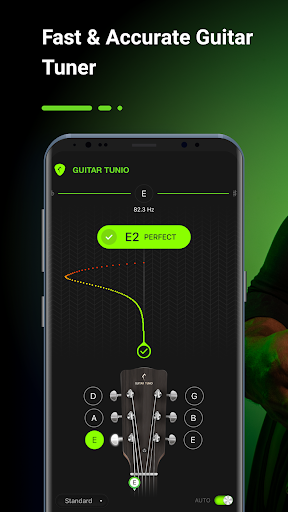
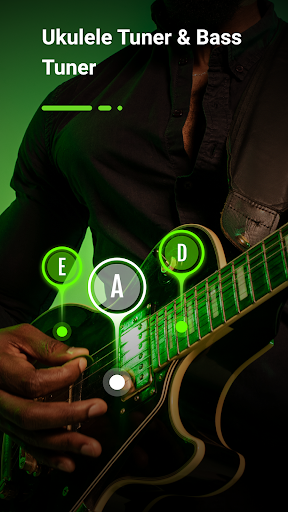
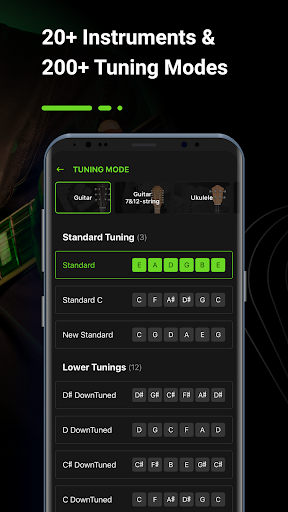
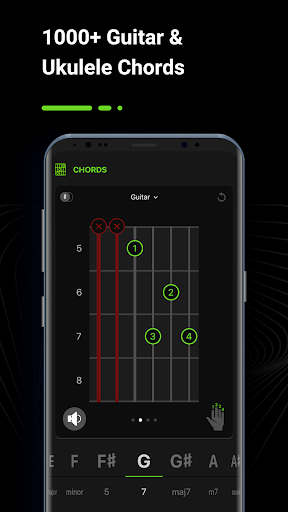
GuitarTunio – Guitar Tuner is an incredibly powerful tuning application for string instruments. It is one of the best and most user-friendly tuners available for Android users today with many smart, handy and high performance features such as instrument tuner, digital metronome and chords. GuitarTunio is fast, easy-to-use, accurate and perfect for both beginners and experts.
GuitarTunio provides its users an ultimate tuner that works well with a variety of string instruments. It offers over 200 different tunings for more than 20 instrument, including:
GUITAR TUNER - Guitar Tunings:
+ Standard
+ Lower, DownTuned
+ Higher, HighTuned
+ Dropped
+ Double Dropped
+ Step
+ Open
+ Cross-Note
+ Modal
+ Extended
+ Other guitar tunings
7 & 12 STRING GUITAR TUNER - Tunings:
+ 7-string guitar: Standard, Metal, Jazz, Russian Open G, Variant, Lenny Breau, Charlie Hunter
+ 12-string guitar: Standard, Variant, Variant 2
UKULELE TUNER- Ukulele Tunings:
+ Ukulele: Soprano in C, Concert, Tenor, Open D, Drop G, Baritone, Slack Key, Slide
+ Cavaquinho: Standard
BASS TUNER - Bass Guitar Tunings:
+ 4-string bass: Standard, Drop D, Drop C, Drop B, Half step, Full step, Open A, Open E
+ 5-string bass: Standard, Tenor Standard, Standard C, Drop A, F#BEAD
+ 6-string bass: Standard, EADGCF, F#BEADG
+ 7-string bass: Standard
VIOLIN TUNER - Violin Family Tunings:
+ Violin: Standard, Cajun, Open G, Cross, etc.
+ Viola: Standard
+ Cello: Standard, 5th Suite, Zoltan Kodaly
+ Fiddle: Standard
+ Double Bass: Standard, Solo
FOLK TUNER - Folk Instrument Tunings:
+ Mandolin: Standard, Octave
+ Mandola: Standard
+ Mandocello: Standard, Variant
+ Mandobass: 8-string
+ Balalaika: Standard
+ Banjo: 4-string Standard, 5-string Standard
GuitarTunio interface is designed to be minimal, making the tuning process easier, more comfortable and effective. The pro tuner has 2 modes: Manual Tune Mode and Auto Tune Mode.
⁂ Auto Tune Mode
The Auto Tune Mode is perfect for beginners. All you have to do is open this app, turn on the Auto Tune Mode and place the microphone from your smartphone near your instrument. The app automatically determines the string deviation when you play each string. Then, this app will show you whether it’s sharp (higher pitched) or flat (lower pitched) so that you can adjust it.
⁂ Chromatic Mode (Manual Tune Mode)
Professionals can choose the Manual Tune Mode to tune your instrument instead of using the Auto mode. To use this mode, musicians simply need to select the type of stringed instrument and corresponding preset tuning, and then start tuning.
In addition to the powerful tuner, the GuitarTunio app also offers an advanced digital metronome and a chord library.
⁂ Digital metronome
With a simple user interface and powerful functionality, the digital metronome provides you a tool for improving your timing, rhythm and feel day by day.
For professionals, GuitarTunio has an option to change standard tuning frequency.
⁂ Chord Library for Guitar and Ukulele
With over 1000 chords, you can learn and practice your skills as much as possible. By learning a new chord daily, you can master and enhance your levels.
Besides, GuitarTunio also offers Left Handed Mode to help left-handed people tune their musical instruments more easily and quickly. Moreover, when using the tuning app to tune your beloved instrument or to practice your rhythm with the metronome, you don’t need any additional equipment because it works directly with the microphone of your smartphone.
GuitarTunio will turn your phone into a real expensive digital tuner . The cool guitar tuner app converges many powerful and useful features that musicians are looking for.
Let’s try it out and show us your experience with the guitar tuner!
แสดงเพิ่มเติม

1. ดาวน์โหลดตัวติดตั้ง MEmu และสิ้นสุดการติดตั้ง

2. เริ่ม MEmu จากนั้นเปิด Google Play บนหน้าแรก

3. ค้นหา Guitar Tuner, GuitarTunio ใน Google Play
Install
4. ดาวน์โหลดและติดตั้ง Guitar Tuner, GuitarTunio
5. เมื่อติดตั้งเสร็จให้คลิกที่ไอคอนเพื่อเริ่มใช้งาน

6. ใช้ MEmu เพื่อสัมผัสประสบการณ์ Guitar Tuner, GuitarTunio บนคอมพิวเตอร์ของคุณ
MEmu Play คือโปรแกรมจำลอง Android ที่ดีที่สุด มีผู้ใช้มากกว่า 50 ล้านคน มอบประสบการณ์การใช้งานแอป Android ขั้นสุดยอดให้กับคุณ เทคโนโลยีจำลองเสมือนของ MEmu ช่วยให้คุณรันแอป Android หลายพันแอปบนคอมพิวเตอร์ได้อย่างราบรื่น แม้แอปที่กินทรัพยากรเครื่องสูงที่สุด
จอใหญ่และกราฟฟิกสวยกว่า; เล่นได้นาน, ไม่ต้องใช้แบตเตอรี่โทรศัพท์หรือเน็ตโทรศัพท์.
ระบบปรับแต่งปุ่มคีย์บอร์ดและเม้าส์ตามที่คุณเลือก
เล่นมากกว่าหนึ่งเกมบน PC ในเวลาเดียวกันด้วยระบบหลายจอหรือ Multi-Instance manager.
Use Guitar Tuner, GuitarTunio on PC by following steps: