Lazada Seller Center
Actualizada
Versión actual
3.38.2
Ofrecida por

Deje de preocuparse por los recargos cuando use Lazada Seller Center en su teléfono celular, libérese de la pequeña pantalla y disfrute usando la aplicación en una pantalla mucho más grande. A partir de ahora, obtenga una experiencia de pantalla completa de su aplicación con teclado y mouse. MEmu le ofrece todas las características sorprendentes que esperaba: instalación rápida y configuración fácil, controles intuitivos, no más limitaciones de batería, datos móviles y llamadas molestas. El nuevo MEmu 9 es la mejor opción para usar Lazada Seller Center en su computadora. Codificado con nuestra absorción, el administrador de instancias múltiples hace posible abrir 2 o más cuentas al mismo tiempo. Y lo más importante, nuestro exclusivo motor de emulación puede liberar todo el potencial de su PC, hacer que todo sea fluido y agradable.
Más detalles
Descargar Lazada Seller Center en PC con MEmu Android Emulador. Disfruta jugando en la pentalla grande. Manage your business on Lazada wherever you are with the Lazada Seller Center APP!
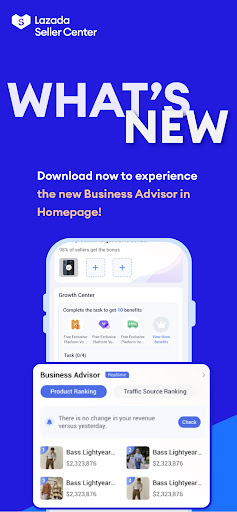
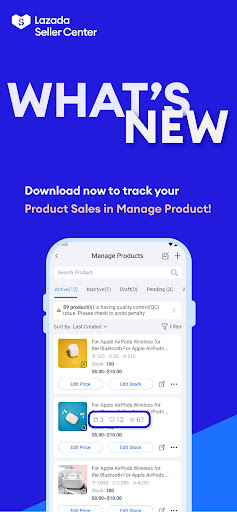
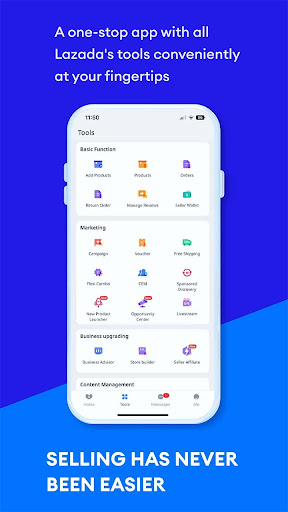
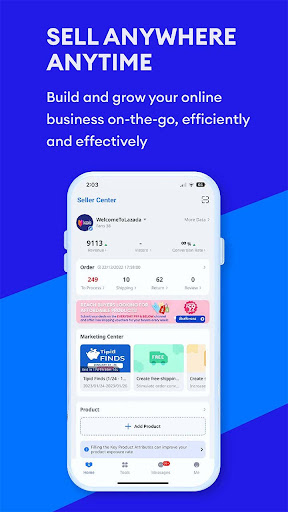
Manage your business on Lazada wherever you are with the Lazada Seller Center APP! Grow your business on the go with key features including sign up, product listing, product management, order fulfillment, Business Advisor (Analytics), message center, and Instant Messaging. The Seller Center APP is open to all sellers across Indonesia, Malaysia, Philippines, Singapore, Thailand, Vietnam, and Cross border.
Grow your business with the Lazada Seller Center APP with the following features:
★ SELLER SIGN UP
• Sign up as an individual or corporate seller
• Receive free on the go training on Lazada basics with direct access to Lazada University
• Activate your account and manage your shop on the go!
★ PRODUCT LISTING & MANAGEMENT
• Create and edit your products conveniently
• Manage product display price, sale price, and stock
• View your product status and visibility
★ ORDER PROCESSING
• View, manage and process your orders
• Efficiently process your orders with barcode scanning and wireless printing functions
• View and cancel your orders
★ BUSINESS ADVISOR
• View your business performance data by day, weeks, or months
• View product level performance
• Receive business advice to help grow your online store
★ CHAT
- Receive instant messages from your buyers on your product or store inquiries
- Communicate between with your buyers through real time chat.
- A simple, fast, and secure chat application to help you grow your customer base and gain loyal customers.
★ Campaign Participation
- Enroll your products in upcoming Lazada campaigns
- Grow your business with giving your products higher visibility during campaigns
★ MESSAGE CENTER
• Quickly view and respond to customer questions
• Receive real time notifications on customer questions, product and order related notices
Using the Lazada Seller Center APP lets you benefit from the abovementioned features on the move! If you’re ever stuck on something, simply reach out to the Seller Support team for further assistance.
Más detalles

1. Descargar el instalador de MEmu y finalice la instalación

2. Iniciar MEmu y abrir Google Play en la página de inicio

3. Buscar Lazada Seller Center en Google Play
Install
4. Descargar y instalar Lazada Seller Center
5. Hacer click al icono para iniciar

6. Experiencia Lazada Seller Center en PC con MEmu
MEmu App Player es el mejor emulador de Android gratuito y 50 millones de personas ya están disfrutando su magnífica experiencia de aplicación en Android. La tecnología de virtualización de MEmu te permite jugar a miles de aplicaciones Android suavemente en tu PC, incluso los más intensivos gráficamente.
Pantalla más grande con mejores gráficos; Larga duración, sin limitación de batería o datos móviles.
Soporte completo de keymapping para un control preciso del teclado y el mouse o gamepad.
Múltiples cuentas de juegos o tareas en una sola PC a la vez con el administrador de instancias múltiples.
Use Lazada Seller Center on PC by following steps: