
MDCalc Medical Calculator
Actualizada
Versión actual
5.2.44
Ofrecida por

Deje de preocuparse por los recargos cuando use MDCalc Medical Calculator en su teléfono celular, libérese de la pequeña pantalla y disfrute usando la aplicación en una pantalla mucho más grande. A partir de ahora, obtenga una experiencia de pantalla completa de su aplicación con teclado y mouse. MEmu le ofrece todas las características sorprendentes que esperaba: instalación rápida y configuración fácil, controles intuitivos, no más limitaciones de batería, datos móviles y llamadas molestas. El nuevo MEmu 9 es la mejor opción para usar MDCalc Medical Calculator en su computadora. Codificado con nuestra absorción, el administrador de instancias múltiples hace posible abrir 2 o más cuentas al mismo tiempo. Y lo más importante, nuestro exclusivo motor de emulación puede liberar todo el potencial de su PC, hacer que todo sea fluido y agradable.
Más detalles
Descargar MDCalc Medical Calculator en PC con MEmu Android Emulador. Disfruta jugando en la pentalla grande. Join the millions of medical professionals who use MDCalc daily to support clinical decision making at the bedside.

Join the millions of medical professionals who use MDCalc daily to support clinical decision making at the bedside. Since 2005, MDCalc has been the leading medical reference for the most relevant, up-to-date and widely-used clinical calculators that support evidence-based patient care. Registration is free and takes less than 30 seconds for full, unlimited access.
MDCalc clinical decision support is created exclusively by board-certified physicians for use by physicians, physician assistants, nurse practitioners, pharmacists, and medical students. The simple yet sleek app provides access to 550+ easy-to-use clinical decision tools including risk scores, algorithms, equations, formulas, classifications, dosing calculators, and more.
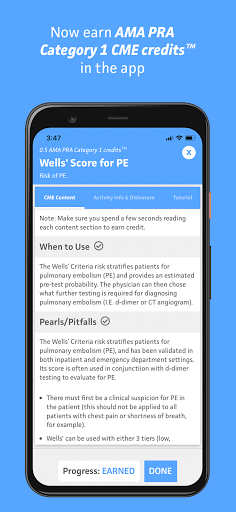
With a new enhancement, clinicians can now earn AMA PRA Category 1TM CME credits by simply reading the clinical content for 150+ calculators. The app will keep track of the CME credits earned in a personal dashboard, where users can also redeem credits for certificates and access their receipts for easy documentation. In order to redeem CME credits, users will need to sign up for a paid CME plan.
Unique features, ideal for the busy practicing clinician:
• Works offline and in limited connection settings. (CME tracking requires a connection.)
• Fast and easy search and filter to discover new calculators.
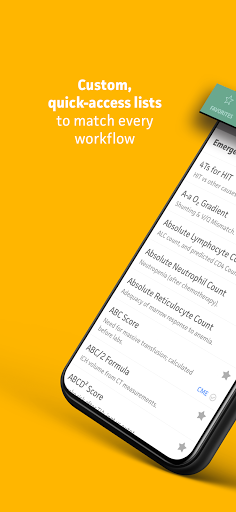
• Customizable lists for quick access: favorites, recently used, your specialty.
• Auto-syncing between the website and app.
• Quick toggle between US and SI units.
• Error warnings and normal values to help avoid mistakes and improper inputs.
Our exclusive “MDCalc Method” for selecting tools - including in-depth appraisal and validation of evidence AND clinical relevance - results in only the highest-quality tools to help you make better decisions and be more efficient in your workflow. And our network of academic and practicing physician experts create easy-to-digest content to reinforce decision making and support training:
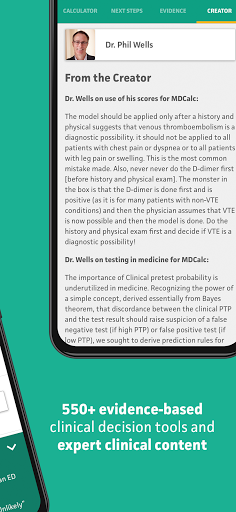
• Insights and advice from the EBM creators (e.g. Dr. Phil Wells’ on the Wells’ Criteria).
• Expert content by specialists on use cases, pearls & pitfalls, results interpretation and more.
• Synopses of the evidence from the original and validation research.
From iMedicalApps in 2016: “The evidence based medicine (EBM) components of the medical app are what really set MDCalc apart from its peers... The MDCalc app gives brief summaries of the critical studies concerning the medical calculator, links to the studies on PubMed as well as “pearls/pitfalls”, “next steps” and expert commentary from the authors of the calculators.” - iMedicalApps “MDCalc app, the best online medical calculator is now an app”
MDCalc clinical decision tools support 35+ specialties including cardiology, critical care/ICU, emergency medicine, endocrinology, gastroenterology, hematology, hepatology, infectious disease, internal medicine, nephrology, neurology, obstetrics, oncology, orthopedics, pediatrics, primary care, psychiatry, pulmonology, surgery, urology, and more! Here are some examples of the tools:
* Calculators that include CME content
» Creatinine Clearance (Cockcroft-Gault Equation)
» CHA2DS2-VASc Score for Atrial Fibrillation Stroke Risk
» Calcium Correction for Hypoalbuminemia
» MELD Score (Model For End-Stage Liver Disease) (12 and older)
» HAS-BLED Score for Major Bleeding Risk
» CHADS2 Score for Atrial Fibrillation Stroke Risk
» HEART Score for Major Cardiac Events *
» SIRS, Sepsis, and Septic Shock Criteria *
» Fractional Excretion of Sodium (FENa)
» Mean Arterial Pressure (MAP) *
» Wells’ Criteria for Pulmonary Embolism *
» Wells’ Criteria for DVT
Más detalles

1. Descargar el instalador de MEmu y finalice la instalación

2. Iniciar MEmu y abrir Google Play en la página de inicio

3. Buscar MDCalc Medical Calculator en Google Play
Install
4. Descargar y instalar MDCalc Medical Calculator
5. Hacer click al icono para iniciar

6. Experiencia MDCalc Medical Calculator en PC con MEmu
MEmu App Player es el mejor emulador de Android gratuito y 50 millones de personas ya están disfrutando su magnífica experiencia de aplicación en Android. La tecnología de virtualización de MEmu te permite jugar a miles de aplicaciones Android suavemente en tu PC, incluso los más intensivos gráficamente.
Pantalla más grande con mejores gráficos; Larga duración, sin limitación de batería o datos móviles.
Soporte completo de keymapping para un control preciso del teclado y el mouse o gamepad.
Múltiples cuentas de juegos o tareas en una sola PC a la vez con el administrador de instancias múltiples.
Use MDCalc Medical Calculator on PC by following steps: