Schlage Home
Actualizada
Versión actual
5.1.0
Ofrecida por

Deje de preocuparse por los recargos cuando use Schlage Home en su teléfono celular, libérese de la pequeña pantalla y disfrute usando la aplicación en una pantalla mucho más grande. A partir de ahora, obtenga una experiencia de pantalla completa de su aplicación con teclado y mouse. MEmu le ofrece todas las características sorprendentes que esperaba: instalación rápida y configuración fácil, controles intuitivos, no más limitaciones de batería, datos móviles y llamadas molestas. El nuevo MEmu 9 es la mejor opción para usar Schlage Home en su computadora. Codificado con nuestra absorción, el administrador de instancias múltiples hace posible abrir 2 o más cuentas al mismo tiempo. Y lo más importante, nuestro exclusivo motor de emulación puede liberar todo el potencial de su PC, hacer que todo sea fluido y agradable.
Más detalles
Descargar Schlage Home en PC con MEmu Android Emulador. Disfruta jugando en la pentalla grande. Schlage helps protect what matters most – peace of mind.
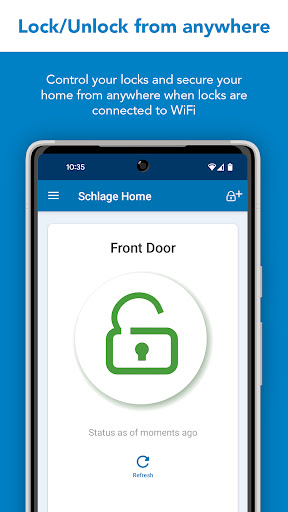
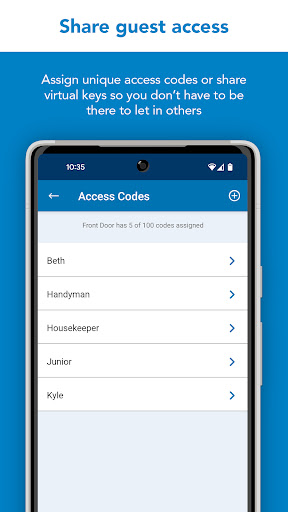
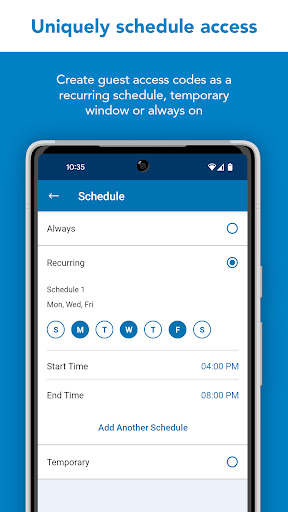
Schlage helps protect what matters most – peace of mind. The Schlage Home app lets you conveniently control and monitor your locks from your smartphone with a secure encrypted connection and pair your locks with leading smart home devices. This app works with Schlage Encode Plus™ Smart WiFi Deadbolt, Schlage Encode™ Smart WiFi Deadbolt, Schlage Encode™ Smart WiFi Lever and Schlage Sense® Smart Deadbolt. The Schlage Home app for Apple Watch works with Schlage Encode™ Smart WiFi Deadbolt and Smart WiFi Lever. These Encode smart lock owners can lock and unlock as well as check the status of their deadbolt from the Schlage Home app on their Apple Watch.
SCHLAGE ENCODE SMART WIFI DEADBOLT, SCHLAGE ENCODE SMART WIFI LEVER & SCHLAGE ENCODE PLUS SMART WIFI DEADBOLT
These locks feature built-in WiFi so you don’t need to purchase additional hubs or accessories for remote access of your lock. When a lock is paired to your smartphone and connected to your home’s WiFi network, conveniently use the Schlage Home app to:
- Lock/unlock and check your lock’s status from anywhere
- Manage up to 100 unique access codes per lock
- Schedule access codes as always-on, recurring at specific times / days, or temporary with a specific start and end date / time
- Share virtual keys for full administrative access or guest lock/unlock only access
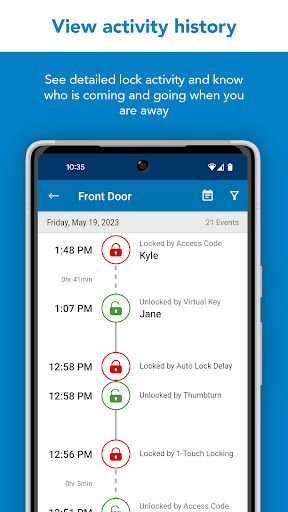
- Use the history log to see activity at your lock
- Customize push notifications to be alerted if specific access codes are used and when your door is locked/unlocked
- Select time delay for auto-locking
- Receive low battery warnings with advanced notice
- Set built-in alarm warnings based on the type of disturbance detected
- Enjoy hands-free, voice control with leading voice-enabled devices
SCHLAGE ENCODE PLUS SMART WIFI DEADBOLT + APPLE HOMEKIT
In addition to the features & benefits above, the Schlage Encode deadbolt works with Apple HomeKit. After creating an account with Schlage, use the Schlage Home app to pair your lock with Apple HomeKit to:
- Create an Apple home key in the Wallet app for easy, secure access to your home using your iPhone or Apple Watch
- Create and manage always-on access codes in your Apple Home app
- Lock/unlock your deadbolt from your iPhone or Apple Watch
- Use Siri voice control to operate and check the status of your lock
- Make your lock part of automations or control it with the Apple Home app remotely when used with a HomePod or Apple TV set up as a home hub
SCHLAGE SENSE SMART DEADBOLT
The Schlage Sense deadbolt features Bluetooth technology allowing you to easily use your smartphone with the Schlage Home app to:
Within Bluetooth range:
- Lock/unlock and check your lock’s status
- Manage up to 30 unique access codes per lock
- Schedule access codes as always-on or recurring at specific times / days
- Share virtual keys for full administrative access or guest lock/unlock only access
- Use the history log to see activity at your lock
- Select time delay for auto-locking
- Set built-in alarm warnings based on the type of disturbance detected
Pair with a Schlage Sense WiFi Adapter and your home WiFi network to:
- Lock/unlock, check status, view history log and manage access codes from anywhere
- Enjoy hands-free, voice control with leading voice-enabled devices
- Customize push notifications to be alerted if specific access codes are used and when your door is locked/unlocked
- Make your Schlage Sense Smart Deadbolt accessible when you are away from home with Apple HomeKit. Remotely control and automate your lock with the Apple Home app when used with a HomePod,Apple TV or iPad set up as a home hub.
The Schlage Connect® Smart Deadbolt is not supported by the Schlage Home app. Visit Schlage’s website for more information on compatible home hubs and apps for the Schlage Connect Smart Deadbolt.
Works best in Google and Samsung flagship phones.
Más detalles

1. Descargar el instalador de MEmu y finalice la instalación

2. Iniciar MEmu y abrir Google Play en la página de inicio

3. Buscar Schlage Home en Google Play
Install
4. Descargar y instalar Schlage Home
5. Hacer click al icono para iniciar

6. Experiencia Schlage Home en PC con MEmu
MEmu App Player es el mejor emulador de Android gratuito y 50 millones de personas ya están disfrutando su magnífica experiencia de aplicación en Android. La tecnología de virtualización de MEmu te permite jugar a miles de aplicaciones Android suavemente en tu PC, incluso los más intensivos gráficamente.
Pantalla más grande con mejores gráficos; Larga duración, sin limitación de batería o datos móviles.
Soporte completo de keymapping para un control preciso del teclado y el mouse o gamepad.
Múltiples cuentas de juegos o tareas en una sola PC a la vez con el administrador de instancias múltiples.
Use Schlage Home on PC by following steps: