Upwork for Clients
Actualizada
Versión actual
1.74.3
Ofrecida por

Deje de preocuparse por los recargos cuando use Upwork for Clients en su teléfono celular, libérese de la pequeña pantalla y disfrute usando la aplicación en una pantalla mucho más grande. A partir de ahora, obtenga una experiencia de pantalla completa de su aplicación con teclado y mouse. MEmu le ofrece todas las características sorprendentes que esperaba: instalación rápida y configuración fácil, controles intuitivos, no más limitaciones de batería, datos móviles y llamadas molestas. El nuevo MEmu 9 es la mejor opción para usar Upwork for Clients en su computadora. Codificado con nuestra absorción, el administrador de instancias múltiples hace posible abrir 2 o más cuentas al mismo tiempo. Y lo más importante, nuestro exclusivo motor de emulación puede liberar todo el potencial de su PC, hacer que todo sea fluido y agradable.
Más detalles
Descargar Upwork for Clients en PC con MEmu Android Emulador. Disfruta jugando en la pentalla grande. Find the talent you want with the skills you need—Upwork is a platform that matches you to top freelancers and agencies in minutes, not days.
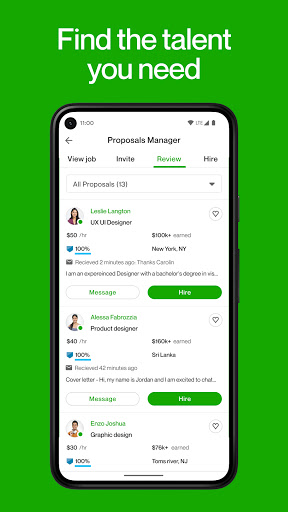


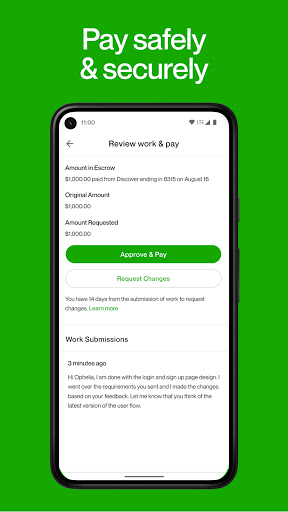
Find the talent you want with the skills you need—Upwork is a platform that matches you to top freelancers and agencies in minutes, not days.
Our global network of experienced freelancers and agencies specialize in over 5,000 skills and can help with projects like:
• Building e-commerce websites
• Developing mobile apps
• QA and software testing
• Translation and localization
• Social media marketing
• Inbound lead generation
• Customer service
• Email marketing
• Logo and web design
• Shooting and editing videos
• Creating brochures and sales material
Sign up, search, and find the right talent to get more done. Upwork offers end-to-end project support, from skilled professionals, hiring the best match, to payments and accounting.
How it works
Post a job for free
Tell us what you need. Upwork connects you with top talent around the world, or near you.
Freelancers come to you
Get qualified proposals within 24 hours. Compare bids, reviews, and prior work, interview favorites and hire the best fit.
Collaborate easily
Use Upwork to chat or video call, share files, and track project milestones from your desktop or mobile.
Payment simplified
Pay hourly or fixed-price and receive invoices through Upwork. Only pay for work you authorize.
Please reach out to us with any questions may have at support@upwork.com.
To learn more about opting out of the "sale" or "sharing" of your personal information, please visit our Privacy Center: https://www.upwork.com/legal#privacy-center
Más detalles

1. Descargar el instalador de MEmu y finalice la instalación

2. Iniciar MEmu y abrir Google Play en la página de inicio

3. Buscar Upwork for Clients en Google Play
Install
4. Descargar y instalar Upwork for Clients
5. Hacer click al icono para iniciar

6. Experiencia Upwork for Clients en PC con MEmu
MEmu App Player es el mejor emulador de Android gratuito y 50 millones de personas ya están disfrutando su magnífica experiencia de aplicación en Android. La tecnología de virtualización de MEmu te permite jugar a miles de aplicaciones Android suavemente en tu PC, incluso los más intensivos gráficamente.
Pantalla más grande con mejores gráficos; Larga duración, sin limitación de batería o datos móviles.
Soporte completo de keymapping para un control preciso del teclado y el mouse o gamepad.
Múltiples cuentas de juegos o tareas en una sola PC a la vez con el administrador de instancias múltiples.
Use Upwork for Clients on PC by following steps: