eCricket
تاریخ بهروزرسانی
نسخه کنونی
ارائهکننده

با تمام اشتیاق شما به بازی eCricket، قرار نیست دست های شما روی صفحه نمایش کوچک گوشی شما محدود شود. مانند یک حرفه ای بازی کنید و کنترل کامل بازی خود را با صفحه کلید و ماوس بدست آورید.MEmu همه ی انتظاراتی که دارید را برآورده می کند.eCricket را بر روی رایانه شخصی دانلود و بازی کنید. تا زمانی که می خواهید بازی کنید، دیگر محدودیتی در باتری، داده تلفن همراه و تماس های مزاحم وجود ندارد.MEmu 9 کاملاً جدید و بهترین انتخاب برای بازی eCricket روی رایانه شخصی است. با تخصص ما، سیستم keymapping از پیش تعیین شده عالی،eCricket را به یک بازی رایانه شخصی واقعی تبدیل می کند.مدیریت چند موردی MEmu امکان اجرای 2 یا چندین حساب در یک دستگاه را فراهم می کند.و مهمتر از همه، موتور شبیهسازی انحصاری ما میتواند پتانسیل کامل رایانه شما را آزاد کند و همه چیز را روان کند.
بیشتر نشان بده
دانلود بازی eCricket برای کامپیوتر با MEmu Play. از بازی روی صفحه نمایش بزرگ لذت ببرید. eCricket lets players compete in real-time multiplayer matches, rise through global leaderboards, and participate in live esports tournaments designed for both aspiring players and seasoned professionals.


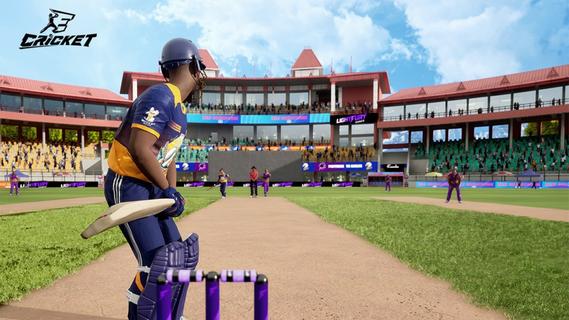
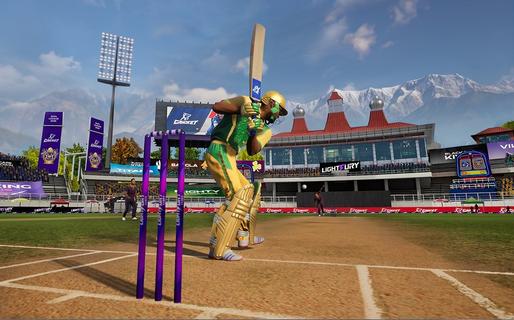
eCricket lets players compete in real-time multiplayer matches, rise through global leaderboards, and participate in live esports tournaments designed for both aspiring players and seasoned professionals. With fast-paced action and deep tactical gameplay, eCricket blends the intensity of cricket with the thrill of competitive gaming.Multiplayer cricket battlesJump straight into high-adrenaline, real-time matches and face off against cricket fans from across the globe in thrilling multiplayer showdowns. Every ball is live, every shot is a split-second decision, and every over demands sharp reflexes and smart tactics. Whether youâre playing short, explosive games or full-length battles, no two matches ever feel the same, keeping the competition fresh, skill-based, and endlessly replayable.Advanced AI and nextâgen gameplay mechanicsFeel the difference as eCricketâs advanced AI learns how you play and pushes back with smarter, more realistic match situations. Nextâgen mechanics let you unleash precise shots, deceptive bowling variations, and tactical field changes with intuitive controls. The more you play, the deeper the game becomes, striking a perfect balance between easy-to-pick-up fun and high-level mastery for serious competitors.Immersive graphics powered by Unreal Engine 5Step into beautifully rendered stadiums brought to life with Unreal Engine 5âs cuttingâedge visuals. From the texture of the pitch to the movement of the crowd and the lighting under a night sky, every detail is crafted to feel like real cricket. Lifelike player models and smooth animations make every drive, yorker, and celebration look and feel authentic, pulling you deeper into the atmosphere of the match.Global esports tournaments and competitive rankingsJoin a global stage where your performance truly matters. Compete in official esports tournaments, climb through international rankings, and prove your skills against the worldâs best players. Earn recognition as you rise through the tiers, unlock prestige by winning events, and turn every match into a chance to showcase your talent in a structured, high-stakes competitive ecosystem.Built for casual fans and esports prosWhether you just love cricket or live for competitive play, eCricket is built for you. Jump into fast, fun matches with simple controls and flexible modes, or dive deeper into advanced systems, tactics, and ranked play as you improve. Scalable difficulty, smart onboarding, and rich competitive features make it an inclusive arena where newcomers can enjoy the game and serious players can grind, optimize, and dominate.How to play eCricket on AndroidReady to start your innings on mobile? Playing eCricket on Android is quick and simple. Just install the game, sign in, and jump into your preferred mode - whether youâre in the mood for a fast Quick Match, a Single Player session, or a full-on Multiplayer battle. Within minutes, youâll be batting, bowling, and competing in high-intensity cricket matches right from your phone.Download and install eCricket APK latest version from APKPure.Launch eCricket and log in using your registered email or account.Complete the initial setup and follow the tutorial to learn the basics.From the main menu, select Quick Match, Single Player, or Multiplayer.Follow the on-screen controls and start your first match.Get Started with eCricketBe among the first to experience the next era of cricket gaming. eCricket early access is live, giving you an exclusive preview of its competitive, high-fidelity gameplay before the worldwide launch. Register on the official website to lock in your early access and step onto the pitch ahead of the crowd. Then pre-register for eCricket on APKPure to receive instant alerts when new builds and the full release go live, so you never miss a single update - or a single ball.
بیشتر نشان بده

1. نصب کننده Memu را دانلود کرده و راه اندازی را تمام کنید

2. Memu را اجرا کنید و سپس گوگل پلی را بر روی دستکتاپ باز کنید

3. eCricket را بر روی گوگل پلی جستجو کنید
Install
4. eCricket را دانلود و نصب کنید
5. پس از اتمام نصب روی آیکون کلیک کنید تا اجرا شود

6. از بازی کردن eCricket بر روی رایانه شخصی با MEmu لذت ببرید
MEmu بهترین نمونه ساز رایگان اندروید است و پیش از این 50 میلیون نفر از تجربه بسیار خوب بازی اندروید در آن لذت برده اند. تکنولوژی مجازی ساز MEmu شما را قادر می سازد هزاران بازی اندرویدی را در کامپیوتر به طور روان اجرا کنید، حتی آنهایی که گرافیک سنگین تری دارند.
صفحه نمایش بزرگتر با گرافیک بهتر؛ زمان طولانی تر، بدون محدودیت باتری یا داده تلفن همراه.
پشتیبانی کامل از Keymapping برای کنترل دقیق صفحه کلید و ماوس یا گیم پد.
چندین حساب بازی یا وظایف در یک رایانه شخصی در یک زمان با مدیریت همزمان همه
Play eCricket on PC by following steps: