eCricket
Đã cập nhật
Phiên bản hiện tại
Cung cấp bởi

Với tất cả niềm đam mê chơi eCricket, đôi tay của bạn sẽ không còn bị giới hạn trên một màn hình nhỏ của điện thoại. Trải nghiệm chơi như một người chuyên nghiệp và kiểm soát hoàn toàn trò chơi của bạn bằng bàn phím và chuột. MEmu cung cấp cho bạn tất cả những điều mà bạn đang mong đợi. Tải xuống và chơi eCricket trên PC. Miễn là bạn muốn chơi, bởi nó không còn giới hạn về pin, dữ liệu di động và các cuộc gọi làm phiền. MEmu 9 hoàn toàn là sự lựa chọn tốt nhất để chơi eCricket trên PC. Với sự chuẩn bị về chuyên môn của chúng tôi, hệ thống sơ đồ bàn phím tinh tế làm cho eCricket trở thành một trò chơi thực sự trên PC. Trình Quản lý đa năng, đã được chăm chút bởi sự tiếp thu của chúng tôi, có thể phát 2 hoặc nhiều tài khoản trên cùng một thiết bị. Và điều quan trọng nhất, công cụ mô phỏng độc quyền của chúng tôi có thể phát huy toàn bộ tiềm năng PC của bạn, giúp mọi thứ hoạt động trơn tru nhất có thể. Chúng tôi biết rằng quá trình tận hưởng hạnh phúc ở mỗi trò chơi cũng là mong muốn của mỗi game thủ, vì vậy các bạn chỉ cần chơi thôi hãy để chúng tôi quan tâm đến tất cả trải nghiệm đó.
Nhiều hơn
Tải eCricket trên PC với Trình giả lập Android MEmu. Tận hưởng trải nghiệm chơi game trên màn hình lớn eCricket lets players compete in real-time multiplayer matches, rise through global leaderboards, and participate in live esports tournaments designed for both aspiring players and seasoned professionals.


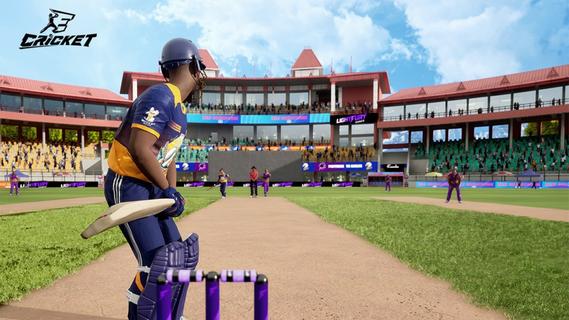
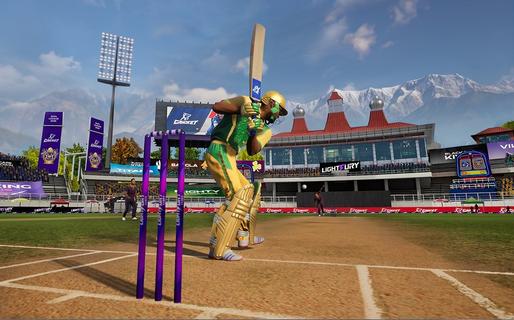
eCricket lets players compete in real-time multiplayer matches, rise through global leaderboards, and participate in live esports tournaments designed for both aspiring players and seasoned professionals. With fast-paced action and deep tactical gameplay, eCricket blends the intensity of cricket with the thrill of competitive gaming.Multiplayer cricket battlesJump straight into high-adrenaline, real-time matches and face off against cricket fans from across the globe in thrilling multiplayer showdowns. Every ball is live, every shot is a split-second decision, and every over demands sharp reflexes and smart tactics. Whether youâre playing short, explosive games or full-length battles, no two matches ever feel the same, keeping the competition fresh, skill-based, and endlessly replayable.Advanced AI and nextâgen gameplay mechanicsFeel the difference as eCricketâs advanced AI learns how you play and pushes back with smarter, more realistic match situations. Nextâgen mechanics let you unleash precise shots, deceptive bowling variations, and tactical field changes with intuitive controls. The more you play, the deeper the game becomes, striking a perfect balance between easy-to-pick-up fun and high-level mastery for serious competitors.Immersive graphics powered by Unreal Engine 5Step into beautifully rendered stadiums brought to life with Unreal Engine 5âs cuttingâedge visuals. From the texture of the pitch to the movement of the crowd and the lighting under a night sky, every detail is crafted to feel like real cricket. Lifelike player models and smooth animations make every drive, yorker, and celebration look and feel authentic, pulling you deeper into the atmosphere of the match.Global esports tournaments and competitive rankingsJoin a global stage where your performance truly matters. Compete in official esports tournaments, climb through international rankings, and prove your skills against the worldâs best players. Earn recognition as you rise through the tiers, unlock prestige by winning events, and turn every match into a chance to showcase your talent in a structured, high-stakes competitive ecosystem.Built for casual fans and esports prosWhether you just love cricket or live for competitive play, eCricket is built for you. Jump into fast, fun matches with simple controls and flexible modes, or dive deeper into advanced systems, tactics, and ranked play as you improve. Scalable difficulty, smart onboarding, and rich competitive features make it an inclusive arena where newcomers can enjoy the game and serious players can grind, optimize, and dominate.How to play eCricket on AndroidReady to start your innings on mobile? Playing eCricket on Android is quick and simple. Just install the game, sign in, and jump into your preferred mode - whether youâre in the mood for a fast Quick Match, a Single Player session, or a full-on Multiplayer battle. Within minutes, youâll be batting, bowling, and competing in high-intensity cricket matches right from your phone.Download and install eCricket APK latest version from APKPure.Launch eCricket and log in using your registered email or account.Complete the initial setup and follow the tutorial to learn the basics.From the main menu, select Quick Match, Single Player, or Multiplayer.Follow the on-screen controls and start your first match.Get Started with eCricketBe among the first to experience the next era of cricket gaming. eCricket early access is live, giving you an exclusive preview of its competitive, high-fidelity gameplay before the worldwide launch. Register on the official website to lock in your early access and step onto the pitch ahead of the crowd. Then pre-register for eCricket on APKPure to receive instant alerts when new builds and the full release go live, so you never miss a single update - or a single ball.
Nhiều hơn

1. Tải trình cài đặt MEmu và hoàn tất cài đặt

2. Khởi động MEmu, sau đó mở Google Play trên trang chủ

3. Tìm kiếm eCricket trong Google Play
Install
4. Tải và Cài Đặt eCricket
5. Khi cài đặt hoàn tất, nhấp vào biểu tượng để bắt đầu

6. Tận hưởng chơi eCricket trên PC với MEmu
MEmu App Player là trình mô phỏng Android miễn phí tốt nhất và 50 triệu người đã tận hưởng trải nghiệm chơi trò chơi tuyệt vời trên Android của mình. Công nghệ ảo hóa MEmu trao quyền cho bạn để chơi hàng ngàn trò chơi Android mượt mà trên PC của bạn, ngay cả những trò chơi chuyên sâu nhất.
Màn hình lớn hơn cùng với đồ hoạ tốt hơn; thời lượng dài, không giới hạn về pin hoặc dữ liệu di động
Hỗ trợ đầy đủ Keymapping cho việc kiểm soát chính xác bàn phím và chuột hoặc gamepad
Nhiều tài khoản trò chơi hoặc tác vụ cùng lúc trên một PC với Quản lý Đa năng
Play eCricket on PC by following steps: