eCricket
Updated
Current Version
Offered By

With your passion for eCricket, you shouldn’t have to limit yourself to the small screen of a phone. Play like a pro and take full control of the game using a keyboard and mouse. MEmu gives you everything you’re looking for. Download and play eCricket on PC. Play as long as you want — no more worries about battery life, mobile data, or unexpected calls. The all-new MEmu 9 is the best way to play eCricket on PC. With our expertly designed keymapping system, eCricket feels just like a real PC game. The MEmu multi-instance manager lets you run two or more accounts on the same device at the same time. Most importantly, our exclusive emulation engine unlocks your PC’s full potential, delivering smooth and seamless performance.
Show more
Download eCricket on PC with MEmu Android Emulator. Enjoy playing on big screen. eCricket lets players compete in real-time multiplayer matches, rise through global leaderboards, and participate in live esports tournaments designed for both aspiring players and seasoned professionals.


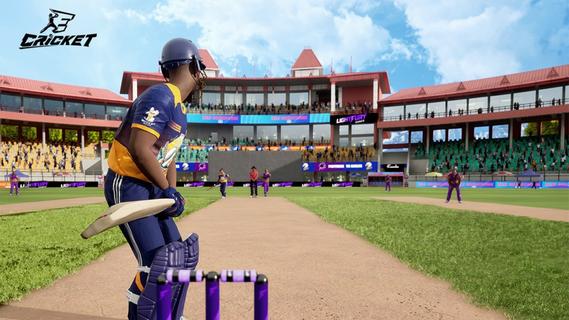
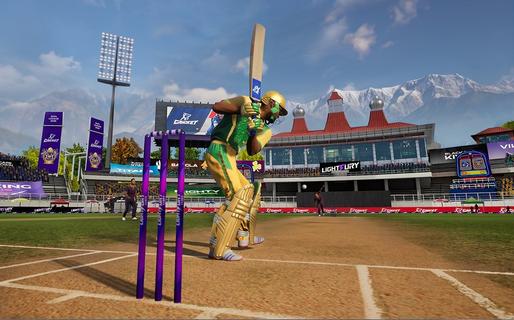
eCricket lets players compete in real-time multiplayer matches, rise through global leaderboards, and participate in live esports tournaments designed for both aspiring players and seasoned professionals. With fast-paced action and deep tactical gameplay, eCricket blends the intensity of cricket with the thrill of competitive gaming.Multiplayer cricket battlesJump straight into high-adrenaline, real-time matches and face off against cricket fans from across the globe in thrilling multiplayer showdowns. Every ball is live, every shot is a split-second decision, and every over demands sharp reflexes and smart tactics. Whether you’re playing short, explosive games or full-length battles, no two matches ever feel the same, keeping the competition fresh, skill-based, and endlessly replayable.Advanced AI and next‑gen gameplay mechanicsFeel the difference as eCricket’s advanced AI learns how you play and pushes back with smarter, more realistic match situations. Next‑gen mechanics let you unleash precise shots, deceptive bowling variations, and tactical field changes with intuitive controls. The more you play, the deeper the game becomes, striking a perfect balance between easy-to-pick-up fun and high-level mastery for serious competitors.Immersive graphics powered by Unreal Engine 5Step into beautifully rendered stadiums brought to life with Unreal Engine 5’s cutting‑edge visuals. From the texture of the pitch to the movement of the crowd and the lighting under a night sky, every detail is crafted to feel like real cricket. Lifelike player models and smooth animations make every drive, yorker, and celebration look and feel authentic, pulling you deeper into the atmosphere of the match.Global esports tournaments and competitive rankingsJoin a global stage where your performance truly matters. Compete in official esports tournaments, climb through international rankings, and prove your skills against the world’s best players. Earn recognition as you rise through the tiers, unlock prestige by winning events, and turn every match into a chance to showcase your talent in a structured, high-stakes competitive ecosystem.Built for casual fans and esports prosWhether you just love cricket or live for competitive play, eCricket is built for you. Jump into fast, fun matches with simple controls and flexible modes, or dive deeper into advanced systems, tactics, and ranked play as you improve. Scalable difficulty, smart onboarding, and rich competitive features make it an inclusive arena where newcomers can enjoy the game and serious players can grind, optimize, and dominate.How to play eCricket on AndroidReady to start your innings on mobile? Playing eCricket on Android is quick and simple. Just install the game, sign in, and jump into your preferred mode - whether you’re in the mood for a fast Quick Match, a Single Player session, or a full-on Multiplayer battle. Within minutes, you’ll be batting, bowling, and competing in high-intensity cricket matches right from your phone.Download and install eCricket APK latest version from APKPure.Launch eCricket and log in using your registered email or account.Complete the initial setup and follow the tutorial to learn the basics.From the main menu, select Quick Match, Single Player, or Multiplayer.Follow the on-screen controls and start your first match.Get Started with eCricketBe among the first to experience the next era of cricket gaming. eCricket early access is live, giving you an exclusive preview of its competitive, high-fidelity gameplay before the worldwide launch. Register on the official website to lock in your early access and step onto the pitch ahead of the crowd. Then pre-register for eCricket on APKPure to receive instant alerts when new builds and the full release go live, so you never miss a single update - or a single ball.
Show more

1. Download MEmu installer and finish the setup

2. Start MEmu then open Google Play on the desktop

3. Search eCricket in Google Play
Install
4. Download and Install eCricket
5. On install completion click the icon to start

6. Enjoy playing eCricket on PC with MEmu
MEmu Play is the best Android emulator and 100 million people already enjoy its superb Android gaming experience. The MEmu virtualization technology empowers you to play thousands of Android games smoothly on your PC, even the most graphic-intensive ones.
Bigger screen with better graphics; Long duration, without limitation of battery or mobile data.
Full Keymapping support for precise control of keyboard and mouse or gamepad.
Multiple game accounts or tasks on single PC at one time with Multi-Instance manager.
Play eCricket on PC by following steps: