eCricket
Aktualisiert
Aktuelle Version
Angeboten von

Bei all Ihrer Leidenschaft für das Spielen von eCricket sollten Ihre Hände nicht auf einen winzigen Bildschirm Ihres Telefons beschränkt sein. Spielen Sie wie ein Profi und übernehmen Sie die volle Kontrolle über Ihr Spiel mit Tastatur und Maus. MEmu bietet Ihnen all die Dinge, die Sie erwarten. Laden Sie eCricket herunter und spielen Sie es auf dem PC. Spielen Sie so lange, wie Sie wollen, ohne Grenzwerte für Akku, mobile Daten und störende Anrufe. Das brandneue MEmu 9 ist die beste Wahl, um eCricket auf dem PC zu spielen. Das exquisite voreingestellte Tastaturbelegungssystem, das mit unserem Fachwissen vorbereitet wurde, macht eCricket zu einem echten PC-Spiel. Der MEmu Multi-Instanz-Manager ermöglicht das Spielen von 2 oder mehr Konten auf demselben Gerät. Und das Wichtigste: Unsere exklusive Emulations-Engine kann das volle Potenzial Ihres PCs freisetzen und für reibungslose Abläufe sorgen.
Mehr anzeigen
Laden Sie Play eCricket auf dem PC mit MEmu Android Emulator. Viel Spaß beim Spielen auf großmundieren. eCricket lets players compete in real-time multiplayer matches, rise through global leaderboards, and participate in live esports tournaments designed for both aspiring players and seasoned professionals.


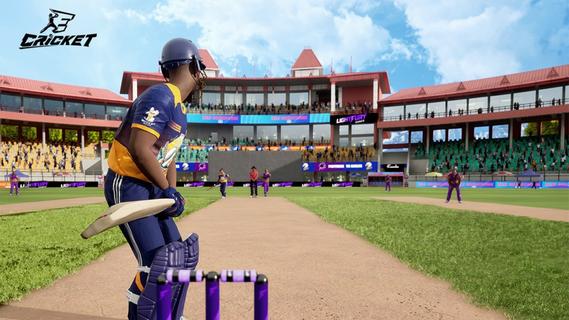
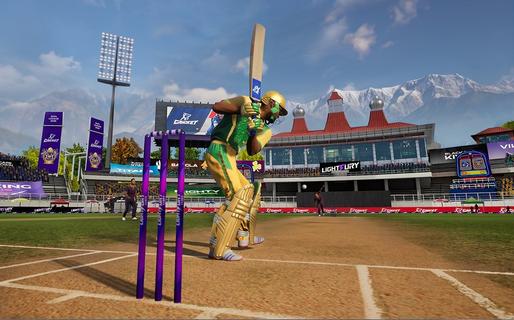
eCricket lets players compete in real-time multiplayer matches, rise through global leaderboards, and participate in live esports tournaments designed for both aspiring players and seasoned professionals. With fast-paced action and deep tactical gameplay, eCricket blends the intensity of cricket with the thrill of competitive gaming.Multiplayer cricket battlesJump straight into high-adrenaline, real-time matches and face off against cricket fans from across the globe in thrilling multiplayer showdowns. Every ball is live, every shot is a split-second decision, and every over demands sharp reflexes and smart tactics. Whether youâre playing short, explosive games or full-length battles, no two matches ever feel the same, keeping the competition fresh, skill-based, and endlessly replayable.Advanced AI and nextâgen gameplay mechanicsFeel the difference as eCricketâs advanced AI learns how you play and pushes back with smarter, more realistic match situations. Nextâgen mechanics let you unleash precise shots, deceptive bowling variations, and tactical field changes with intuitive controls. The more you play, the deeper the game becomes, striking a perfect balance between easy-to-pick-up fun and high-level mastery for serious competitors.Immersive graphics powered by Unreal Engine 5Step into beautifully rendered stadiums brought to life with Unreal Engine 5âs cuttingâedge visuals. From the texture of the pitch to the movement of the crowd and the lighting under a night sky, every detail is crafted to feel like real cricket. Lifelike player models and smooth animations make every drive, yorker, and celebration look and feel authentic, pulling you deeper into the atmosphere of the match.Global esports tournaments and competitive rankingsJoin a global stage where your performance truly matters. Compete in official esports tournaments, climb through international rankings, and prove your skills against the worldâs best players. Earn recognition as you rise through the tiers, unlock prestige by winning events, and turn every match into a chance to showcase your talent in a structured, high-stakes competitive ecosystem.Built for casual fans and esports prosWhether you just love cricket or live for competitive play, eCricket is built for you. Jump into fast, fun matches with simple controls and flexible modes, or dive deeper into advanced systems, tactics, and ranked play as you improve. Scalable difficulty, smart onboarding, and rich competitive features make it an inclusive arena where newcomers can enjoy the game and serious players can grind, optimize, and dominate.How to play eCricket on AndroidReady to start your innings on mobile? Playing eCricket on Android is quick and simple. Just install the game, sign in, and jump into your preferred mode - whether youâre in the mood for a fast Quick Match, a Single Player session, or a full-on Multiplayer battle. Within minutes, youâll be batting, bowling, and competing in high-intensity cricket matches right from your phone.Download and install eCricket APK latest version from APKPure.Launch eCricket and log in using your registered email or account.Complete the initial setup and follow the tutorial to learn the basics.From the main menu, select Quick Match, Single Player, or Multiplayer.Follow the on-screen controls and start your first match.Get Started with eCricketBe among the first to experience the next era of cricket gaming. eCricket early access is live, giving you an exclusive preview of its competitive, high-fidelity gameplay before the worldwide launch. Register on the official website to lock in your early access and step onto the pitch ahead of the crowd. Then pre-register for eCricket on APKPure to receive instant alerts when new builds and the full release go live, so you never miss a single update - or a single ball.
Mehr anzeigen

1. Laden das MEmu-Installationsprogramm herunter und beenden die Installation

2. MEmu starten und Google Play auf der Homepage öffnen

3. Suchen eCricket in Google Play
Install
4. Herunterladen und Installieren eCricket
5. Klicken nach Abschluss der Installation auf das Symbol, um es zu starten

6. Viel Spaß beim Spielen von eCricket auf dem PC mit MEmu
MEmu App Player ist der beste kostenlose Android-Emulator und 50 Millionen Menschen genießen bereits seine hervorragende Android-Gaming-Erfahrung. Mit der MEmu-Virtualisierungstechnologie können Sie Tausende von Android-Spielen problemlos auf Ihrem PC spielen, selbst bei grafikintensiven Spielen.
BGrößeres Bild mit besserer Grafik; Keine unterbrechungen, keine sorgen um Akku
Komplette Tastenbelegung unterstützt mit Maus und Tastatur oder Controller
Mit dem „Multi-Instance-Manager“ können Sie mehrere Spielkonten oder Spiele gleichzeitig auf einem PC ausführen.
Play eCricket on PC by following steps: