Gnomia - Your virtual garden
تاریخ بهروزرسانی
نسخه کنونی
1.176
ارائهکننده

با تمام اشتیاق شما به بازی Gnomia - Your virtual garden، قرار نیست دست های شما روی صفحه نمایش کوچک گوشی شما محدود شود. مانند یک حرفه ای بازی کنید و کنترل کامل بازی خود را با صفحه کلید و ماوس بدست آورید.MEmu همه ی انتظاراتی که دارید را برآورده می کند.Gnomia - Your virtual garden را بر روی رایانه شخصی دانلود و بازی کنید. تا زمانی که می خواهید بازی کنید، دیگر محدودیتی در باتری، داده تلفن همراه و تماس های مزاحم وجود ندارد.MEmu 9 کاملاً جدید و بهترین انتخاب برای بازی Gnomia - Your virtual garden روی رایانه شخصی است. با تخصص ما، سیستم keymapping از پیش تعیین شده عالی،Gnomia - Your virtual garden را به یک بازی رایانه شخصی واقعی تبدیل می کند.مدیریت چند موردی MEmu امکان اجرای 2 یا چندین حساب در یک دستگاه را فراهم می کند.و مهمتر از همه، موتور شبیهسازی انحصاری ما میتواند پتانسیل کامل رایانه شما را آزاد کند و همه چیز را روان کند.
بیشتر نشان بده
دانلود بازی Gnomia - Your virtual garden برای کامپیوتر با MEmu Play. از بازی روی صفحه نمایش بزرگ لذت ببرید. Gnomia is a cozy gardening game where your real-world walks help your garden grow.
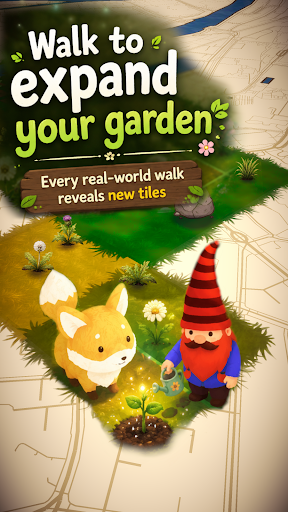
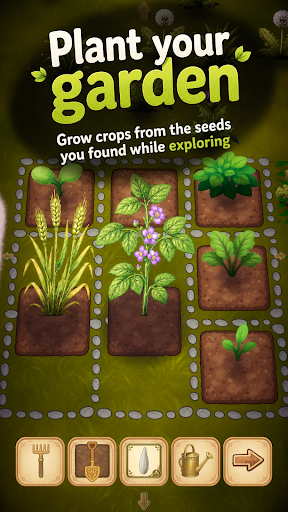
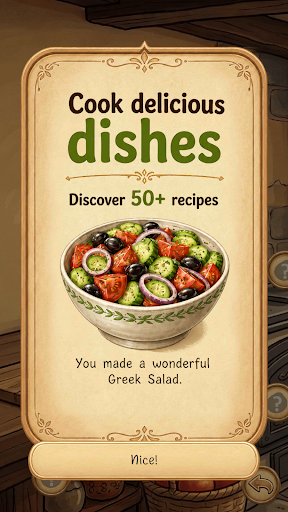
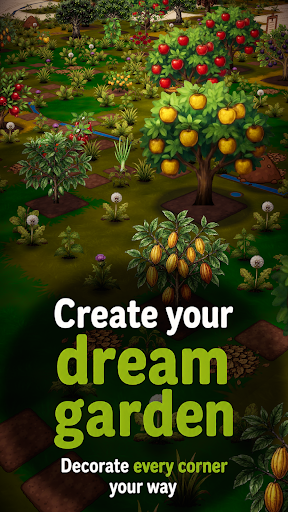
Gnomia is a cozy gardening game where your real-world walks help your garden grow. Explore new places, plant crops, cook with your harvests, decorate your space, and join community events with other players. Every walk brings something new back to your garden.
It's completely free, no ads and you can play offline.
Find cute companions and convince them to join you for special bonuses on your walks. You can even integrate with Strava and track your walks/runs this way.
Gnomia combines location-based movement with cozy garden management, cooking, collecting, decoration, community play, and discovery. Your real movement helps you visit tiles, uncover new places, gather resources, complete requests, and bring your garden to life.
Build your home garden from the ground up. Clear weeds, till soil, plant seeds, water crops, harvest produce, and improve your tools as you play. Every seed and harvest can carry its own quality giving you reasons to keep growing, experimenting, and collecting better crops. Discover fruits, vegetables, herbs, mushrooms, flowers, rare plants, and unusual seed variants as your garden expands.
Your real-world adventures matter. Start a GPS session, walk through your neighborhood, and watch your route contribute to your progress. Track distance, time, pace, and visited tiles, then review your adventure afterward with route recaps and session history. Bring companions along on your walks to help with tile visits, resources, watering, soil, weeds, and other garden tasks.
Cooking turns your harvests into something more. Craft dishes from the produce you grow. Unlock recipes, experiment with ingredients, fill kitchen jobs, and use cooked dishes for requests, festivals, progression, and collection goals.
There is more beneath the surface. Unlock cave entrances through requests and explore procedurally generated underground worlds filled with walls, obstacles, cave flora, resources, and deeper challenges. Use cave actions carefully, clear paths with tools like the pickaxe and axe, and push farther into mysterious underground spaces.
Grow beyond simple farming with structures and science machines. Build and upgrade helpful structures that affect nearby tiles, such as watering surrounding plants, improving adjacent soil, or granting extra actions.
Join the community side of Gnomia through communities, rankings, friends, and weekly festivals. Create or join a community, contribute to shared festival boards, complete festival requests, claim rewards, and help your club level up over time. Work together by turning in seeds, produce, resources, and dishes, then compare progress through leaderboards and rankings.
Meet companions and build relationships through requests and adventures. Companions can join your journey, gain affection, support your active sessions, and provide useful effects while you explore. Complete mystery objectives to earn experience, resources, tools, decorations, cooking stations, cave actions, hints, and more.
Make the world your own. Customize your gnome character with different hats, body parts, beards, hair, details, and moustaches. Decorate your garden with unlockable decorations and build your garden.
Gnomia is full of discoveries. Use the catalog to track seeds, produce, dishes, and growth stages. Unlock hints that point toward recipes, secrets, and hidden progression paths without giving everything away at once. Chase achievements, improve your best seeds, collect rare items, upgrade tools, complete daily rewards, visit markets, and keep uncovering new systems as your garden grows.
Whether you want a relaxing garden to check each day, a reason to go for a walk, a collection game with deep progression, or a community challenge to share with friends, Gnomia gives every step a purpose.
Plant, walk, cook, explore, decorate, and discover the hidden life growing all around you.
بیشتر نشان بده

1. نصب کننده Memu را دانلود کرده و راه اندازی را تمام کنید

2. Memu را اجرا کنید و سپس گوگل پلی را بر روی دستکتاپ باز کنید

3. Gnomia - Your virtual garden را بر روی گوگل پلی جستجو کنید
Install
4. Gnomia - Your virtual garden را دانلود و نصب کنید
5. پس از اتمام نصب روی آیکون کلیک کنید تا اجرا شود

6. از بازی کردن Gnomia - Your virtual garden بر روی رایانه شخصی با MEmu لذت ببرید
MEmu بهترین نمونه ساز رایگان اندروید است و پیش از این 50 میلیون نفر از تجربه بسیار خوب بازی اندروید در آن لذت برده اند. تکنولوژی مجازی ساز MEmu شما را قادر می سازد هزاران بازی اندرویدی را در کامپیوتر به طور روان اجرا کنید، حتی آنهایی که گرافیک سنگین تری دارند.
صفحه نمایش بزرگتر با گرافیک بهتر؛ زمان طولانی تر، بدون محدودیت باتری یا داده تلفن همراه.
پشتیبانی کامل از Keymapping برای کنترل دقیق صفحه کلید و ماوس یا گیم پد.
چندین حساب بازی یا وظایف در یک رایانه شخصی در یک زمان با مدیریت همزمان همه
Play Gnomia - Your virtual garden on PC by following steps: