Gnomia - Your virtual garden
Aktualizováno
Aktuální verze
1.176
Od vývojáře

With all your passion for playing Gnomia - Your virtual garden, you hands are not supposed to be limited on a tiny screen of your phone. Play like a pro and get full control of your game with keyboard and mouse. MEmu offers you all the things that you are expecting. Download and play Gnomia - Your virtual garden on PC. Play as long as you want, no more limitations of battery, mobile data and disturbing calls. The brand new MEmu 9 is the best choice of playing Gnomia - Your virtual garden on PC. Prepared with our expertise, the exquisite preset keymapping system makes Gnomia - Your virtual garden a real PC game. MEmu multi-instance manager makes playing 2 or more accounts on the same device possible. And the most important, our exclusive emulation engine can release full potential of your PC, make everything smooth.
Show more
Vychutnejte si vynikající zážitek z přehrávání Gnomia - Your virtual garden na PC s MEMU App Player. Je to silný bezplatný emulátor pro Android, který vám umožní hrát tisíce her v systému Android. Gnomia is a cozy gardening game where your real-world walks help your garden grow.
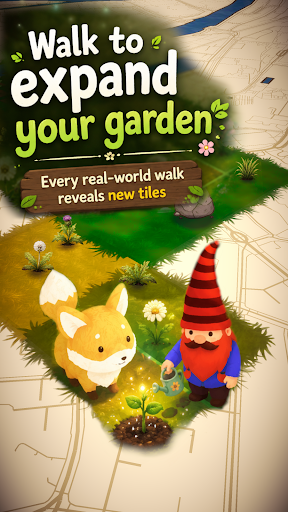
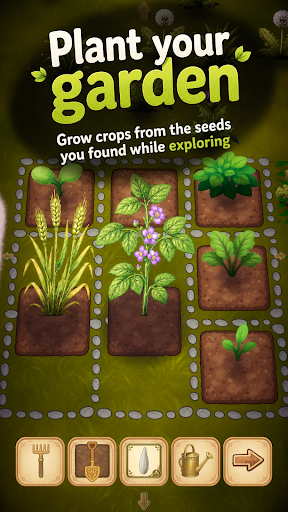
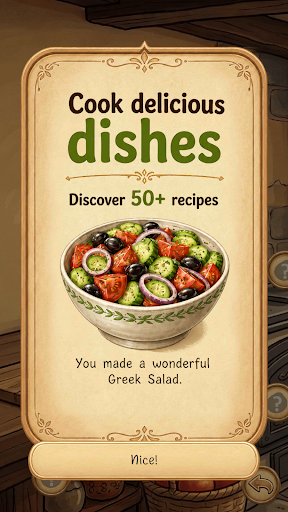
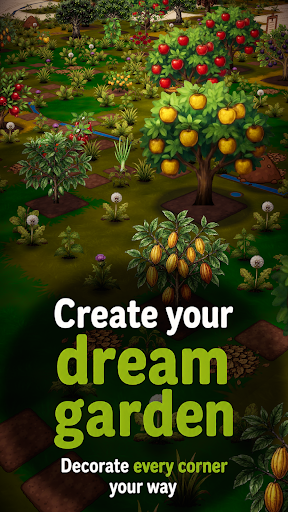
Gnomia is a cozy gardening game where your real-world walks help your garden grow. Explore new places, plant crops, cook with your harvests, decorate your space, and join community events with other players. Every walk brings something new back to your garden.
It's completely free, no ads and you can play offline.
Find cute companions and convince them to join you for special bonuses on your walks. You can even integrate with Strava and track your walks/runs this way.
Gnomia combines location-based movement with cozy garden management, cooking, collecting, decoration, community play, and discovery. Your real movement helps you visit tiles, uncover new places, gather resources, complete requests, and bring your garden to life.
Build your home garden from the ground up. Clear weeds, till soil, plant seeds, water crops, harvest produce, and improve your tools as you play. Every seed and harvest can carry its own quality giving you reasons to keep growing, experimenting, and collecting better crops. Discover fruits, vegetables, herbs, mushrooms, flowers, rare plants, and unusual seed variants as your garden expands.
Your real-world adventures matter. Start a GPS session, walk through your neighborhood, and watch your route contribute to your progress. Track distance, time, pace, and visited tiles, then review your adventure afterward with route recaps and session history. Bring companions along on your walks to help with tile visits, resources, watering, soil, weeds, and other garden tasks.
Cooking turns your harvests into something more. Craft dishes from the produce you grow. Unlock recipes, experiment with ingredients, fill kitchen jobs, and use cooked dishes for requests, festivals, progression, and collection goals.
There is more beneath the surface. Unlock cave entrances through requests and explore procedurally generated underground worlds filled with walls, obstacles, cave flora, resources, and deeper challenges. Use cave actions carefully, clear paths with tools like the pickaxe and axe, and push farther into mysterious underground spaces.
Grow beyond simple farming with structures and science machines. Build and upgrade helpful structures that affect nearby tiles, such as watering surrounding plants, improving adjacent soil, or granting extra actions.
Join the community side of Gnomia through communities, rankings, friends, and weekly festivals. Create or join a community, contribute to shared festival boards, complete festival requests, claim rewards, and help your club level up over time. Work together by turning in seeds, produce, resources, and dishes, then compare progress through leaderboards and rankings.
Meet companions and build relationships through requests and adventures. Companions can join your journey, gain affection, support your active sessions, and provide useful effects while you explore. Complete mystery objectives to earn experience, resources, tools, decorations, cooking stations, cave actions, hints, and more.
Make the world your own. Customize your gnome character with different hats, body parts, beards, hair, details, and moustaches. Decorate your garden with unlockable decorations and build your garden.
Gnomia is full of discoveries. Use the catalog to track seeds, produce, dishes, and growth stages. Unlock hints that point toward recipes, secrets, and hidden progression paths without giving everything away at once. Chase achievements, improve your best seeds, collect rare items, upgrade tools, complete daily rewards, visit markets, and keep uncovering new systems as your garden grows.
Whether you want a relaxing garden to check each day, a reason to go for a walk, a collection game with deep progression, or a community challenge to share with friends, Gnomia gives every step a purpose.
Plant, walk, cook, explore, decorate, and discover the hidden life growing all around you.
Show more

1. Stáhněte si instalační program MEmu a dokončete instalaci

2. Spusťte MEmu a poté otevřete Google Play na ploše

3. Vyhledejte Gnomia - Your virtual garden v Google Play
Install
4. Stáhněte a nainstalujte Gnomia - Your virtual garden
5. Po dokončení instalace klikněte na ikonu pro spuštění

6. Užijte si hraní Gnomia - Your virtual garden na PC s MEmu
MEmu je zdarma a ten nejlepší Android emulátor. 50 milionů lidí si užívá jeho nejlepší herní zážitky. Technologie virtualizace MEmu ti dovolí plynule hrát Android hry na PC a to i ty nejnáročnější.
Větší obrazovka s lepší grafikou; Dlouhá výdrž bez omezení baterie nebo mobilních dat.
Plná podpora mapování kláves pro přesné ovládání klávesnice a myši nebo gamepadu.
Více herních účtů nebo úkolů na jednom počítači najednou s Multi-Instance Managerem.
Play Gnomia - Your virtual garden on PC by following steps: