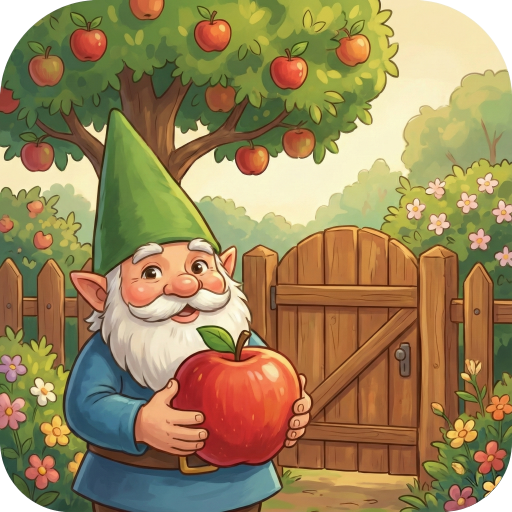
Gnomia - Your virtual garden
تازہ کاری
موجودہ ورژن
1.176
پیشکش بذریعہ

Gnomia - Your virtual garden کھیلنے کے اپنے پورے جنون کے دوران آپ کے ہاتھ آپ کے فون کی ایک چھوٹی سی اسکرین تک محدود نہیں ہونے چاہئیں۔ پرو کی طرح کھیلیں اور کی بورڈ اور ماؤس کے سہارے اپنے گیم پر مکمل کنٹرول حاصل کریں۔ MEmu آپ کو وہ تمام چیزیں پیش کرتا ہے جس کی آپ امید کرتے ہیں۔ پی سی پر Gnomia - Your virtual garden ڈاؤن لوڈ کریں اور کھیلیں۔ جتنی دیر تک آپ چاہیں کھیلیں، بیٹری، موبائل ڈیٹا کی کوئی حد نہیں ہے اور پریشان کن کالز نہیں ہیں۔ نئے برانڈ کا MEmu 9 پی سی پر Gnomia - Your virtual garden کھیلنے کا بہترین اختیار ہے۔ ہماری مہارت کی مدد سے تیار کردہ، شاندار پری سیٹ کی میپنگ سسٹم Gnomia - Your virtual garden کو ایک ریئل پی سی گیم بناتا ہے۔ MEmu کثیر نظیری منیجرایک ہی ڈیوائس پر 2 یا زیادہ اکاؤنٹس پلے کرنا ممکن بناتا ہے۔ اور سب سے اہم بات یہ ہے کہ، ہمارا خصوصی ایمولیشن انجن آپ کے پی سی کی مکمل طاقت ریلیز کرتے ہوئے ہر چیز ہموار بنا سکتا ہے۔
مزید دکھائیں
MEmu Play کے ساتھ PC پر Gnomia - Your virtual garden ڈاؤن لوڈ کریں۔ بڑی اسکرین پر کھیلنے کا لطف اٹھائیں۔ Gnomia is a cozy gardening game where your real-world walks help your garden grow.
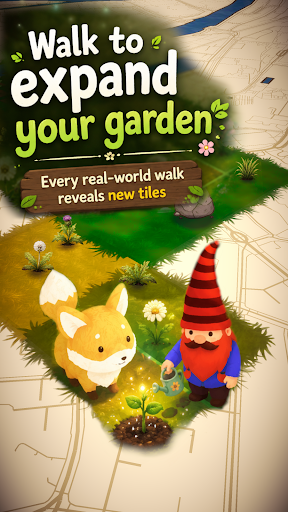
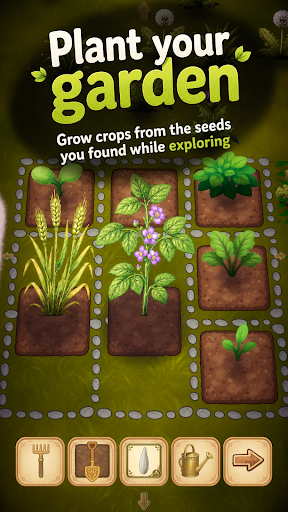
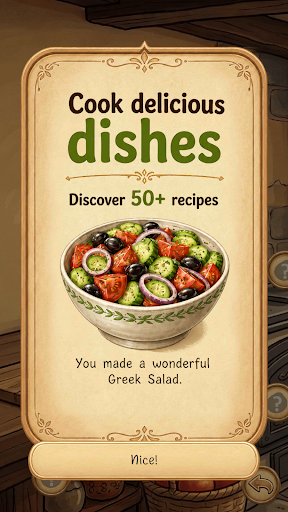
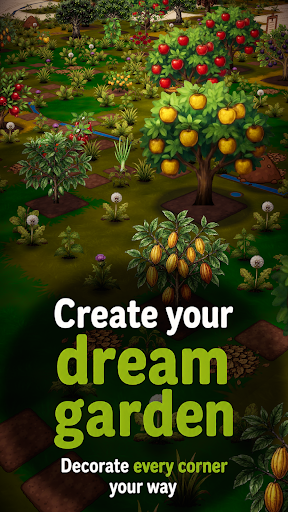
Gnomia is a cozy gardening game where your real-world walks help your garden grow. Explore new places, plant crops, cook with your harvests, decorate your space, and join community events with other players. Every walk brings something new back to your garden.
It's completely free, no ads and you can play offline.
Find cute companions and convince them to join you for special bonuses on your walks. You can even integrate with Strava and track your walks/runs this way.
Gnomia combines location-based movement with cozy garden management, cooking, collecting, decoration, community play, and discovery. Your real movement helps you visit tiles, uncover new places, gather resources, complete requests, and bring your garden to life.
Build your home garden from the ground up. Clear weeds, till soil, plant seeds, water crops, harvest produce, and improve your tools as you play. Every seed and harvest can carry its own quality giving you reasons to keep growing, experimenting, and collecting better crops. Discover fruits, vegetables, herbs, mushrooms, flowers, rare plants, and unusual seed variants as your garden expands.
Your real-world adventures matter. Start a GPS session, walk through your neighborhood, and watch your route contribute to your progress. Track distance, time, pace, and visited tiles, then review your adventure afterward with route recaps and session history. Bring companions along on your walks to help with tile visits, resources, watering, soil, weeds, and other garden tasks.
Cooking turns your harvests into something more. Craft dishes from the produce you grow. Unlock recipes, experiment with ingredients, fill kitchen jobs, and use cooked dishes for requests, festivals, progression, and collection goals.
There is more beneath the surface. Unlock cave entrances through requests and explore procedurally generated underground worlds filled with walls, obstacles, cave flora, resources, and deeper challenges. Use cave actions carefully, clear paths with tools like the pickaxe and axe, and push farther into mysterious underground spaces.
Grow beyond simple farming with structures and science machines. Build and upgrade helpful structures that affect nearby tiles, such as watering surrounding plants, improving adjacent soil, or granting extra actions.
Join the community side of Gnomia through communities, rankings, friends, and weekly festivals. Create or join a community, contribute to shared festival boards, complete festival requests, claim rewards, and help your club level up over time. Work together by turning in seeds, produce, resources, and dishes, then compare progress through leaderboards and rankings.
Meet companions and build relationships through requests and adventures. Companions can join your journey, gain affection, support your active sessions, and provide useful effects while you explore. Complete mystery objectives to earn experience, resources, tools, decorations, cooking stations, cave actions, hints, and more.
Make the world your own. Customize your gnome character with different hats, body parts, beards, hair, details, and moustaches. Decorate your garden with unlockable decorations and build your garden.
Gnomia is full of discoveries. Use the catalog to track seeds, produce, dishes, and growth stages. Unlock hints that point toward recipes, secrets, and hidden progression paths without giving everything away at once. Chase achievements, improve your best seeds, collect rare items, upgrade tools, complete daily rewards, visit markets, and keep uncovering new systems as your garden grows.
Whether you want a relaxing garden to check each day, a reason to go for a walk, a collection game with deep progression, or a community challenge to share with friends, Gnomia gives every step a purpose.
Plant, walk, cook, explore, decorate, and discover the hidden life growing all around you.
مزید دکھائیں

1. MEmu انسٹالر ڈاؤن لوڈ کریں اور سیٹ اپ مکمل کریں

2. MEmu شروع کریں اسکے بعد ڈیسکٹاپ پر Google Play کھولیں

3. Google Play میں Gnomia - Your virtual garden تلاش کریں
Install
4. Gnomia - Your virtual garden ڈاؤن لوڈ کریں اور انسٹال کریں
5. انسٹال مکمل ہونے کے بعد سٹارٹ کرنے کے لیے آئیکن پر کلک کریں

6. MEmu کے ساتھ پی سی پر Gnomia - Your virtual garden کھیلنے کا لطف لیں
MEmu پلے بہترین اینڈرائڈ ایمولیٹر ہے اور 100 ملین لوگ اس کے زبردست اینڈرائڈ گیمنگ تجربہ سے لطف اندوز ہو رہے ہیں۔ MEmu کی ورچولائزیشن ٹیکنالوجی آپ کو اپنے PC پر ہزاروں اینڈرائڈ گیمز یہاں تک کہ انتہائی گرافک والے گیمز باسہولت کھیلنے کی طاقت دیتی ہے۔
بہتر گرافکس کے ساتھ بڑی اسکرین؛ طویل دورانیہ، بیٹری یا لامحدود موبائل ڈیٹا کے بغیر۔
کی بورڈ اور ماؤس یا گیم پیڈ کے عین مطابق کنٹرول کے لیے کی میپنگ کا پورا سپورٹ۔
کثیر مثالی منیجر کے ساتھ بیک وقت ایک پی سی پر متعدد گیم اکاؤنٹس یا ٹاسکس۔
پی سی پر درج ذیل مراحل پر عمل کرتے ہوئے Gnomia - Your virtual garden کھیلیں: