QT777
تاریخ بهروزرسانی
نسخه کنونی
11.63.1
ارائهکننده

با تمام اشتیاق شما به بازی QT777، قرار نیست دست های شما روی صفحه نمایش کوچک گوشی شما محدود شود. مانند یک حرفه ای بازی کنید و کنترل کامل بازی خود را با صفحه کلید و ماوس بدست آورید.MEmu همه ی انتظاراتی که دارید را برآورده می کند.QT777 را بر روی رایانه شخصی دانلود و بازی کنید. تا زمانی که می خواهید بازی کنید، دیگر محدودیتی در باتری، داده تلفن همراه و تماس های مزاحم وجود ندارد.MEmu 9 کاملاً جدید و بهترین انتخاب برای بازی QT777 روی رایانه شخصی است. با تخصص ما، سیستم keymapping از پیش تعیین شده عالی،QT777 را به یک بازی رایانه شخصی واقعی تبدیل می کند.مدیریت چند موردی MEmu امکان اجرای 2 یا چندین حساب در یک دستگاه را فراهم می کند.و مهمتر از همه، موتور شبیهسازی انحصاری ما میتواند پتانسیل کامل رایانه شما را آزاد کند و همه چیز را روان کند.
بیشتر نشان بده
دانلود بازی QT777 برای کامپیوتر با MEmu Play. از بازی روی صفحه نمایش بزرگ لذت ببرید. QT777 fits quick breaks and short play sessions when you want a focused puzzle without long setup.

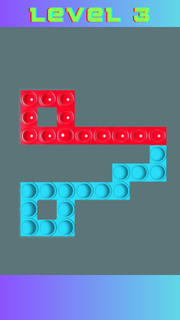
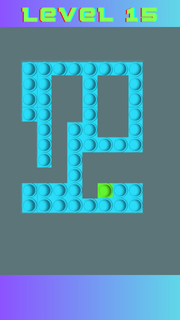
QT777 fits quick breaks and short play sessions when you want a focused puzzle without long setup. It centers on clearing a board with simple, tactile actions and clear goals, so you can start fast and stay engaged at your own pace. As the stages progress, the challenge increases in a steady way, while the look and feel stay bright and readable. For users looking for the QT777 APK, this title delivers a straightforward puzzle loop with no complex rules and a clean visual style.QT777 featuresSwipe to pop gameplayQT777 asks you to swipe left or right to pop every item on the board. Each swipe affects the entire row or column, so your choices matter. You aim to clear everything with deliberate moves, then finish the level once nothing is left. The mechanic is easy to learn and stays consistent from stage to stage.Progressive difficulty curveAs you advance, the game introduces tougher layouts and more demanding patterns. Early levels teach the basics, then later ones require more planning to clear efficiently. This gradual curve helps you improve without abrupt jumps, making each success feel earned and preparing you for the next set of puzzles.Clear visual and audio feedbackQT777 uses colorful boards and crisp popping effects that make each swipe feel responsive. Visual cues help you see what changed after a move, so you understand results at a glance. Light sound feedback supports the action and keeps the pace steady, which is useful during repeated attempts.Simple controls for quick playYou interact through snap, drag, and swipe inputs that respond quickly on touch screens. There are no nested menus or complicated rule sheets to learn first. This setup keeps your attention on the puzzle in front of you, so you can jump in whenever you have a minute.Short, replayable levelsLevels are designed to be completed in brief sessions, which suits daily downtime. If a plan does not work, you can retry in seconds and test a different sequence. This pick up and play approach supports both casual attempts and longer practice streaks when you want to refine your strategy.QT777 identity and developer detailsTo avoid confusion with unrelated genres, note that QT777 is the Pop Trail swipe to pop puzzle, not a casino or card product. The QT777 app is published by CayohuntApps under the package name com.cayohuntapps.PopTrailChallengeGame. If search results show mixed content, verify the package and developer to confirm you have the correct QT777 Android title.Version availability for QT777Users sometimes look for different builds of this game, including recent updates and earlier releases. Check the version name and release date shown on this page to match what you need. This helps you confirm whether you are grabbing a newer build or an older revision that your device already supports.How to play QT777Getting started takes just a moment, and the flow is the same across levels. If you plan to download QT777, these steps outline what to expect during your first run. Open QT777, then wait for the main menu to load and choose a level to begin. Review the board for a second so you see how many pops are present and where they sit. Swipe left or right to pop items, then watch the feedback to understand what changed after your move. If the board is not clear, adjust your plan and swipe again, using drag or snap as needed for precise input. Once everything is cleared, proceed to the next level and repeat the same process with the new layout.Start playing nowQT777 focuses on a clear swipe to pop loop with rising challenge and concise levels. It suits short breaks and repeat attempts when you want a direct puzzle task. To keep up with improvements, look for the QT777 latest version when updating.Official details Developer: CayohuntApps Package name: com.cayohuntapps.PopTrailChallengeGame Also known as: Pop Trail
بیشتر نشان بده

1. نصب کننده Memu را دانلود کرده و راه اندازی را تمام کنید

2. Memu را اجرا کنید و سپس گوگل پلی را بر روی دستکتاپ باز کنید

3. QT777 را بر روی گوگل پلی جستجو کنید
Install
4. QT777 را دانلود و نصب کنید
5. پس از اتمام نصب روی آیکون کلیک کنید تا اجرا شود

6. از بازی کردن QT777 بر روی رایانه شخصی با MEmu لذت ببرید
MEmu بهترین نمونه ساز رایگان اندروید است و پیش از این 50 میلیون نفر از تجربه بسیار خوب بازی اندروید در آن لذت برده اند. تکنولوژی مجازی ساز MEmu شما را قادر می سازد هزاران بازی اندرویدی را در کامپیوتر به طور روان اجرا کنید، حتی آنهایی که گرافیک سنگین تری دارند.
صفحه نمایش بزرگتر با گرافیک بهتر؛ زمان طولانی تر، بدون محدودیت باتری یا داده تلفن همراه.
پشتیبانی کامل از Keymapping برای کنترل دقیق صفحه کلید و ماوس یا گیم پد.
چندین حساب بازی یا وظایف در یک رایانه شخصی در یک زمان با مدیریت همزمان همه
Play QT777 on PC by following steps: