QT777
Ενημερώθηκε
Τρέχουσα έκδοση
11.63.1
Προσφέρεται από

Με όλο το πάθος σας για το παιχνίδι QT777, τα χέρια σας δεν πρέπει να περιορίζονται σε μια μικροσκοπική οθόνη του τηλεφώνου σας. Παίξτε σαν επαγγελματίας και αποκτήστε τον πλήρη έλεγχο του παιχνιδιού σας με πληκτρολόγιο και ποντίκι. Το MEmu σας προσφέρει όλα όσα περιμένετε. Κατεβάστε και παίξτε QT777 σε υπολογιστή. Παίξτε όσο θέλετε, χωρίς άλλους περιορισμούς μπαταρίας, δεδομένων κινητής τηλεφωνίας και ενοχλητικών κλήσεων. Το ολοκαίνουργιο MEmu 9 είναι η καλύτερη επιλογή για να παίξετε QT777 σε υπολογιστή. Ετοιμασμένο με την εμπειρία μας, το εξαιρετικό σύστημα προκαθορισμένης αντιστοίχισης πλήκτρων καθιστά το QT777 ένα πραγματικό παιχνίδι υπολογιστή. Ο διαχειριστής πολλαπλών περιπτώσεων MEmu καθιστά δυνατό το παιχνίδι με 2 ή περισσότερους λογαριασμούς στην ίδια συσκευή. Και το πιο σημαντικό, η αποκλειστική μηχανή εξομοίωσης μας μπορεί να απελευθερώσει πλήρως τις δυνατότητες του υπολογιστή σας, κάνοντας τα πάντα ομαλά.
Show more
Απολαύστε την υπέροχη εμπειρία αναπαραγωγής του QT777 σε υπολογιστή με το MEMU App Player. Πρόκειται για έναν ισχυρό δωρεάν εξομοιωτή Android που σας επιτρέπει να παίζετε χιλιάδες παιχνίδια Android. QT777 fits quick breaks and short play sessions when you want a focused puzzle without long setup.

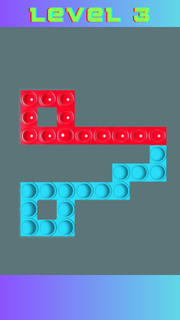
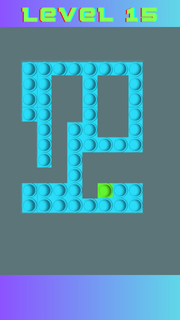
QT777 fits quick breaks and short play sessions when you want a focused puzzle without long setup. It centers on clearing a board with simple, tactile actions and clear goals, so you can start fast and stay engaged at your own pace. As the stages progress, the challenge increases in a steady way, while the look and feel stay bright and readable. For users looking for the QT777 APK, this title delivers a straightforward puzzle loop with no complex rules and a clean visual style.QT777 featuresSwipe to pop gameplayQT777 asks you to swipe left or right to pop every item on the board. Each swipe affects the entire row or column, so your choices matter. You aim to clear everything with deliberate moves, then finish the level once nothing is left. The mechanic is easy to learn and stays consistent from stage to stage.Progressive difficulty curveAs you advance, the game introduces tougher layouts and more demanding patterns. Early levels teach the basics, then later ones require more planning to clear efficiently. This gradual curve helps you improve without abrupt jumps, making each success feel earned and preparing you for the next set of puzzles.Clear visual and audio feedbackQT777 uses colorful boards and crisp popping effects that make each swipe feel responsive. Visual cues help you see what changed after a move, so you understand results at a glance. Light sound feedback supports the action and keeps the pace steady, which is useful during repeated attempts.Simple controls for quick playYou interact through snap, drag, and swipe inputs that respond quickly on touch screens. There are no nested menus or complicated rule sheets to learn first. This setup keeps your attention on the puzzle in front of you, so you can jump in whenever you have a minute.Short, replayable levelsLevels are designed to be completed in brief sessions, which suits daily downtime. If a plan does not work, you can retry in seconds and test a different sequence. This pick up and play approach supports both casual attempts and longer practice streaks when you want to refine your strategy.QT777 identity and developer detailsTo avoid confusion with unrelated genres, note that QT777 is the Pop Trail swipe to pop puzzle, not a casino or card product. The QT777 app is published by CayohuntApps under the package name com.cayohuntapps.PopTrailChallengeGame. If search results show mixed content, verify the package and developer to confirm you have the correct QT777 Android title.Version availability for QT777Users sometimes look for different builds of this game, including recent updates and earlier releases. Check the version name and release date shown on this page to match what you need. This helps you confirm whether you are grabbing a newer build or an older revision that your device already supports.How to play QT777Getting started takes just a moment, and the flow is the same across levels. If you plan to download QT777, these steps outline what to expect during your first run. Open QT777, then wait for the main menu to load and choose a level to begin. Review the board for a second so you see how many pops are present and where they sit. Swipe left or right to pop items, then watch the feedback to understand what changed after your move. If the board is not clear, adjust your plan and swipe again, using drag or snap as needed for precise input. Once everything is cleared, proceed to the next level and repeat the same process with the new layout.Start playing nowQT777 focuses on a clear swipe to pop loop with rising challenge and concise levels. It suits short breaks and repeat attempts when you want a direct puzzle task. To keep up with improvements, look for the QT777 latest version when updating.Official details Developer: CayohuntApps Package name: com.cayohuntapps.PopTrailChallengeGame Also known as: Pop Trail
Show more

1. Κατεβάστε το πρόγραμμα εγκατάστασης MEmu και ολοκληρώστε την εγκατάσταση

2. Ξεκινήστε το MEmu και στη συνέχεια ανοίξτε το Google Play στην επιφάνεια εργασίας

3. Αναζητήστε τον QT777 στο Google Play
Install
4. Λήψη και εγκατάσταση του QT777
5. Μόλις ολοκληρωθεί η εγκατάσταση, κάντε κλικ στο εικονίδιο για να ξεκινήσετε

6. Enjoy playing QT777 on PC with MEmu
Το MEmu Play, αποτελεί την ιδανικότερη δωρεάν λύση για την εξομοίωση του λειτουργικού Android, και χρησιμοποιείται ήδη από περισσότερους από 50 εκατομμύρια χρήστες, ο οποίοι απολαμβάνουν, την καταπληκτική εμπειρία παιχνιδιού που προσφέρεται μέσω της εφαρμογής. Με τη χρήση του MEmu Virtualization, είναι δυνατή η αναπαραγωγή παιχνιδιών Android στον υπολογιστή, ακόμη και εκείνων που απαιτούν μεγάλη επεξεργαστική ισχύ γραφικών, δίχως συμβιβασμούς στην ποιότητα και στην εμπειρία χρήσης, ακριβώς όπως ένα τελευταίας γενιάς κινητό τηλέφωνο.
Μεγαλύτερη οθόνη με καλύτερα γραφικά. Μεγάλη διάρκεια ζωής, χωρίς περιορισμό μπαταρίας ή δεδομένων κινητής τηλεφωνίας.
Πλήρης υποστήριξη αντιστοίχισης πλήκτρων για ακριβή έλεγχο του πληκτρολογίου και του ποντικιού ή του gamepad.
Πολλαπλοί λογαριασμοί παιχνιδιών ή εργασίες σε έναν υπολογιστή ταυτόχρονα με τον διαχειριστή πολλαπλών περιπτώσεων.
Play QT777 on PC by following steps: