ILL
Mise à jour
Version actuelle
Proposée par

Avec toute la passion que vous avez à jouer ILL, vos mains ne sont pas sensées se limiter à l’infime écran de votre téléphone. Jouez comme un pro et ayez le contrôle total de votre jeu à l’aide du clavier et de la souris. MEmu satisfait toutes vos attentes. Téléchargez et jouez ILL sur PC. Jouez aussi longtemps que vous souhaitez sans aucune limitation de batterie, de données mobiles et d’appels embêtants. La toute nouvelle version de MEmu 9 est la meilleure option de jouer ILL sur PC. Réalisé par nos experts, l’e magnifique système d’affectation de touches prédéfini fait de ILL un jeu réaliste sur PC. Le gestionnaire multi-instances de MEmu permet 2 ou plusieurs comptes de jeu sur le même appareil. Et le plus important, le moteur d’émulation exclusif peut libérer le plein potentiel de votre PC, ce qui facilite tout.
Afficher plus
Téléchargez ILL avec le simulateur d’Android MEmu sur votre PC. Profitez de jouer sur un grand écran. ILL is a gripping first-person action horror game that plunges players into a nightmarish world filled with dread, suspense, and relentless danger.


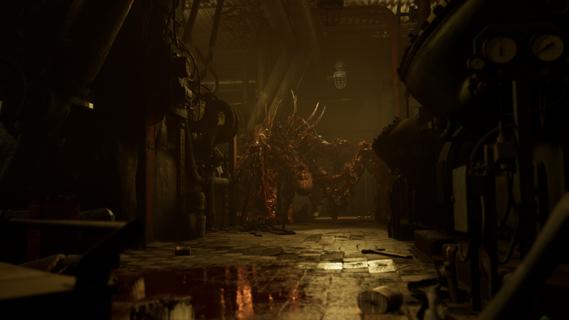

ILL is a gripping first-person action horror game that plunges players into a nightmarish world filled with dread, suspense, and relentless danger. Set within the confines of a dark, abandoned fort, the game immerses you in an environment overtaken by a mysterious and malevolent entity. From the moment you step inside, the atmosphere is thick with tension, and every shadow seems to conceal a lurking threat. One of the defining features of ILL is its commitment to realism. The game’s physics engine meticulously simulates the environment, making every interaction feel tangible and authentic. Whether you’re navigating through crumbling corridors or manipulating objects to solve puzzles, the realistic physics add a layer of immersion that intensifies the horror experience. This attention to detail extends to the visceral dismemberment system, which is both brutal and realistic. Combat encounters are not just about shooting or evading enemies; they involve strategic dismemberment of grotesque monsters, making every fight a harrowing and visceral struggle for survival. The enemies in ILL are unpredictable and terrifying. Unlike traditional horror games where enemy behavior can become repetitive or scripted, the monsters here adapt and react in ways that keep players constantly on edge. Their movements are erratic and aggressive, and their ability to appear suddenly from unexpected places creates a sense of paranoia that permeates the entire gameplay. This unpredictability forces players to remain vigilant, think quickly, and use their environment to their advantage. ILL’s narrative unfolds gradually, revealing the dark secrets behind the fort and the entity that has taken control. As you explore, you uncover clues and pieces of the story that paint a chilling picture of what transpired before your arrival. The game’s storytelling is subtle yet effective, relying on environmental details, audio cues, and fragmented documents to build a sense of mystery and foreboding. This approach encourages exploration and rewards players who pay close attention to their surroundings. The gameplay mechanics blend action, stealth, and survival elements seamlessly. Players must manage limited resources such as ammunition and health, making every decision critical. Stealth can be a viable option to avoid overwhelming enemies, but sometimes confrontation is unavoidable. When combat ensues, the game’s physics and dismemberment system come into play, allowing for dynamic and intense encounters that require both skill and strategy. Visually, ILL delivers a haunting and immersive aesthetic. The dark fort is rendered with meticulous detail, from the decaying architecture to the eerie lighting that casts long shadows and obscures potential dangers. Sound design plays a crucial role in building suspense, with ambient noises, distant growls, and sudden shrieks heightening the player’s sense of vulnerability. In conclusion, ILL stands out as a realistic and intense first-person horror experience that challenges players to confront their fears in a hostile and unpredictable environment. Its combination of realistic physics, visceral combat, and atmospheric storytelling creates a game that is both terrifying and deeply engaging. For fans of horror who seek a game that pushes the boundaries of immersion and suspense, ILL offers a harrowing journey into darkness that will linger long after the screen goes black.
Afficher plus

1. Téléchargez l'installateur MEmu et terminez l'installation

2. Démarrez MEmu puis ouvrez Google Play sur la page d'accueil

3. Recherchez ILL dans Google Play
Install
4. Téléchargez et installez ILL
5. Une fois l'installation terminée, cliquez sur l'icône pour démarrer

6. Profitez de jouer ILL sur PC avec MEmu
Le lecteur d'application MEmu est le meilleur émulateur Android gratuit, et 50 millions de personnes profitent déjà de sa fantastique expérience de jeu Android. La technologie de virtualisation MEmu vous donne la possibilité de jouer à des milliers de jeux Android sur votre PC sans aucune difficulté, même aux plus gourmands.
L’écran plus grand avec de meilleurs graphismes; Une longue durée, sans limitation de batterie ou de données mobiles.
Soutien du Keymapping pour un contrôle précis du clavier et de la souris ou de la manette de jeu
Plusieurs comptes de jeu ou tâches sur un seul PC en même temps avec le gestionnaire de multi-instance.
Play ILL on PC by following steps: