
ILL
Bijgewerkt
Huidige Versie
Aangeboden door

Met al je passie voor het spelen van ILL, zouden je handen niet beperkt moeten zijn tot een klein scherm van je telefoon. Speel als een professional en krijg volledige controle over je spel met toetsenbord en muis. MEmu biedt je alles wat je verwacht. Download en speel ILL op PC. Speel zo lang als je wilt, geen beperkingen meer van batterij, mobiele data en storende oproepen. De gloednieuwe MEmu 9 is de beste keuze om ILL op PC te spelen. Voorbereid met onze expertise, maakt het uitmuntende vooraf ingestelde keymapping systeem van ILL een echt PC-spel. MEmu multi-instance manager maakt het spelen van 2 of meer accounts op hetzelfde apparaat mogelijk. En het belangrijkste, onze exclusieve emulatie-engine kan het volledige potentieel van je PC benutten, waardoor alles soepel verloopt.
Meer tonen
Download ILL on PC with MEmu Android Emulator. Enjoy playing on big screen. ILL is a gripping first-person action horror game that plunges players into a nightmarish world filled with dread, suspense, and relentless danger.


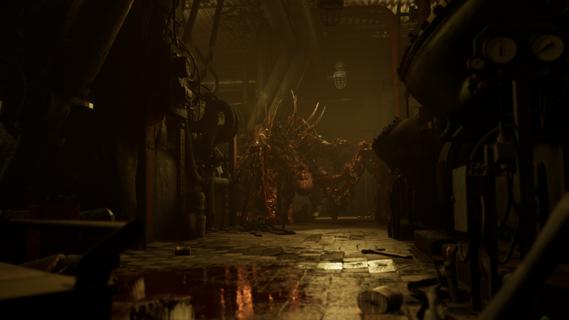

ILL is a gripping first-person action horror game that plunges players into a nightmarish world filled with dread, suspense, and relentless danger. Set within the confines of a dark, abandoned fort, the game immerses you in an environment overtaken by a mysterious and malevolent entity. From the moment you step inside, the atmosphere is thick with tension, and every shadow seems to conceal a lurking threat. One of the defining features of ILL is its commitment to realism. The game’s physics engine meticulously simulates the environment, making every interaction feel tangible and authentic. Whether you’re navigating through crumbling corridors or manipulating objects to solve puzzles, the realistic physics add a layer of immersion that intensifies the horror experience. This attention to detail extends to the visceral dismemberment system, which is both brutal and realistic. Combat encounters are not just about shooting or evading enemies; they involve strategic dismemberment of grotesque monsters, making every fight a harrowing and visceral struggle for survival. The enemies in ILL are unpredictable and terrifying. Unlike traditional horror games where enemy behavior can become repetitive or scripted, the monsters here adapt and react in ways that keep players constantly on edge. Their movements are erratic and aggressive, and their ability to appear suddenly from unexpected places creates a sense of paranoia that permeates the entire gameplay. This unpredictability forces players to remain vigilant, think quickly, and use their environment to their advantage. ILL’s narrative unfolds gradually, revealing the dark secrets behind the fort and the entity that has taken control. As you explore, you uncover clues and pieces of the story that paint a chilling picture of what transpired before your arrival. The game’s storytelling is subtle yet effective, relying on environmental details, audio cues, and fragmented documents to build a sense of mystery and foreboding. This approach encourages exploration and rewards players who pay close attention to their surroundings. The gameplay mechanics blend action, stealth, and survival elements seamlessly. Players must manage limited resources such as ammunition and health, making every decision critical. Stealth can be a viable option to avoid overwhelming enemies, but sometimes confrontation is unavoidable. When combat ensues, the game’s physics and dismemberment system come into play, allowing for dynamic and intense encounters that require both skill and strategy. Visually, ILL delivers a haunting and immersive aesthetic. The dark fort is rendered with meticulous detail, from the decaying architecture to the eerie lighting that casts long shadows and obscures potential dangers. Sound design plays a crucial role in building suspense, with ambient noises, distant growls, and sudden shrieks heightening the player’s sense of vulnerability. In conclusion, ILL stands out as a realistic and intense first-person horror experience that challenges players to confront their fears in a hostile and unpredictable environment. Its combination of realistic physics, visceral combat, and atmospheric storytelling creates a game that is both terrifying and deeply engaging. For fans of horror who seek a game that pushes the boundaries of immersion and suspense, ILL offers a harrowing journey into darkness that will linger long after the screen goes black.
Meer tonen

1. Download de MEmu-installatie en voltooi de setup

2. Start MEmu en open vervolgens Google Play op het bureaublad

3. Zoek ILL in Google Play
Install
4. Download en installeer ILL
5. Klik op het icoon om te starten na het voltooien van de installatie

6. Geniet van het spelen van ILL op PC met MEmu
MEmu Play is de beste Android Emulator en 100 miljoen mensen genieten al van de superieure Android-game-ervaring. De virtualisatietechnologie van MEmu stelt je in staat om duizenden Android-spellen soepel op je PC te spelen, zelfs de meest grafisch intensieve.
Groter scherm met betere graphics; Lange duur, zonder beperking van batterij of mobiele data.
Volledige Keymapping-ondersteuning voor nauwkeurige besturing van toetsenbord en muis of gamepad.
Meerdere game-accounts of taken op één PC tegelijk met Multi-Instance manager.
Speel ILL op PC door de volgende stappen te volgen: