
ILL
อัปเดตเมื่อ
เวอร์ชันปัจจุบัน
ให้บริการโดย

เวลาคุณเล่น ILL, คุณอาจรู้สึกว่ามือคุณอาจบังจอแล้วทำให้ไม่ได้เล่นแบบเต็มที่. เล่นแบบไร้ขีดจำกัดด้วยเม้าส์และคีย์บอร์ด. MEmu มีตัวเลือกหลายอย่างให้คุณใช้งานเกมที่คุณเล่นแบบที่คุณต้องการ. ดาวน์โหลดและเล่น ILL บน PC. เล่นนานแค่ไหนก็ได้, ไม่ต้องชาร์จแบตเตอรี่, หรือเจอคนโทรเข้ามาระหว่างเล่น. MEmu 9 เป็นตัวเลือกสำหรับการเล่น ILL บน PC. ทางทีมงานเราได้ปรับแต่งเกม, ปรับให้เล่นเกมบางเกมได้เหมือนเล่น ILL เป็นเกม PC เช่นเล็งด้วยเม้าส์หรือใช้คีย์บอร์ด. ระบบของเรายังทำให้คุณสามารถเปิดเล่นได้มากกว่า 2 เกมพร้อมๆกันในคอมของคุณ. และที่สำคัญที่สุด, ระบบโปรแกรมของเราสามารถทำให้คุณใช้ระบบของ PC ทำให้เกมลื่นเหมือนกับใช้โทรศัพท์รุ่นล่าสุด. เราไม่ได้ดูแลเรื่องการเล่นเกม, แต่เราดูแลถึงความสนุกสนานที่คุณได้จากการเล่นด้วย.
แสดงเพิ่มเติม
ดาวน์โหลด ILL บน PC ด้วย MEmu Android Emulator สนุกกับการเล่นบนหน้าจอขนาดใหญ่ ILL is a gripping first-person action horror game that plunges players into a nightmarish world filled with dread, suspense, and relentless danger.


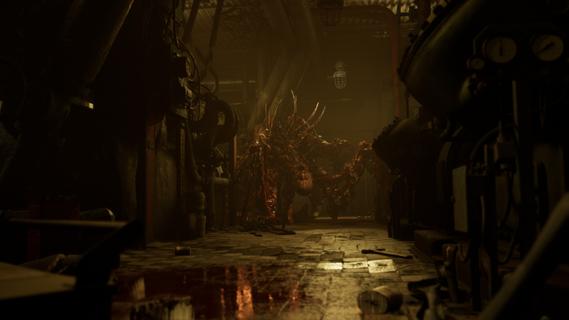
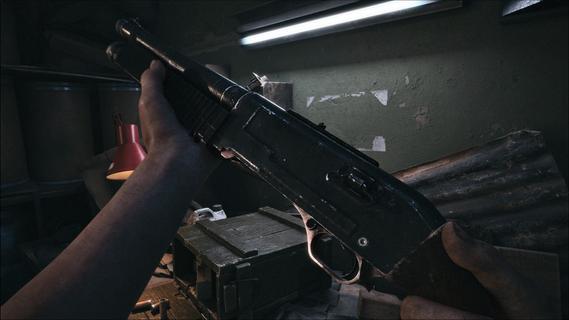
ILL is a gripping first-person action horror game that plunges players into a nightmarish world filled with dread, suspense, and relentless danger. Set within the confines of a dark, abandoned fort, the game immerses you in an environment overtaken by a mysterious and malevolent entity. From the moment you step inside, the atmosphere is thick with tension, and every shadow seems to conceal a lurking threat. One of the defining features of ILL is its commitment to realism. The game’s physics engine meticulously simulates the environment, making every interaction feel tangible and authentic. Whether you’re navigating through crumbling corridors or manipulating objects to solve puzzles, the realistic physics add a layer of immersion that intensifies the horror experience. This attention to detail extends to the visceral dismemberment system, which is both brutal and realistic. Combat encounters are not just about shooting or evading enemies; they involve strategic dismemberment of grotesque monsters, making every fight a harrowing and visceral struggle for survival. The enemies in ILL are unpredictable and terrifying. Unlike traditional horror games where enemy behavior can become repetitive or scripted, the monsters here adapt and react in ways that keep players constantly on edge. Their movements are erratic and aggressive, and their ability to appear suddenly from unexpected places creates a sense of paranoia that permeates the entire gameplay. This unpredictability forces players to remain vigilant, think quickly, and use their environment to their advantage. ILL’s narrative unfolds gradually, revealing the dark secrets behind the fort and the entity that has taken control. As you explore, you uncover clues and pieces of the story that paint a chilling picture of what transpired before your arrival. The game’s storytelling is subtle yet effective, relying on environmental details, audio cues, and fragmented documents to build a sense of mystery and foreboding. This approach encourages exploration and rewards players who pay close attention to their surroundings. The gameplay mechanics blend action, stealth, and survival elements seamlessly. Players must manage limited resources such as ammunition and health, making every decision critical. Stealth can be a viable option to avoid overwhelming enemies, but sometimes confrontation is unavoidable. When combat ensues, the game’s physics and dismemberment system come into play, allowing for dynamic and intense encounters that require both skill and strategy. Visually, ILL delivers a haunting and immersive aesthetic. The dark fort is rendered with meticulous detail, from the decaying architecture to the eerie lighting that casts long shadows and obscures potential dangers. Sound design plays a crucial role in building suspense, with ambient noises, distant growls, and sudden shrieks heightening the player’s sense of vulnerability. In conclusion, ILL stands out as a realistic and intense first-person horror experience that challenges players to confront their fears in a hostile and unpredictable environment. Its combination of realistic physics, visceral combat, and atmospheric storytelling creates a game that is both terrifying and deeply engaging. For fans of horror who seek a game that pushes the boundaries of immersion and suspense, ILL offers a harrowing journey into darkness that will linger long after the screen goes black.
แสดงเพิ่มเติม

1. ดาวน์โหลดตัวติดตั้ง MEmu และสิ้นสุดการติดตั้ง

2. เริ่ม MEmu จากนั้นเปิด Google Play บนหน้าแรก

3. ค้นหา ILL ใน Google Play
Install
4. ดาวน์โหลดและติดตั้ง ILL
5. เมื่อติดตั้งเสร็จให้คลิกที่ไอคอนเพื่อเริ่มใช้งาน

6. สนุกกับการเล่น ILL บนพีซีด้วย MEmu
MEmu App Player เป็นอีมูเลเตอร์ Android ที่ดีที่สุดและผู้คนกว่า 50 ล้านคนเพลิดเพลินไปกับประสบการณ์การเล่นเกม Android ที่ยอดเยี่ยม เทคโนโลยีการจำลองเสมือนของ MEmu ช่วยให้คุณเล่นเกม Android หลายพันเกมได้อย่างราบรื่นบนพีซีของคุณแม้แต่เกมที่ต้องใช้กราฟิกมากที่สุด
จอใหญ่และกราฟฟิกสวยกว่า; เล่นได้นาน, ไม่ต้องใช้แบตเตอรี่โทรศัพท์หรือเน็ตโทรศัพท์.
ระบบปรับแต่งปุ่มคีย์บอร์ดและเม้าส์ตามที่คุณเลือก
เล่นมากกว่าหนึ่งเกมบน PC ในเวลาเดียวกันด้วยระบบหลายจอหรือ Multi-Instance manager.
Play ILL on PC by following steps: