MV Master - Best Video Maker & Photo Video Editor
Mise à jour
Version actuelle
5.4.0.10209
Proposée par

Ne vous inquiétez plus des surcharges lorsque vous utilisez MV Master - Best Video Maker & Photo Video Editor sur votre téléphone portable, libérez-vous de l'écran minuscule et profitez de l'application sur un écran beaucoup plus grand. Désormais, vous pouvez utiliser votre application en plein écran avec le clavier et la souris. MEmu vous offre toutes les fonctionnalités surprenantes que vous attendiez : installation rapide et configuration facile, commandes intuitives, plus de limitations de batterie, de données mobiles et d'appels dérangeants. Le tout nouveau MEmu 9 est le meilleur choix pour utiliser MV Master - Best Video Maker & Photo Video Editor sur votre ordinateur. Codé avec notre absorption, le gestionnaire multi-instance permet d'ouvrir 2 ou plusieurs comptes en même temps. Et le plus important, notre moteur d'émulation exclusif peut libérer tout le potentiel de votre PC, rendre tout cela fluide et agréable.
Afficher plus
Téléchargez MV Master - Best Video Maker & Photo Video Editor avec le simulateur d’Android MEmu sur votre PC. Profitez de jouer sur un grand écran. MV Master is the BEST Video Maker, FREE Video Editor and PRO Photo Editor App with more than 10,000 video templates and unlimited top music.
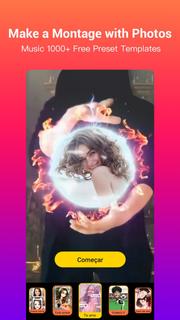
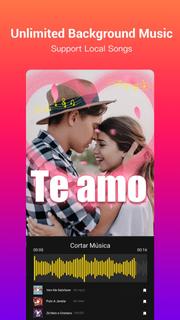
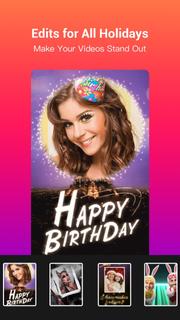
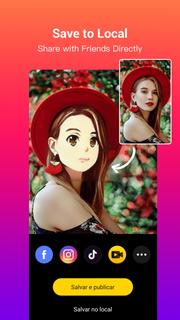
MV Master is the BEST Video Maker, FREE Video Editor and PRO Photo Editor App with more than 10,000 video templates and unlimited top music. You can easily edit videos for free with photos and music, make photo videos or music videos like a Pro in seconds, and share videos on TikTok, YouTube, Instagram, WhatsApp, etc.Check out MV Master’s powerful features on making photo videos and editing videos. It’s time to turn your plain photos or videos into great music videos with this EASY, USEFUL and FUN video maker App!KEY FEATURES❤ Video Templates and Collage Layouts: fast edit photos into photo videos- There are already 10000+ online video editing templates for you to edit videos easily and fast. We keep updating new templates on a daily basis, and recommend the most popular templates on the homepage.- Meet each video editing requirement by providing various types and holiday edits: Happy Birthday, Ramadan, I Love You, Wedding, Anniversary, Anime Face, Growing Old, Cute Dance, Good night- Templates make creative video effects such as beautiful effect, dynamic effect, glitch effect, magic effect, cute effect, animation effect, collage effect, funny effect, romantic effect and so on. Your photo videos will make the best effects with MV Master video editing templates.- Smartly make photo slideshows and photo videos by suggesting the amount of photos needed varying from 1 photo to dozens of photos.- A part of the templates now support editing videos and making music videos with your original video clips.❤ Free Online Music: add background music to videos and make music videos or movie videos- One tap to choose background music for your videos from a variety of top music in MV music Library. And all songs are 100% free!- Dozens of music genres including Trending, Pop Music, Electronic Dance Music, Rock, Hip-Hop, Indie, 8 Bit Music and more- You can also add your own songs as the background music of the videos- Support cropping music and showing lyrics on music videos❤ Quote and Text: share your stories, express mood and customize your photo videos- We will pick a Random quote matching your photo video. You can switch to another until you get the perfect one for your photo video.- You can find more categorized quotes about love, friendship, mood or motivation in the quote library. No matter what you want to express, there will alway be a quote well matched and tell your stories accurately.- The Style feature makes it easy to change the fonts and colors of the quotes.❤ Dynamic BeatsBy using MV Master’s very creative “Beats” feature you can add tempos, rhythms and stickers to your music videos to make your photo videos DYNAMIC and COOL. The beats can perfectly match your music videos!❤ Stylish FiltersAs a free video editor and photo editor, MV Master provides tons of stylish filters to make your photo videos stand out. Try the most popular filters like Natural, Lively, Noble, Lomo, Ancient...❤ Amazing MaskAnother creative feature “Mask” will create a wonderful vibe for your music videos or photo slideshows. Add “Frog” and “Butterfly” masks to make your photo videos mysterious, “Red Heart”, “Love” and “Flower” to express love, “Shining”, “Color Light” and “Stars” to create a sparkling vibe. ❤ Shoot Videos and Edit VideosWe provide some templates for you to shoot videos immediately, and make the same videos as what the templates show: Count Down, Romantic Mask, Angels Wings, Swan Princess and any templates with “Shoot” buttons.❤ Save and PublishYou can fast make videos for TikTok, Youtube, Instagram, WhatsApp and more, save videos to albums, and share with your friends on social media like Facebook, WhatsApp, Twitter.Contact Us❤️: [email protected]Fan Page
Afficher plus

1. Téléchargez l'installateur MEmu et terminez l'installation

2. Démarrez MEmu puis ouvrez Google Play sur la page d'accueil

3. Recherchez MV Master - Best Video Maker & Photo Video Editor dans Google Play
Install
4. Téléchargez et installez MV Master - Best Video Maker & Photo Video Editor
5. Une fois l'installation terminée, cliquez sur l'icône pour démarrer

6. Utiliser MEmu pour utiliser MV Master - Best Video Maker & Photo Video Editor sur votre ordinateur
MEmu Play est actuellement le meilleur émulateur Android gratuit, avec 50 millions d'utilisateurs qui profitent d'une expérience Android exceptionnelle. La technologie de virtualisation de MEmu vous permet de jouer facilement à des milliers d'applications Android sur votre ordinateur, même les plus gourmandes en ressources.
L’écran plus grand avec de meilleurs graphismes; Une longue durée, sans limitation de batterie ou de données mobiles.
Soutien du Keymapping pour un contrôle précis du clavier et de la souris ou de la manette de jeu
Plusieurs comptes de jeu ou tâches sur un seul PC en même temps avec le gestionnaire de multi-instance.
Use MV Master - Best Video Maker & Photo Video Editor on PC by following steps: