MV Master - Best Video Maker & Photo Video Editor
Zaktualizowano
Aktualna wersja
5.4.0.10209
Sprzedawca

Przestań martwić się nadmiernymi opłatami podczas korzystania z MV Master - Best Video Maker & Photo Video Editor na telefonie komórkowym, uwolnij się od małego ekranu i ciesz się korzystaniem z aplikacji na znacznie większym wyświetlaczu. Od teraz korzystaj z aplikacji na pełnym ekranie za pomocą klawiatury i myszy. MEmu oferuje wszystkie zaskakujące funkcje, których się spodziewałeś: szybką instalację i łatwą konfigurację, intuicyjne sterowanie, koniec z ograniczeniami baterii, danych mobilnych i niepokojących połączeń. Zupełnie nowy MEmu 9 to najlepszy wybór do używania MV Master - Best Video Maker & Photo Video Editor na twoim komputerze. Zakodowany przez naszą absorpcję, menedżer wielu instancji umożliwia otwarcie 2 lub więcej kont w tym samym czasie. A co najważniejsze, nasz ekskluzywny emulator może uwolnić pełny potencjał twojego komputera, sprawić, że wszystko będzie płynne i przyjemne.
Pokaż więcej
Ciesz się wspaniałym doświadczeniem podczas grania w MV Master - Best Video Maker & Photo Video Editor na komputerze z aplikacją MEMU App Player. Jest to potężny darmowy emulator Androida pozwalający grać w tysiące gier na Androida. MV Master is the BEST Video Maker, FREE Video Editor and PRO Photo Editor App with more than 10,000 video templates and unlimited top music.
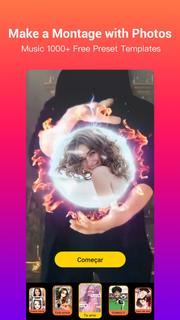
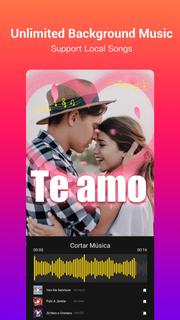
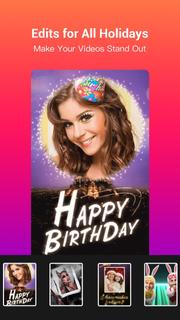
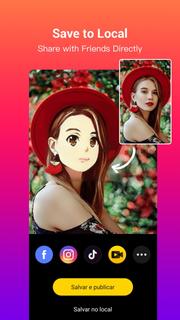
MV Master is the BEST Video Maker, FREE Video Editor and PRO Photo Editor App with more than 10,000 video templates and unlimited top music. You can easily edit videos for free with photos and music, make photo videos or music videos like a Pro in seconds, and share videos on TikTok, YouTube, Instagram, WhatsApp, etc.Check out MV Master’s powerful features on making photo videos and editing videos. It’s time to turn your plain photos or videos into great music videos with this EASY, USEFUL and FUN video maker App!KEY FEATURES❤ Video Templates and Collage Layouts: fast edit photos into photo videos- There are already 10000+ online video editing templates for you to edit videos easily and fast. We keep updating new templates on a daily basis, and recommend the most popular templates on the homepage.- Meet each video editing requirement by providing various types and holiday edits: Happy Birthday, Ramadan, I Love You, Wedding, Anniversary, Anime Face, Growing Old, Cute Dance, Good night- Templates make creative video effects such as beautiful effect, dynamic effect, glitch effect, magic effect, cute effect, animation effect, collage effect, funny effect, romantic effect and so on. Your photo videos will make the best effects with MV Master video editing templates.- Smartly make photo slideshows and photo videos by suggesting the amount of photos needed varying from 1 photo to dozens of photos.- A part of the templates now support editing videos and making music videos with your original video clips.❤ Free Online Music: add background music to videos and make music videos or movie videos- One tap to choose background music for your videos from a variety of top music in MV music Library. And all songs are 100% free!- Dozens of music genres including Trending, Pop Music, Electronic Dance Music, Rock, Hip-Hop, Indie, 8 Bit Music and more- You can also add your own songs as the background music of the videos- Support cropping music and showing lyrics on music videos❤ Quote and Text: share your stories, express mood and customize your photo videos- We will pick a Random quote matching your photo video. You can switch to another until you get the perfect one for your photo video.- You can find more categorized quotes about love, friendship, mood or motivation in the quote library. No matter what you want to express, there will alway be a quote well matched and tell your stories accurately.- The Style feature makes it easy to change the fonts and colors of the quotes.❤ Dynamic BeatsBy using MV Master’s very creative “Beats” feature you can add tempos, rhythms and stickers to your music videos to make your photo videos DYNAMIC and COOL. The beats can perfectly match your music videos!❤ Stylish FiltersAs a free video editor and photo editor, MV Master provides tons of stylish filters to make your photo videos stand out. Try the most popular filters like Natural, Lively, Noble, Lomo, Ancient...❤ Amazing MaskAnother creative feature “Mask” will create a wonderful vibe for your music videos or photo slideshows. Add “Frog” and “Butterfly” masks to make your photo videos mysterious, “Red Heart”, “Love” and “Flower” to express love, “Shining”, “Color Light” and “Stars” to create a sparkling vibe. ❤ Shoot Videos and Edit VideosWe provide some templates for you to shoot videos immediately, and make the same videos as what the templates show: Count Down, Romantic Mask, Angels Wings, Swan Princess and any templates with “Shoot” buttons.❤ Save and PublishYou can fast make videos for TikTok, Youtube, Instagram, WhatsApp and more, save videos to albums, and share with your friends on social media like Facebook, WhatsApp, Twitter.Contact Us❤️: [email protected]Fan Page
Pokaż więcej

1. Pobierz instalator MEmu i zakończ instalację

2. Uruchom MEmu, a następnie otwórz Google Play na pulpicie

3. Wyszukaj MV Master - Best Video Maker & Photo Video Editor w Google Play
Install
4. Pobierz i zainstaluj MV Master - Best Video Maker & Photo Video Editor
5. Po zakończeniu instalacji kliknij ikonę, aby rozpocząć

6. Użyj MEmu, aby doświadczyć MV Master - Best Video Maker & Photo Video Editor na swoim komputerze
MEmu Play to najlepszy emulator Androida, z którego korzysta ponad 100 milionów użytkowników, ciesząc się wyjątkowym doświadczeniem aplikacji na Androida. Technologia wirtualizacji MEmu pozwala na płynne uruchamianie tysięcy aplikacji Androida na komputerze, nawet tych najbardziej wymagających.
Większy ekran z lepszą grafiką; Długi czas, bez ograniczeń baterii lub danych mobilnych.
Pełna obsługa mapowania klawiszy dla precyzyjnego sterowania klawiaturą i myszą lub gamepadem.
Wiele kont gier lub zadań na jednym komputerze jednocześnie z menedżerem wielu instancji.
Use MV Master - Best Video Maker & Photo Video Editor on PC by following steps: