My Best Colors
Mise à jour
Version actuelle
10.1.3
Proposée par

Ne vous inquiétez plus des surcharges lorsque vous utilisez My Best Colors sur votre téléphone portable, libérez-vous de l'écran minuscule et profitez de l'application sur un écran beaucoup plus grand. Désormais, vous pouvez utiliser votre application en plein écran avec le clavier et la souris. MEmu vous offre toutes les fonctionnalités surprenantes que vous attendiez : installation rapide et configuration facile, commandes intuitives, plus de limitations de batterie, de données mobiles et d'appels dérangeants. Le tout nouveau MEmu 9 est le meilleur choix pour utiliser My Best Colors sur votre ordinateur. Codé avec notre absorption, le gestionnaire multi-instance permet d'ouvrir 2 ou plusieurs comptes en même temps. Et le plus important, notre moteur d'émulation exclusif peut libérer tout le potentiel de votre PC, rendre tout cela fluide et agréable.
Afficher plus
Téléchargez My Best Colors avec le simulateur d’Android MEmu sur votre PC. Profitez de jouer sur un grand écran. Discover a smarter way to shop, dress, and express yourself with My Best Colors—your personal color consultant right in your pocket.
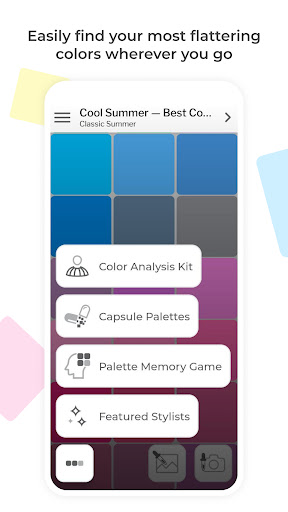
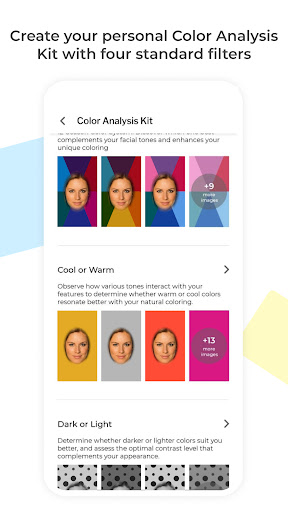
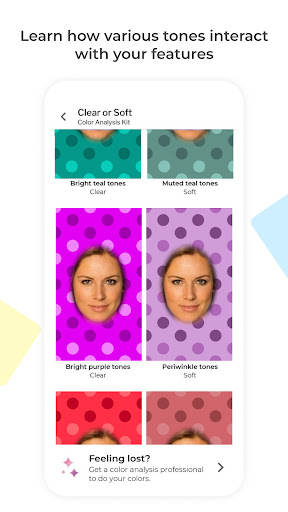
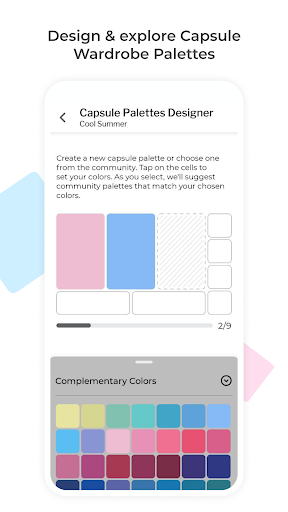
Discover a smarter way to shop, dress, and express yourself with My Best Colors—your personal color consultant right in your pocket. Effortlessly identify the hues that flatter you most using your smartphone's camera, and say goodbye to wardrobe guesswork!
Use the app at home to select the perfect outfit or take it shopping to find clothing, accessories, cosmetics, and jewelry that enhance your natural beauty.
** Tailored Color Palettes at Your Fingertips **
Explore the 12 Season Color System through free Best Colors palettes. Additionally, enjoy specially curated premium palettes like Complementary Colors, Neutral Colors, Accent Colors, Jewelry, Eyeshadow Colors, and Lipstick Colors. Plus, explore community-created color combinations to build your own custom capsule wardrobe palettes.
** Color Analysis Kit with Personalized Filters **
Experiment with various colors to discover the ones that suit you best. Our specialized camera will illuminate your face with different shades, producing photos that mimic the effects of an in-person color draping session.
** Harmonize Your Wardrobe **
Explore the harmony between colors and build a cohesive wardrobe with capsules designed by other users. Search the community’s creations, visualize color combinations, and see how outfit colors work together to find perfect matches or create your own stunning combinations.
** Make it Uniquely Yours **
The app is fully compatible with the custom palettes you or your stylist have created on colorwise.me. Express yourself through colors that resonate with your personality.
** Key Features **
Since pioneering digital color analysis in 2017, we've consistently led with innovation, adding groundbreaking features like AI-driven analysis and the exclusive Color Analysis Camera©. My Best Colors offers the internet's largest Capsule Palettes library, a Palette Memory game, and a truly unique color analysis experience.
- Free Best Colors Palettes: Access the 12 Season Color System's Best Colors palette at no cost.
- Color Analysis Kit: Personalized filters that help you identify your color type.
- Color Analysis Camera©: Simulates the effect of color reflections similar to draping fabric over your torso, a technique seen at standard in-person consultations.
- Capsule Palettes: Explore and search for capsule wardrobe palettes created by others, and create your own combinations.
- Capsule Harmony Preview: Mix and match complementary, neutral, and accent colors to create cohesive outfits.
- Custom Palettes: Bring in your custom palettes from colorwise.me and social platforms.
- Smart Color Picker: Instantly find flattering colors—just point your camera or select a photo.
- Mix-and-Match: Experiment with palette shades and real-life colors for unique combinations.
- Take Pictures: Capture pictures in the app with color information embedded.
- Realistic Fabric Previews: Visualize colors with lifelike fabric textures.
- Works anywhere: Operates in diverse lighting conditions with automatic white balance and flash support.
- Favorite Colors: Save and quickly access the shades you love most.
- Palette Memory Game: Enhance your ability to spot your best colors with our fun, engaging game.
Shop Smarter, Dress Better, and Shine Brighter with My Best Colors!
Download now and transform the way you experience color.
Afficher plus

1. Téléchargez l'installateur MEmu et terminez l'installation

2. Démarrez MEmu puis ouvrez Google Play sur la page d'accueil

3. Recherchez My Best Colors dans Google Play
Install
4. Téléchargez et installez My Best Colors
5. Une fois l'installation terminée, cliquez sur l'icône pour démarrer

6. Utiliser MEmu pour utiliser My Best Colors sur votre ordinateur
MEmu Play est actuellement le meilleur émulateur Android gratuit, avec 50 millions d'utilisateurs qui profitent d'une expérience Android exceptionnelle. La technologie de virtualisation de MEmu vous permet de jouer facilement à des milliers d'applications Android sur votre ordinateur, même les plus gourmandes en ressources.
L’écran plus grand avec de meilleurs graphismes; Une longue durée, sans limitation de batterie ou de données mobiles.
Soutien du Keymapping pour un contrôle précis du clavier et de la souris ou de la manette de jeu
Plusieurs comptes de jeu ou tâches sur un seul PC en même temps avec le gestionnaire de multi-instance.
Use My Best Colors on PC by following steps: