My Best Colors
更新日
現在のバージョン
10.1.3
提供元

スマートフォンは不要!パソコンと同じようにキーボードとマウスで操作できます。MEmu Playは、あなたが待ち望んでいたすべての楽しみをお届けします。バッテリー残量や小さな画面を気にすることなく、My Best Colorsをご利用ください。最新のMEmu 9は、My Best ColorsをPCで体験するのに最適です!完璧なキーマッピングシステムにより、PCのようなスムーズな操作性を実現します。マルチインスタンス機能により、複数のアプリケーションを同時に実行できます。独自の仮想化エンジンがPCのパフォーマンスを最大限に引き出します。アプリを使用するだけでなく、高品質な体験を得ることができます。
もっと見る
My Best ColorsをPCでダウンロード!大画面でより楽しむ。電源が落ちてしまうとか通信料が足りないとかの問題を心配する必要がなく、PCの大画面でより快適にゲームを楽しましょう! Discover a smarter way to shop, dress, and express yourself with My Best Colors—your personal color consultant right in your pocket.
Discover a smarter way to shop, dress, and express yourself with My Best Colors—your personal color consultant right in your pocket. Effortlessly identify the hues that flatter you most using your smartphone's camera, and say goodbye to wardrobe guesswork!
Use the app at home to select the perfect outfit or take it shopping to find clothing, accessories, cosmetics, and jewelry that enhance your natural beauty.
** Tailored Color Palettes at Your Fingertips **
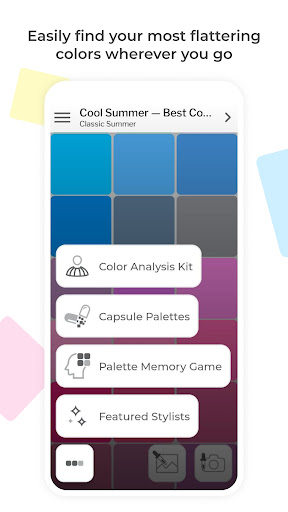
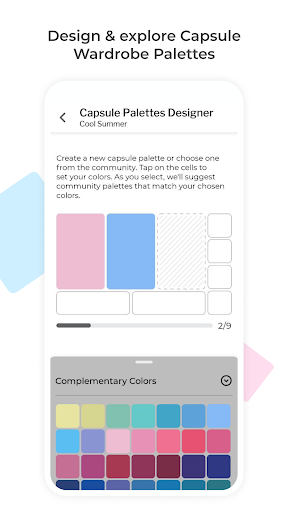
Explore the 12 Season Color System through free Best Colors palettes. Additionally, enjoy specially curated premium palettes like Complementary Colors, Neutral Colors, Accent Colors, Jewelry, Eyeshadow Colors, and Lipstick Colors. Plus, explore community-created color combinations to build your own custom capsule wardrobe palettes.
** Color Analysis Kit with Personalized Filters **
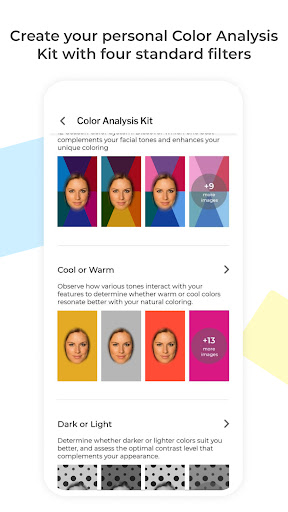
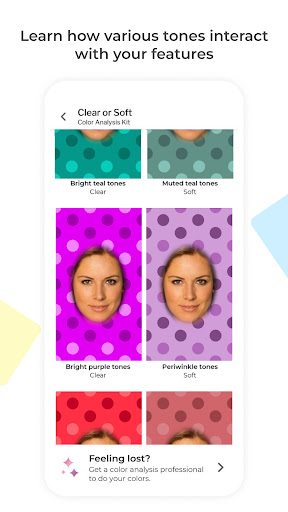
Experiment with various colors to discover the ones that suit you best. Our specialized camera will illuminate your face with different shades, producing photos that mimic the effects of an in-person color draping session.
** Harmonize Your Wardrobe **
Explore the harmony between colors and build a cohesive wardrobe with capsules designed by other users. Search the community’s creations, visualize color combinations, and see how outfit colors work together to find perfect matches or create your own stunning combinations.
** Make it Uniquely Yours **
The app is fully compatible with the custom palettes you or your stylist have created on colorwise.me. Express yourself through colors that resonate with your personality.
** Key Features **
Since pioneering digital color analysis in 2017, we've consistently led with innovation, adding groundbreaking features like AI-driven analysis and the exclusive Color Analysis Camera©. My Best Colors offers the internet's largest Capsule Palettes library, a Palette Memory game, and a truly unique color analysis experience.
- Free Best Colors Palettes: Access the 12 Season Color System's Best Colors palette at no cost.
- Color Analysis Kit: Personalized filters that help you identify your color type.
- Color Analysis Camera©: Simulates the effect of color reflections similar to draping fabric over your torso, a technique seen at standard in-person consultations.
- Capsule Palettes: Explore and search for capsule wardrobe palettes created by others, and create your own combinations.
- Capsule Harmony Preview: Mix and match complementary, neutral, and accent colors to create cohesive outfits.
- Custom Palettes: Bring in your custom palettes from colorwise.me and social platforms.
- Smart Color Picker: Instantly find flattering colors—just point your camera or select a photo.
- Mix-and-Match: Experiment with palette shades and real-life colors for unique combinations.
- Take Pictures: Capture pictures in the app with color information embedded.
- Realistic Fabric Previews: Visualize colors with lifelike fabric textures.
- Works anywhere: Operates in diverse lighting conditions with automatic white balance and flash support.
- Favorite Colors: Save and quickly access the shades you love most.
- Palette Memory Game: Enhance your ability to spot your best colors with our fun, engaging game.
Shop Smarter, Dress Better, and Shine Brighter with My Best Colors!
Download now and transform the way you experience color.
もっと見る

1. MEmuインストーラーをダウンロードしてセットアップを完了する

2. MEmuを起動し、デスクトップでのPlayストアを開く

3. PlayストアでMy Best Colorsを検索する
Install
4. My Best Colorsをダウンロードしてインストールする
5. インストールが完了したら、アイコンをクリックしてスタート

6. MEmuを使ってパソコンでMy Best Colorsを体験する
MEmu Playは現在、最高の無料Androidエミュレーターであり、5,000万人のユーザーが優れたAndroidアプリ体験を楽しんでいます。MEmuの仮想化テクノロジーにより、数千ものAndroidアプリをコンピューターでスムーズに実行できます。
大画面でより精細;無限の待機、電池とドラフィックの極限を超え
キーボード・マウス・コントローラーを全力でサポート、より快適
マルチインスタンスで複数のゲームを同時に実行
Use My Best Colors on PC by following steps: