My Best Colors
Actualizada
Versión actual
10.1.3
Ofrecida por

Deje de preocuparse por los recargos cuando use My Best Colors en su teléfono celular, libérese de la pequeña pantalla y disfrute usando la aplicación en una pantalla mucho más grande. A partir de ahora, obtenga una experiencia de pantalla completa de su aplicación con teclado y mouse. MEmu le ofrece todas las características sorprendentes que esperaba: instalación rápida y configuración fácil, controles intuitivos, no más limitaciones de batería, datos móviles y llamadas molestas. El nuevo MEmu 9 es la mejor opción para usar My Best Colors en su computadora. Codificado con nuestra absorción, el administrador de instancias múltiples hace posible abrir 2 o más cuentas al mismo tiempo. Y lo más importante, nuestro exclusivo motor de emulación puede liberar todo el potencial de su PC, hacer que todo sea fluido y agradable.
Más detalles
Descargar My Best Colors en PC con MEmu Android Emulador. Disfruta jugando en la pentalla grande. Discover a smarter way to shop, dress, and express yourself with My Best Colors—your personal color consultant right in your pocket.
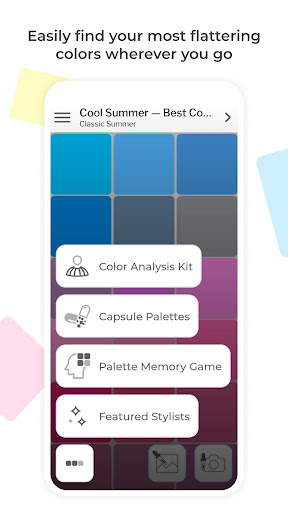
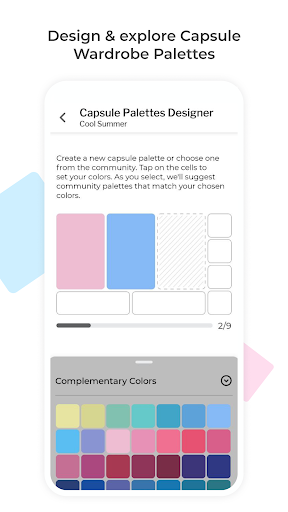
Discover a smarter way to shop, dress, and express yourself with My Best Colors—your personal color consultant right in your pocket. Effortlessly identify the hues that flatter you most using your smartphone's camera, and say goodbye to wardrobe guesswork!
Use the app at home to select the perfect outfit or take it shopping to find clothing, accessories, cosmetics, and jewelry that enhance your natural beauty.
** Tailored Color Palettes at Your Fingertips **
Explore the 12 Season Color System through free Best Colors palettes. Additionally, enjoy specially curated premium palettes like Complementary Colors, Neutral Colors, Accent Colors, Jewelry, Eyeshadow Colors, and Lipstick Colors. Plus, explore community-created color combinations to build your own custom capsule wardrobe palettes.
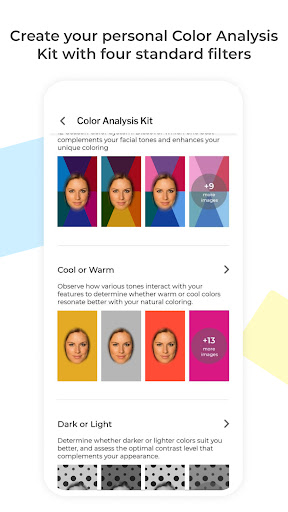
** Color Analysis Kit with Personalized Filters **
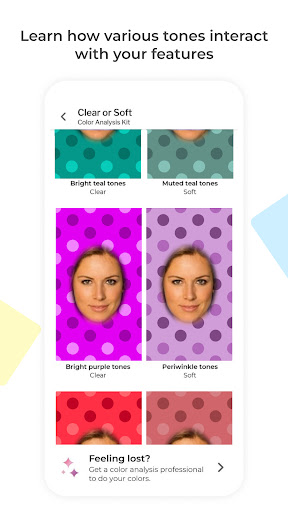
Experiment with various colors to discover the ones that suit you best. Our specialized camera will illuminate your face with different shades, producing photos that mimic the effects of an in-person color draping session.
** Harmonize Your Wardrobe **
Explore the harmony between colors and build a cohesive wardrobe with capsules designed by other users. Search the community’s creations, visualize color combinations, and see how outfit colors work together to find perfect matches or create your own stunning combinations.
** Make it Uniquely Yours **
The app is fully compatible with the custom palettes you or your stylist have created on colorwise.me. Express yourself through colors that resonate with your personality.
** Key Features **
Since pioneering digital color analysis in 2017, we've consistently led with innovation, adding groundbreaking features like AI-driven analysis and the exclusive Color Analysis Camera©. My Best Colors offers the internet's largest Capsule Palettes library, a Palette Memory game, and a truly unique color analysis experience.
- Free Best Colors Palettes: Access the 12 Season Color System's Best Colors palette at no cost.
- Color Analysis Kit: Personalized filters that help you identify your color type.
- Color Analysis Camera©: Simulates the effect of color reflections similar to draping fabric over your torso, a technique seen at standard in-person consultations.
- Capsule Palettes: Explore and search for capsule wardrobe palettes created by others, and create your own combinations.
- Capsule Harmony Preview: Mix and match complementary, neutral, and accent colors to create cohesive outfits.
- Custom Palettes: Bring in your custom palettes from colorwise.me and social platforms.
- Smart Color Picker: Instantly find flattering colors—just point your camera or select a photo.
- Mix-and-Match: Experiment with palette shades and real-life colors for unique combinations.
- Take Pictures: Capture pictures in the app with color information embedded.
- Realistic Fabric Previews: Visualize colors with lifelike fabric textures.
- Works anywhere: Operates in diverse lighting conditions with automatic white balance and flash support.
- Favorite Colors: Save and quickly access the shades you love most.
- Palette Memory Game: Enhance your ability to spot your best colors with our fun, engaging game.
Shop Smarter, Dress Better, and Shine Brighter with My Best Colors!
Download now and transform the way you experience color.
Más detalles

1. Descargar el instalador de MEmu y finalice la instalación

2. Iniciar MEmu y abrir Google Play en la página de inicio

3. Buscar My Best Colors en Google Play
Install
4. Descargar y instalar My Best Colors
5. Hacer click al icono para iniciar

6. Experiencia My Best Colors en PC con MEmu
MEmu App Player es el mejor emulador de Android gratuito y 50 millones de personas ya están disfrutando su magnífica experiencia de aplicación en Android. La tecnología de virtualización de MEmu te permite jugar a miles de aplicaciones Android suavemente en tu PC, incluso los más intensivos gráficamente.
Pantalla más grande con mejores gráficos; Larga duración, sin limitación de batería o datos móviles.
Soporte completo de keymapping para un control preciso del teclado y el mouse o gamepad.
Múltiples cuentas de juegos o tareas en una sola PC a la vez con el administrador de instancias múltiples.
Use My Best Colors on PC by following steps: