Tomb Raider™
Ενημερώθηκε
Τρέχουσα έκδοση
1.4RC6
Προσφέρεται από

Με όλο το πάθος σας για το παιχνίδι Tomb Raider™, τα χέρια σας δεν πρέπει να περιορίζονται σε μια μικροσκοπική οθόνη του τηλεφώνου σας. Παίξτε σαν επαγγελματίας και αποκτήστε τον πλήρη έλεγχο του παιχνιδιού σας με πληκτρολόγιο και ποντίκι. Το MEmu σας προσφέρει όλα όσα περιμένετε. Κατεβάστε και παίξτε Tomb Raider™ σε υπολογιστή. Παίξτε όσο θέλετε, χωρίς άλλους περιορισμούς μπαταρίας, δεδομένων κινητής τηλεφωνίας και ενοχλητικών κλήσεων. Το ολοκαίνουργιο MEmu 9 είναι η καλύτερη επιλογή για να παίξετε Tomb Raider™ σε υπολογιστή. Ετοιμασμένο με την εμπειρία μας, το εξαιρετικό σύστημα προκαθορισμένης αντιστοίχισης πλήκτρων καθιστά το Tomb Raider™ ένα πραγματικό παιχνίδι υπολογιστή. Ο διαχειριστής πολλαπλών περιπτώσεων MEmu καθιστά δυνατό το παιχνίδι με 2 ή περισσότερους λογαριασμούς στην ίδια συσκευή. Και το πιο σημαντικό, η αποκλειστική μηχανή εξομοίωσης μας μπορεί να απελευθερώσει πλήρως τις δυνατότητες του υπολογιστή σας, κάνοντας τα πάντα ομαλά.
Show more
Απολαύστε την υπέροχη εμπειρία αναπαραγωγής του Tomb Raider™ σε υπολογιστή με το MEMU App Player. Πρόκειται για έναν ισχυρό δωρεάν εξομοιωτή Android που σας επιτρέπει να παίζετε χιλιάδες παιχνίδια Android. Before there was the Tomb Raider, there was Lara Croft; twenty-one years old and shipwrecked on her first archaeological expedition.
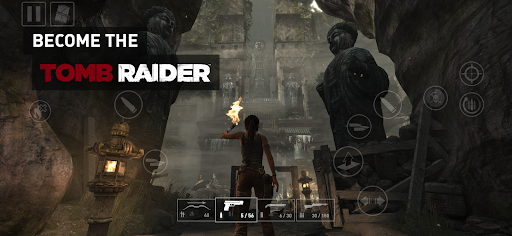
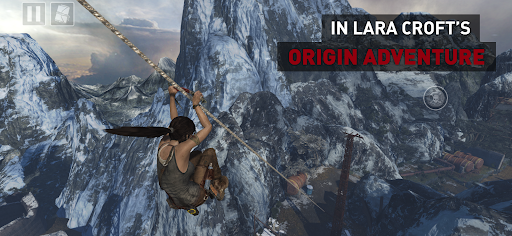
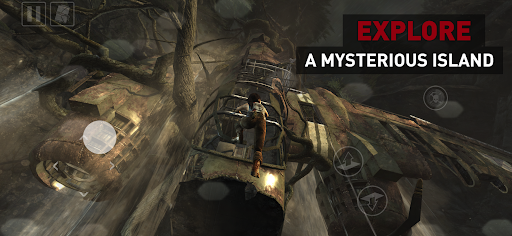
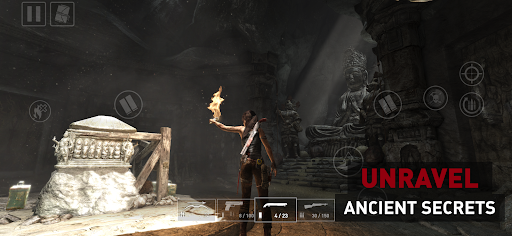
Before there was the Tomb Raider, there was Lara Croft; twenty-one years old and shipwrecked on her first archaeological expedition. To escape the mysterious isle of Yamatai, she must push far beyond her limits, leave innocence behind and be reborn a legend.
Explore Yamatai’s ancient ruins, unlock its riddles and fight for survival against its murderous inhabitants.
Tomb Raider for Android is the complete adventure, expertly adapted for mobile. Play it your way, whether using intuitive touchscreen controls, mouse & keyboard, or your favourite gamepad.
TOMB RAIDER COMPLETE AND UNCUT
Lara’s first AAA outing on Android arrives without compromise — packed with exploration, intense firefights, puzzles and Challenge Tombs.
OVERCOME THE ODDS
Unlock skills, hunt for materials, and craft equipment to take Lara from desperate survivor to master adventurer.
UNCOVER A LOST KINGDOM
Discover lost relics and ancient scrolls to unravel the mysteries of Yamatai and the cultists who prowl its depths.
INCLUDES BONUS CONTENT
Tomb Raider for Android comes with 12 DLC packs, including Skills, Weapon Upgrades and a variety of skins for Lara, plus a bonus Challenge Tomb.
TAILORED TO ANDROID
Includes gyroscopic motion-aim on supported devices, as well as optimisation presets for improved performance or visuals.
===
Tomb Raider requires Android 13 or later. You need 12.5GB of free space on your device, though we recommend at least double this to avoid initial installation issues.
To avoid disappointment, we aim to block users from purchasing a game if their device is not capable of running it. If you are able to purchase this game on your device then we expect it to run well in most cases.
However, we are aware of rare instances where users are able to purchase the game on unsupported devices. This can occur when a device is not correctly identified by the Google Play Store, and therefore cannot be blocked from purchasing. For full details on the supported chipsets for this game, plus a list of tested and verified devices, we recommend that you visit:
https://feral.in/tombraider-android-devices
===
© 2026 Crystal Dynamics group of companies. All rights reserved. TOMB RAIDER, LARA CROFT, CRYSTAL DYNAMICS, the CRYSTAL DYNAMICS logo, EIDOS, and the EIDOS logo are trademarks of the Crystal Dynamics and Eidos Interactive Corp. group of companies. Developed for and published on Android by Feral Interactive Ltd. Android is a trademark of Google LLC. Feral and the Feral logo are trademarks of Feral Interactive Ltd. All other trademarks are the properties of their respective owners. All rights reserved.
===
Rated 18+ by the Indonesia Game Rating System (IGRS)
Show more

1. Κατεβάστε το πρόγραμμα εγκατάστασης MEmu και ολοκληρώστε την εγκατάσταση

2. Ξεκινήστε το MEmu και στη συνέχεια ανοίξτε το Google Play στην επιφάνεια εργασίας

3. Αναζητήστε τον Tomb Raider™ στο Google Play
Install
4. Λήψη και εγκατάσταση του Tomb Raider™
5. Μόλις ολοκληρωθεί η εγκατάσταση, κάντε κλικ στο εικονίδιο για να ξεκινήσετε

6. Enjoy playing Tomb Raider™ on PC with MEmu
Το MEmu Play, αποτελεί την ιδανικότερη δωρεάν λύση για την εξομοίωση του λειτουργικού Android, και χρησιμοποιείται ήδη από περισσότερους από 50 εκατομμύρια χρήστες, ο οποίοι απολαμβάνουν, την καταπληκτική εμπειρία παιχνιδιού που προσφέρεται μέσω της εφαρμογής. Με τη χρήση του MEmu Virtualization, είναι δυνατή η αναπαραγωγή παιχνιδιών Android στον υπολογιστή, ακόμη και εκείνων που απαιτούν μεγάλη επεξεργαστική ισχύ γραφικών, δίχως συμβιβασμούς στην ποιότητα και στην εμπειρία χρήσης, ακριβώς όπως ένα τελευταίας γενιάς κινητό τηλέφωνο.
Μεγαλύτερη οθόνη με καλύτερα γραφικά. Μεγάλη διάρκεια ζωής, χωρίς περιορισμό μπαταρίας ή δεδομένων κινητής τηλεφωνίας.
Πλήρης υποστήριξη αντιστοίχισης πλήκτρων για ακριβή έλεγχο του πληκτρολογίου και του ποντικιού ή του gamepad.
Πολλαπλοί λογαριασμοί παιχνιδιών ή εργασίες σε έναν υπολογιστή ταυτόχρονα με τον διαχειριστή πολλαπλών περιπτώσεων.
Play Tomb Raider™ on PC by following steps: