Minecraft
Ενημερώθηκε
Τρέχουσα έκδοση
1.26.51.1
Προσφέρεται από

Με όλο το πάθος σας για το παιχνίδι Minecraft, τα χέρια σας δεν πρέπει να περιορίζονται σε μια μικροσκοπική οθόνη του τηλεφώνου σας. Παίξτε σαν επαγγελματίας και αποκτήστε τον πλήρη έλεγχο του παιχνιδιού σας με πληκτρολόγιο και ποντίκι. Το MEmu σας προσφέρει όλα όσα περιμένετε. Κατεβάστε και παίξτε Minecraft σε υπολογιστή. Παίξτε όσο θέλετε, χωρίς άλλους περιορισμούς μπαταρίας, δεδομένων κινητής τηλεφωνίας και ενοχλητικών κλήσεων. Το ολοκαίνουργιο MEmu 9 είναι η καλύτερη επιλογή για να παίξετε Minecraft σε υπολογιστή. Ετοιμασμένο με την εμπειρία μας, το εξαιρετικό σύστημα προκαθορισμένης αντιστοίχισης πλήκτρων καθιστά το Minecraft ένα πραγματικό παιχνίδι υπολογιστή. Ο διαχειριστής πολλαπλών περιπτώσεων MEmu καθιστά δυνατό το παιχνίδι με 2 ή περισσότερους λογαριασμούς στην ίδια συσκευή. Και το πιο σημαντικό, η αποκλειστική μηχανή εξομοίωσης μας μπορεί να απελευθερώσει πλήρως τις δυνατότητες του υπολογιστή σας, κάνοντας τα πάντα ομαλά.
Show more
Απολαύστε την υπέροχη εμπειρία αναπαραγωγής του Minecraft σε υπολογιστή με το MEMU App Player. Πρόκειται για έναν ισχυρό δωρεάν εξομοιωτή Android που σας επιτρέπει να παίζετε χιλιάδες παιχνίδια Android. Dive into an open world of building, crafting, and survival in the ultimate sandbox adventure.
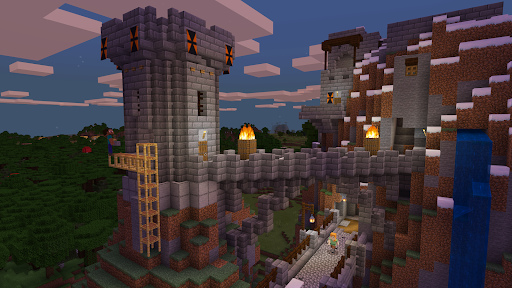
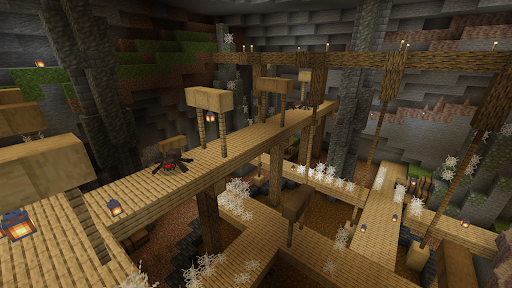
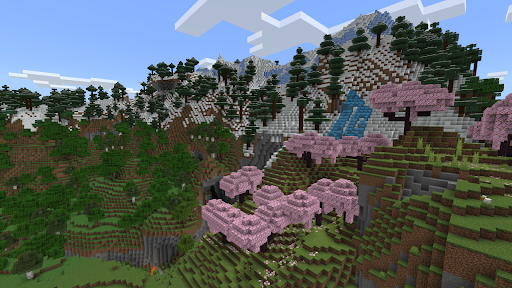

Dive into an open world of building, crafting, and survival in the ultimate sandbox adventure. Gather resources, survive the night, and build a world one block at a time in this solo and multiplayer game. Explore and craft your way through a completely open world where you can play with friends, new and old. Build a city, start a farm, mine deep underground, face mysterious enemies, or just experiment to the limits of your imagination in this expansive online game simulation!
Craft a new house, build cities, or start a farm in this block game. Bring your imagination to life and build your dream world where the possibilities are endless. Adventure through your own online game and play with friends, building from the ground up in our crafting simulation. In Creative game mode, enjoy unlimited resources and the freedom of superior building and crafting. In Survival game mode, survive the night, face intense battles, craft tools, and fend off danger. With seamless cross-platform and multiplayer gameplay on Minecraft: Bedrock Edition, you can adventure solo or with friends and discover an infinite, randomly generated world filled with blocks to mine, biomes to explore, and mobs to befriend (or battle) in a universe of crafting!
In our Minecraft online game, the world is yours to shape - block by block!
BUILD YOUR DREAM WORLD
• Build a house or create an entire world from the ground up
• Building block games for kids, adults, or anyone
• Craft and build from special resources and tools to create brand new structures and landscapes in this solo and multiplayer game
• Explore an endless open world simulation full of different biomes and creatures while building blocks
• Minecraft Online Game Marketplace – Get creator-made add-ons, thrilling worlds, and stylish cosmetics on Minecraft Marketplace
• Private and community block game servers – Online games allow you to connect with millions of players, or subscribe to Realms Plus to cross-play with up to 10 friends on your own private server
• Game slash commands – Tweak how the game plays while you create and build blocks. Change the weather, summon mobs, change the time of day, and more
• Online game aAdd-ons – Block builders can customize their experience even further with add-ons as they build up! If you're more tech-inclined, you can modify your game to create new resource packs
MULTIPLAYER ONLINE GAMES
• Join free massive multiplayer servers and play with thousands of other builders
• Multiplayer online game servers allow you to play with up to 4 players online with a free Xbox Live account
• Explore endless realms in this block game. With Realms and Realms Plus, you can play with up to 10 friends cross-platform, anytime, anywhere on Realms, your own private server that we host for you
• Customize your world with the Realms Plus game. Get instant access to an extensive catalog that is refreshed every month! Share block builds with friends on your own private Realms server*
• MMO servers allow you to connect and play with players across the world, to explore custom worlds, build with friends, and participate in large-scale events
• Enjoy crafting buildings, building gigantic community-run worlds, competing in unique mini-games, and socializing in lobbies full of fellow Minecraft block builders
SUPPORT: https://www.minecraft.net/help
LEARN MORE: https://www.minecraft.net/
MINIMUM RECOMMENDED SPECIFICATION
To check the requirements for your device visit: https://help.minecraft.net/hc/en-us/articles/4409172223501
*Realms & Realms Plus: Try a free 30-day trial in-app.
Show more

1. Κατεβάστε το πρόγραμμα εγκατάστασης MEmu και ολοκληρώστε την εγκατάσταση

2. Ξεκινήστε το MEmu και στη συνέχεια ανοίξτε το Google Play στην επιφάνεια εργασίας

3. Αναζητήστε τον Minecraft στο Google Play
Install
4. Λήψη και εγκατάσταση του Minecraft
5. Μόλις ολοκληρωθεί η εγκατάσταση, κάντε κλικ στο εικονίδιο για να ξεκινήσετε

6. Enjoy playing Minecraft on PC with MEmu
Το MEmu Play, αποτελεί την ιδανικότερη δωρεάν λύση για την εξομοίωση του λειτουργικού Android, και χρησιμοποιείται ήδη από περισσότερους από 50 εκατομμύρια χρήστες, ο οποίοι απολαμβάνουν, την καταπληκτική εμπειρία παιχνιδιού που προσφέρεται μέσω της εφαρμογής. Με τη χρήση του MEmu Virtualization, είναι δυνατή η αναπαραγωγή παιχνιδιών Android στον υπολογιστή, ακόμη και εκείνων που απαιτούν μεγάλη επεξεργαστική ισχύ γραφικών, δίχως συμβιβασμούς στην ποιότητα και στην εμπειρία χρήσης, ακριβώς όπως ένα τελευταίας γενιάς κινητό τηλέφωνο.
Μεγαλύτερη οθόνη με καλύτερα γραφικά. Μεγάλη διάρκεια ζωής, χωρίς περιορισμό μπαταρίας ή δεδομένων κινητής τηλεφωνίας.
Πλήρης υποστήριξη αντιστοίχισης πλήκτρων για ακριβή έλεγχο του πληκτρολογίου και του ποντικιού ή του gamepad.
Πολλαπλοί λογαριασμοί παιχνιδιών ή εργασίες σε έναν υπολογιστή ταυτόχρονα με τον διαχειριστή πολλαπλών περιπτώσεων.
Play Minecraft on PC by following steps: