RequiemM
Ενημερώθηκε
Τρέχουσα έκδοση
1.0.1
Προσφέρεται από

Με όλο το πάθος σας για το παιχνίδι RequiemM, τα χέρια σας δεν πρέπει να περιορίζονται σε μια μικροσκοπική οθόνη του τηλεφώνου σας. Παίξτε σαν επαγγελματίας και αποκτήστε τον πλήρη έλεγχο του παιχνιδιού σας με πληκτρολόγιο και ποντίκι. Το MEmu σας προσφέρει όλα όσα περιμένετε. Κατεβάστε και παίξτε RequiemM σε υπολογιστή. Παίξτε όσο θέλετε, χωρίς άλλους περιορισμούς μπαταρίας, δεδομένων κινητής τηλεφωνίας και ενοχλητικών κλήσεων. Το ολοκαίνουργιο MEmu 9 είναι η καλύτερη επιλογή για να παίξετε RequiemM σε υπολογιστή. Ετοιμασμένο με την εμπειρία μας, το εξαιρετικό σύστημα προκαθορισμένης αντιστοίχισης πλήκτρων καθιστά το RequiemM ένα πραγματικό παιχνίδι υπολογιστή. Ο διαχειριστής πολλαπλών περιπτώσεων MEmu καθιστά δυνατό το παιχνίδι με 2 ή περισσότερους λογαριασμούς στην ίδια συσκευή. Και το πιο σημαντικό, η αποκλειστική μηχανή εξομοίωσης μας μπορεί να απελευθερώσει πλήρως τις δυνατότητες του υπολογιστή σας, κάνοντας τα πάντα ομαλά.
Show more
Απολαύστε την υπέροχη εμπειρία αναπαραγωγής του RequiemM σε υπολογιστή με το MEMU App Player. Πρόκειται για έναν ισχυρό δωρεάν εξομοιωτή Android που σας επιτρέπει να παίζετε χιλιάδες παιχνίδια Android. A Darker Kind of Classic MMORPG Requiem M.
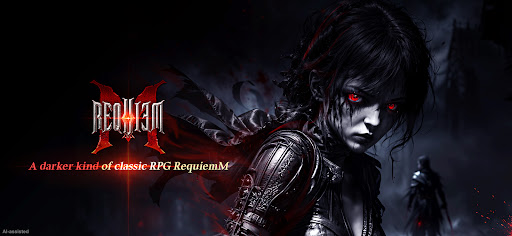
A Darker Kind of Classic MMORPG Requiem M
Experience Requiem M on mobile today!
◆ ABOUT THE GAME ◆
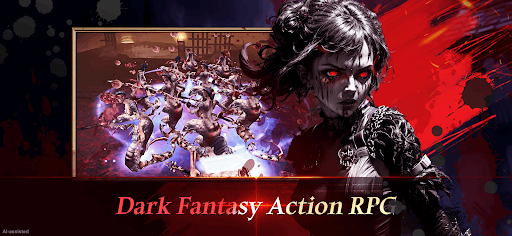
▶ Dark Fantasy Action RPG ◀
Enter a dark fantasy world where blood and darkness intertwine.
A tragedy born of science. Warriors forged in war. As the world teeters on the brink of collapse, you are its last hope.
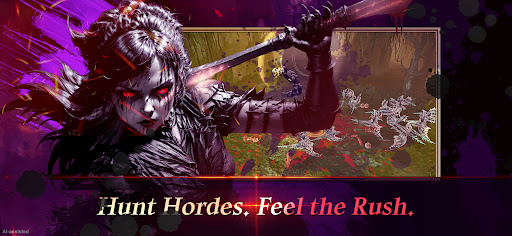
▶ Hunt Hordes. Feel the Rush. ◀
Experience brutal, blood-soaked combat in a dark fantasy world!
Unleash your power against hordes of enemies and feel the adrenaline of every battle!
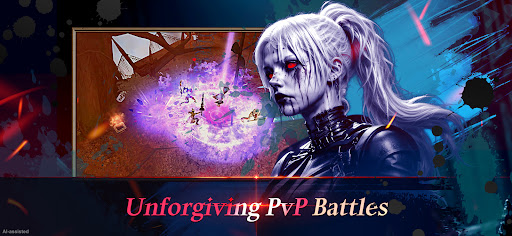
▶ Unforgiving PvP Battles ◀
Enter a ruthless PvP battlefield where alliances are temporary and every opponent is a threat.
Prove your strength and achieve greatness on the battlefield!
▶ One-Tap Progression ◀
Leave behind the slow, repetitive grind of traditional MMORPGs!
Every moment can make you stronger. Progress at lightning speed and begin your legend today!
▶ Unique Races and Classes ◀
Discover extraordinary races and classes unlike anything you've seen before!
Harness the power of science and monster blood to experience exhilarating combat with races of extraordinary origins.
▶ An Open Marketplace ◀
Take part in Requiem M's in-game economy through its open marketplace.
Explore a wide variety of in-game items!
▶ Exciting Events and Rewards ◀
Power up faster with generous rewards from a wide range of events!
Only the strong will survive, while the weak will fall.
Official Community:
https://discord.com/invite/vkasVRsXYM
[APP PERMISSIONS]
▶ Required Permissions
The app may request the following permission while you use it.
Storage: Used to read and save game data.
▶ How to Revoke Permissions
Android 6.0 or later: Go to Settings > Apps > Requiem M > Permissions, then select the permission you want to revoke. Menu names may vary by device.
Android versions below 6.0: Individual permissions cannot be revoked through Settings. Uninstall the app to revoke its access.
※ If the app does not provide in-app permission controls, you can manage permissions through your device's settings.
[PRODUCT INFORMATION AND TERMS OF USE]
※ Additional charges apply when purchasing paid in-game items.
※ This game contains randomized items.
Service Provider: GRAVITY Co., Ltd.
Chief Executive Officers: Park Hyun-chul, KITAMURA YOSHINORI
Terms and Period of Use: As specified in the game. If no expiration date is stated, the period of use is deemed to continue until the service ends.
Payment Amount and Methods: As specified for each product. For payments made in foreign currencies, the actual amount charged may vary due to exchange rates and applicable fees.
Item Delivery: Purchased items are delivered immediately to the in-game mailbox of the character used for the purchase.
Business Address: 15F, Nuritkum Square R&D Tower, 396 World Cup buk-ro, Mapo-gu, Seoul, Republic of Korea
Business Registration Number: 201-81-56197
E-commerce Business Registration Number: 2008-Seoul Mapo-0207
[PRIVACY POLICY]
https://member.gnjoy.com/support/terms/common/commonterm.asp?category=RequiemM_G_privacy
[TERMS OF SERVICE]
https://member.gnjoy.com/support/terms/common/commonterm.asp?category=RequiemM_G_terms
[DEVELOPER CONTACT INFORMATION]
GRAVITY Co., Ltd.
15F, Nuritkum Square, 396 World Cup buk-ro, Mapo-gu, Seoul, Republic of Korea
Show more

1. Κατεβάστε το πρόγραμμα εγκατάστασης MEmu και ολοκληρώστε την εγκατάσταση

2. Ξεκινήστε το MEmu και στη συνέχεια ανοίξτε το Google Play στην επιφάνεια εργασίας

3. Αναζητήστε τον RequiemM στο Google Play
Install
4. Λήψη και εγκατάσταση του RequiemM
5. Μόλις ολοκληρωθεί η εγκατάσταση, κάντε κλικ στο εικονίδιο για να ξεκινήσετε

6. Enjoy playing RequiemM on PC with MEmu
Το MEmu Play, αποτελεί την ιδανικότερη δωρεάν λύση για την εξομοίωση του λειτουργικού Android, και χρησιμοποιείται ήδη από περισσότερους από 50 εκατομμύρια χρήστες, ο οποίοι απολαμβάνουν, την καταπληκτική εμπειρία παιχνιδιού που προσφέρεται μέσω της εφαρμογής. Με τη χρήση του MEmu Virtualization, είναι δυνατή η αναπαραγωγή παιχνιδιών Android στον υπολογιστή, ακόμη και εκείνων που απαιτούν μεγάλη επεξεργαστική ισχύ γραφικών, δίχως συμβιβασμούς στην ποιότητα και στην εμπειρία χρήσης, ακριβώς όπως ένα τελευταίας γενιάς κινητό τηλέφωνο.
Μεγαλύτερη οθόνη με καλύτερα γραφικά. Μεγάλη διάρκεια ζωής, χωρίς περιορισμό μπαταρίας ή δεδομένων κινητής τηλεφωνίας.
Πλήρης υποστήριξη αντιστοίχισης πλήκτρων για ακριβή έλεγχο του πληκτρολογίου και του ποντικιού ή του gamepad.
Πολλαπλοί λογαριασμοί παιχνιδιών ή εργασίες σε έναν υπολογιστή ταυτόχρονα με τον διαχειριστή πολλαπλών περιπτώσεων.
Play RequiemM on PC by following steps: