RequiemM
Zaktualizowano
Aktualna wersja
1.0.1
Sprzedawca

Przy całej swojej pasji do grania w RequiemM, twoje ręce nie powinny być ograniczone na małym ekranie telefonu. Graj jak zawodowiec i uzyskaj pełną kontrolę nad grą za pomocą klawiatury i myszy. MEmu oferuje ci wszystko, czego oczekujesz. Pobierz i graj RequiemM na PC. Graj tak długo, jak chcesz, bez ograniczeń baterii, danych komórkowych i niepokojących połączeń. Zupełnie nowy MEmu 9 to najlepszy wybór do grania w RequiemM na PC. Przygotowany dzięki naszej wiedzy, znakomity, wstępnie ustawiony system mapowania klawiszy sprawia, że RequiemM jest prawdziwą grą na PC. Zakodowany naszą absorpcją, menedżer wielu instancji umożliwia granie na 2 lub więcej kontach na tym samym urządzeniu. A co najważniejsze, nasz emulator może uwolnić pełny potencjał twojego komputera, sprawić, że wszystko będzie płynne. Dbamy nie tylko o to, jak grasz, ale także o cały proces czerpania radości z grania.
Pokaż więcej
Ciesz się wspaniałym doświadczeniem podczas grania w RequiemM na komputerze z aplikacją MEMU App Player. Jest to potężny darmowy emulator Androida pozwalający grać w tysiące gier na Androida. A Darker Kind of Classic MMORPG Requiem M.

A Darker Kind of Classic MMORPG Requiem M
Experience Requiem M on mobile today!
◆ ABOUT THE GAME ◆
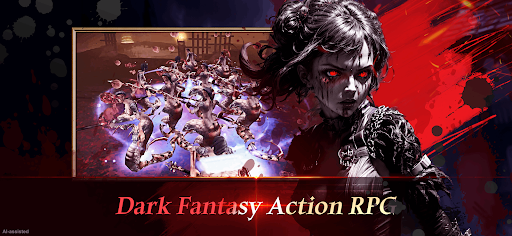
▶ Dark Fantasy Action RPG ◀
Enter a dark fantasy world where blood and darkness intertwine.
A tragedy born of science. Warriors forged in war. As the world teeters on the brink of collapse, you are its last hope.
▶ Hunt Hordes. Feel the Rush. ◀
Experience brutal, blood-soaked combat in a dark fantasy world!
Unleash your power against hordes of enemies and feel the adrenaline of every battle!
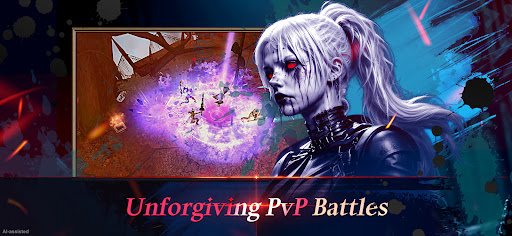
▶ Unforgiving PvP Battles ◀
Enter a ruthless PvP battlefield where alliances are temporary and every opponent is a threat.
Prove your strength and achieve greatness on the battlefield!
▶ One-Tap Progression ◀
Leave behind the slow, repetitive grind of traditional MMORPGs!
Every moment can make you stronger. Progress at lightning speed and begin your legend today!
▶ Unique Races and Classes ◀
Discover extraordinary races and classes unlike anything you've seen before!
Harness the power of science and monster blood to experience exhilarating combat with races of extraordinary origins.
▶ An Open Marketplace ◀
Take part in Requiem M's in-game economy through its open marketplace.
Explore a wide variety of in-game items!
▶ Exciting Events and Rewards ◀
Power up faster with generous rewards from a wide range of events!
Only the strong will survive, while the weak will fall.
Official Community:
https://discord.com/invite/vkasVRsXYM
[APP PERMISSIONS]
▶ Required Permissions
The app may request the following permission while you use it.
Storage: Used to read and save game data.
▶ How to Revoke Permissions
Android 6.0 or later: Go to Settings > Apps > Requiem M > Permissions, then select the permission you want to revoke. Menu names may vary by device.
Android versions below 6.0: Individual permissions cannot be revoked through Settings. Uninstall the app to revoke its access.
※ If the app does not provide in-app permission controls, you can manage permissions through your device's settings.
[PRODUCT INFORMATION AND TERMS OF USE]
※ Additional charges apply when purchasing paid in-game items.
※ This game contains randomized items.
Service Provider: GRAVITY Co., Ltd.
Chief Executive Officers: Park Hyun-chul, KITAMURA YOSHINORI
Terms and Period of Use: As specified in the game. If no expiration date is stated, the period of use is deemed to continue until the service ends.
Payment Amount and Methods: As specified for each product. For payments made in foreign currencies, the actual amount charged may vary due to exchange rates and applicable fees.
Item Delivery: Purchased items are delivered immediately to the in-game mailbox of the character used for the purchase.
Business Address: 15F, Nuritkum Square R&D Tower, 396 World Cup buk-ro, Mapo-gu, Seoul, Republic of Korea
Business Registration Number: 201-81-56197
E-commerce Business Registration Number: 2008-Seoul Mapo-0207
[PRIVACY POLICY]
https://member.gnjoy.com/support/terms/common/commonterm.asp?category=RequiemM_G_privacy
[TERMS OF SERVICE]
https://member.gnjoy.com/support/terms/common/commonterm.asp?category=RequiemM_G_terms
[DEVELOPER CONTACT INFORMATION]
GRAVITY Co., Ltd.
15F, Nuritkum Square, 396 World Cup buk-ro, Mapo-gu, Seoul, Republic of Korea
Pokaż więcej

1. Pobierz instalator MEmu i zakończ instalację

2. Uruchom MEmu, a następnie otwórz Google Play na pulpicie

3. Wyszukaj RequiemM w Google Play
Install
4. Pobierz i zainstaluj RequiemM
5. Po zakończeniu instalacji kliknij ikonę, aby rozpocząć

6. Ciesz się grą RequiemM na PC z MEmu
MEmu Play to najlepszy emulator Androida, a 100 milionów ludzi już korzysta z jego i dosta doskonałe wrażenia z gier na Androida. Technologia wirtualizacji MEmu umożliwia płynne granie w tysiące gier Androida na komputerze, nawet tych najbardziej wymagających grafiki.
Większy ekran z lepszą grafiką; Długi czas, bez ograniczeń baterii lub danych mobilnych.
Pełna obsługa mapowania klawiszy dla precyzyjnego sterowania klawiaturą i myszą lub gamepadem.
Wiele kont gier lub zadań na jednym komputerze jednocześnie z menedżerem wielu instancji.
Play RequiemM on PC by following steps: