Top Museum
अपडेट किया गया
वर्तमान वर्शन
संसाधन

अपने सेलफोन पर Top Museum का उपयोग करते समय ओवरचार्ज के बारे में चिंता करना बंद करें, अपने आप को छोटी स्क्रीन से मुक्त करें और बहुत बड़े डिस्प्ले पर ऐप का उपयोग करने का आनंद लें। अब से, कीबोर्ड और माउस के साथ अपने ऐप का पूर्ण-स्क्रीन अनुभव प्राप्त करें। एमईएमयू आपको उन सभी आश्चर्यजनक सुविधाओं की पेशकश करता है जिनकी आपको उम्मीद थी: त्वरित इंस्टॉल और आसान सेटअप, सहज नियंत्रण, बैटरी की कोई सीमा नहीं, मोबाइल डेटा और परेशान कॉल। आपके कंप्यूटर पर Top Museum का उपयोग करने का सबसे अच्छा विकल्प नया MEmu 9 है। हमारे अवशोषण के साथ कोडित, बहु-उदाहरण प्रबंधक एक ही समय में 2 या अधिक खाते खोलना संभव बनाता है। और सबसे महत्वपूर्ण, हमारा अनन्य उत्सर्जन इंजन आपके पीसी की पूरी क्षमता को जारी कर सकता है, सब कुछ सुचारू और सुखद बना सकता है।
और दिखाएं
डाउनलोड करें Top Museum पीसी पर MEmu एंड्रॉयड एमुलेटर के साथ बड़े पर्दे पर खेलने का आनंद लें। "Top Museum is a casual modern museum management sim.
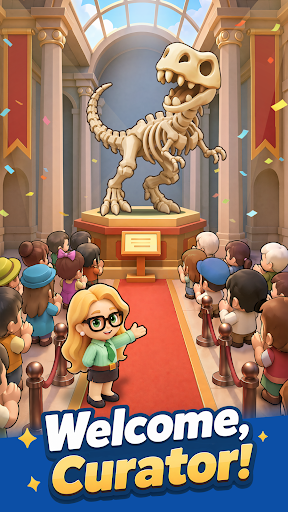
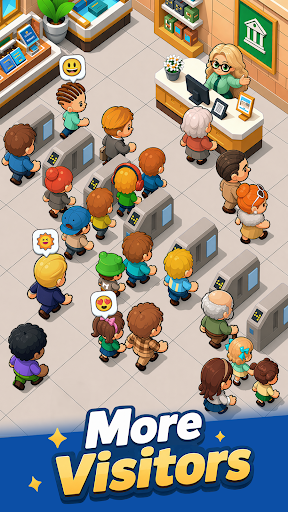


"Top Museum is a casual modern museum management sim. As the curator, you'll rebuild a museum that was looted and left in ruins. Repair damaged halls, recover priceless exhibits, reopen the museum step by step, and turn it into a thriving business again. When the mastermind behind the attack strikes, recruit elite allies, set up your defenses, and crush their plans.
Game Features
Restore the museum and reopen the doors
Repair the damaged exhibition halls, upgrade facilities, and display your collections. Bring the museum back to life and welcome visitors once again.
Recover lost exhibits and grow your income
Follow mysterious clues to track down missing treasures. Return masterpieces and rare fossils to their proper places, unlock their value, and increase ticket sales and sponsorship revenue.
Recruit legendary Heroes
Assemble a team of skilled modern-day professionals. Brilliant scholars, agile treasure hunters, and elite security guards will all play an important role in running and protecting the museum.
Defend against enemy attacks
Face off against surprise raids from the Black Claw Group. Lead your team through each crisis, build your strategy, and shut down the enemy's greedy plans.
Relaxed idle gameplay with steady rewards
Enjoy effortless progression that keeps generating rewards while you’re away. The museum never stops operating, allowing you to return anytime and collect your earnings with a single tap!"
और दिखाएं

1. MEmu इंस्टॉलर को डाउनलोड करें और इंस्टॉलेशन को पूरा करें

2. MEmu शुरू करें फिर होमपेज पर Google Play खोलें

3. Google Play में Top Museum खोजें
Install
4. Top Museum डाउनलोड कर इंस्टॉल करें
5. इंस्टॉल पूरा होने पर आइकन दबाएं

6. MEmu से पीसी पर Top Museum खेलने का आनंद लें
MEmu Play सबसे बेहतरीन मुफ़्त Android एमुलेटर है और 5 करोड़ लोग पहले ही इसके शानदार Android गेमिंग अनुभव का आनंद ले चुके हैं। MEmu 9 वर्चुअलाइज़ेशन तकनीक आपको अपने PC पर हज़ारों Android गेम, यहाँ तक कि सबसे ज़्यादा ग्राफ़िक्स वाले गेम भी, आसानी से खेलने की सुविधा देती है।
असीमित बैटरी या मोबाइल डेटा के साथ बेहतर ग्राफिक्स के साथ बड़ी स्क्रीन; लंबी अवधि।
कीबोर्ड और माउस या गेमपैड के उत्तम नियंत्रण के लिए संपूर्ण कीमैपिंग का समर्थन करता हैं।
एक ही पीसी पर मल्टी-इंस्टेंस मैनेजर के साथ एक समय में कई गेम खाते या कार्य कर सकते हैं।
Play Top Museum on PC by following steps: