World of Slime
अपडेट किया गया
वर्तमान वर्शन
संसाधन

अपने सेलफोन पर World of Slime का उपयोग करते समय ओवरचार्ज के बारे में चिंता करना बंद करें, अपने आप को छोटी स्क्रीन से मुक्त करें और बहुत बड़े डिस्प्ले पर ऐप का उपयोग करने का आनंद लें। अब से, कीबोर्ड और माउस के साथ अपने ऐप का पूर्ण-स्क्रीन अनुभव प्राप्त करें। एमईएमयू आपको उन सभी आश्चर्यजनक सुविधाओं की पेशकश करता है जिनकी आपको उम्मीद थी: त्वरित इंस्टॉल और आसान सेटअप, सहज नियंत्रण, बैटरी की कोई सीमा नहीं, मोबाइल डेटा और परेशान कॉल। आपके कंप्यूटर पर World of Slime का उपयोग करने का सबसे अच्छा विकल्प नया MEmu 9 है। हमारे अवशोषण के साथ कोडित, बहु-उदाहरण प्रबंधक एक ही समय में 2 या अधिक खाते खोलना संभव बनाता है। और सबसे महत्वपूर्ण, हमारा अनन्य उत्सर्जन इंजन आपके पीसी की पूरी क्षमता को जारी कर सकता है, सब कुछ सुचारू और सुखद बना सकता है।
और दिखाएं
डाउनलोड करें World of Slime पीसी पर MEmu एंड्रॉयड एमुलेटर के साथ बड़े पर्दे पर खेलने का आनंद लें। Tame and synthesize slimes as you explore an uncharted world.

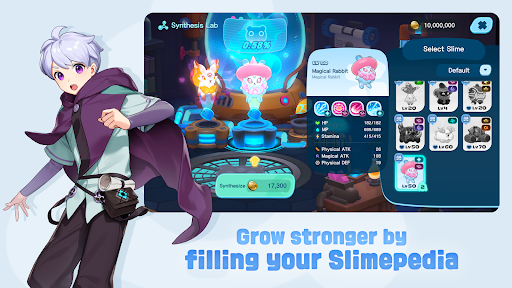
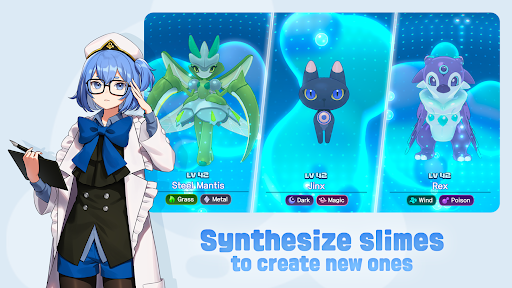
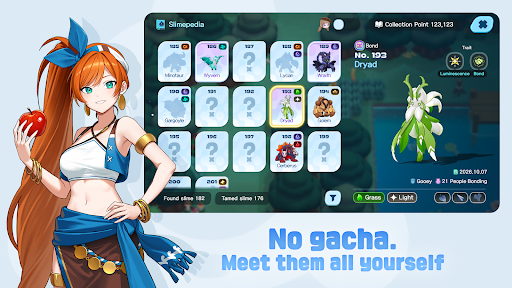
Tame and synthesize slimes as you explore an uncharted world.
A cozy taming MMORPG where you can enjoy laid-back adventures with friends
■ No Gacha: Meet New Slimes Through Synthesis
Slimes can only be found by taming and synthesizing them, never through random draws.
Synthesis offers a different kind of fun from evolution. Discover new slime combinations!
■ A World That Expands with Your Slimes
Ride slimes across rivers, get past obstacles, and solve puzzles.
Travel every corner of a squishy, charming world.
■ A Slimepedia That Grows as You Fill It
The more slimes you meet, tame, and synthesize, the more your skills grow.
Complete quests big and small for the villagers, and meet even more slimes!
■ A Journey with Slimes and Friends
Form a party with friends and take on giant bosses.
Even challenges too tough to face alone are possible when you join forces.
■ Slime Battles, Built Your Way
Mix and match each slime's unique speed, element, and skills.
Battle friends 1v1, or jump into team battles.
और दिखाएं

1. MEmu इंस्टॉलर को डाउनलोड करें और इंस्टॉलेशन को पूरा करें

2. MEmu शुरू करें फिर होमपेज पर Google Play खोलें

3. Google Play में World of Slime खोजें
Install
4. World of Slime डाउनलोड कर इंस्टॉल करें
5. इंस्टॉल पूरा होने पर आइकन दबाएं

6. MEmu से पीसी पर World of Slime खेलने का आनंद लें
MEmu Play सबसे बेहतरीन मुफ़्त Android एमुलेटर है और 5 करोड़ लोग पहले ही इसके शानदार Android गेमिंग अनुभव का आनंद ले चुके हैं। MEmu 9 वर्चुअलाइज़ेशन तकनीक आपको अपने PC पर हज़ारों Android गेम, यहाँ तक कि सबसे ज़्यादा ग्राफ़िक्स वाले गेम भी, आसानी से खेलने की सुविधा देती है।
असीमित बैटरी या मोबाइल डेटा के साथ बेहतर ग्राफिक्स के साथ बड़ी स्क्रीन; लंबी अवधि।
कीबोर्ड और माउस या गेमपैड के उत्तम नियंत्रण के लिए संपूर्ण कीमैपिंग का समर्थन करता हैं।
एक ही पीसी पर मल्टी-इंस्टेंस मैनेजर के साथ एक समय में कई गेम खाते या कार्य कर सकते हैं।
Play World of Slime on PC by following steps: