Voizly – Internet Calling
अपडेट किया गया
वर्तमान वर्शन
2.4.0
संसाधन

Voizly – Internet Calling पर अपनी मोबाइल डेटा सीमा पार करने को अलविदा कहें और छोटी स्क्रीन की सीमाओं से मुक्त होकर बड़े डिस्प्ले के लाभों का अनुभव करें। अब, आप अपने कीबोर्ड और माउस का उपयोग करके फुल-स्क्रीन मोड में टॉपर्स क्लैन की शक्ति का अनुभव कर सकते हैं। MEmu Play में वे सभी बेहतरीन सुविधाएँ हैं जिनकी आप अपेक्षा करते हैं: त्वरित इंस्टॉलेशन और आसान सेटअप, सहज नियंत्रण, बैटरी की आवश्यकता नहीं, और कोई डेटा या कॉल समय सीमा नहीं। नया MEmu 9 आपके कंप्यूटर पर Voizly – Internet Calling का उपयोग करने के लिए सबसे अच्छा विकल्प है। हमारा मालिकाना मल्टी-इंस्टेंस मैनेजर एक साथ दो या अधिक खातों को चलाने का समर्थन करता है। इससे भी महत्वपूर्ण बात यह है कि हमारा अनूठा इम्यूलेशन इंजन आपके कंप्यूटर के प्रदर्शन का पूरा उपयोग करता है, जिससे एक सहज और निर्बाध अनुभव मिलता है।
और दिखाएं
MEmu Play के साथ PC पर Voizly – Internet Calling इस्तेमाल करने के शानदार अनुभव का आनंद लें। यह एक शक्तिशाली मुफ़्त Android एमुलेटर है जो आपको डेस्कटॉप वर्ज़न के लिए हज़ारों Android ऐप्स उपलब्ध कराता है। दोस्तों से जुड़ने और अपने काम को और भी बेहतर बनाने का आनंद लें! Voizly – Internet Calling made easy.
Voizly – Internet Calling made easy.
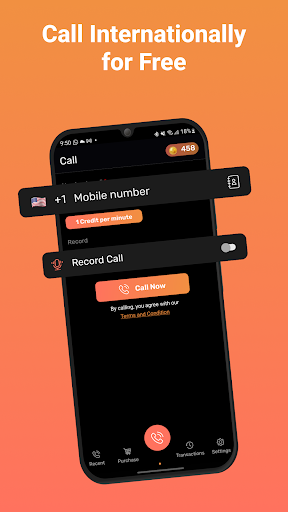
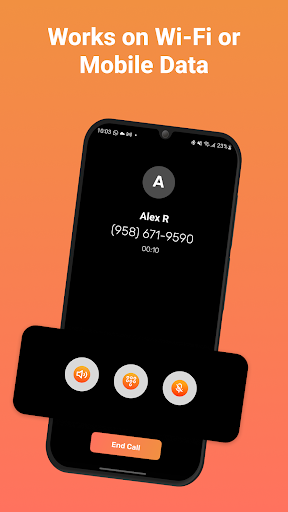
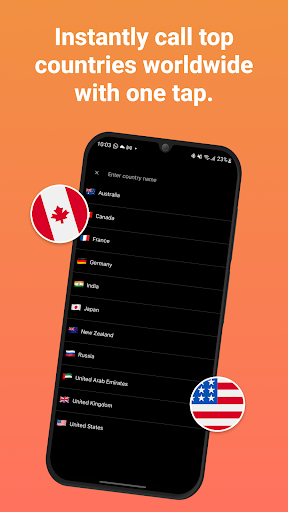
Call any mobile number using WiFi or mobile data. No SIM needed. Stay connected anywhere — simple, clear and affordable worldwide calling.
Key Features
Call Any Number Using WiFi
Make high-quality calls to phones worldwide. Works on WiFi, 4G, and 5G networks.
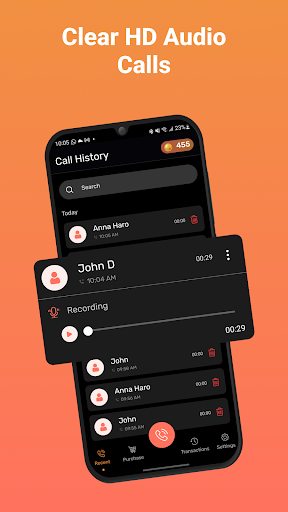
Call Recording (With Consent)
Record calls for personal reference and replay them anytime from your call history.
Call recording may be restricted in some regions. Please make sure all parties agree before recording or sharing.
Privacy Number System
Your personal number stays private.
Each call uses a temporary, system-generated caller ID to help maintain privacy and reduce spam risk.
Shareable Call Recordings
Play or export recordings directly from the call history.
Call History and Redial
View recent calls, replay recordings, and quickly call back.
Purchase Credits Easily
Buy calling credits securely from the Purchase tab.
No hidden charges.
Transaction Records
View your past purchases and usage in one place for transparency.
Settings and Preferences
Manage recording options, audio behavior, caller ID privacy, and support options from the Settings tab.
Why Use Voizly?
- Works without a SIM card
- Simple and clean interface
- Clear voice quality
- Works anywhere with internet access
- Organized call and transaction history
Voizly is designed to make calling more flexible, private, and convenient for everyday communication.
Legal Notice
- Call recording and privacy number features must be used responsibly.
- Please ensure that both parties have consented before recording or sharing a call.
- Features may vary depending on your country’s regulations.
और दिखाएं

1. MEmu इंस्टॉलर को डाउनलोड करें और इंस्टॉलेशन को पूरा करें

2. MEmu शुरू करें फिर होमपेज पर Google Play खोलें

3. Google Play में Voizly – Internet Calling खोजें
Install
4. Voizly – Internet Calling डाउनलोड कर इंस्टॉल करें
5. इंस्टॉल पूरा होने पर आइकन दबाएं

6. MEmu का उपयोग करके अपने कंप्यूटर पर Voizly – Internet Calling का अनुभव करें
MEmu Play सबसे बेहतरीन मुफ़्त Android एमुलेटर है और 5 करोड़ लोग पहले ही इसके शानदार Android ऐप अनुभव का आनंद ले चुके हैं। MEmu 9 वर्चुअलाइज़ेशन तकनीक आपको अपने PC पर हज़ारों Android ऐप्स, यहाँ तक कि सबसे ज़्यादा ग्राफ़िक्स वाले ऐप्स भी, आसानी से चलाने की सुविधा देती है।
असीमित बैटरी या मोबाइल डेटा के साथ बेहतर ग्राफिक्स के साथ बड़ी स्क्रीन; लंबी अवधि।
कीबोर्ड और माउस या गेमपैड के उत्तम नियंत्रण के लिए संपूर्ण कीमैपिंग का समर्थन करता हैं।
एक ही पीसी पर मल्टी-इंस्टेंस मैनेजर के साथ एक समय में कई गेम खाते या कार्य कर सकते हैं।
Use Voizly – Internet Calling on PC by following steps:



![티비핫 [TVHOT] :: 티비위키 시즌 2 PC](https://dl.memuplay.com/new_market/img/com.tvhot.tvhot.icon.2025-01-16-10-12-57.png)