Diffuse - AI Video Generator
अपडेट किया गया
वर्तमान वर्शन
3.0.0
संसाधन

Diffuse - AI Video Generator पर अपनी मोबाइल डेटा सीमा पार करने को अलविदा कहें और छोटी स्क्रीन की सीमाओं से मुक्त होकर बड़े डिस्प्ले के लाभों का अनुभव करें। अब, आप अपने कीबोर्ड और माउस का उपयोग करके फुल-स्क्रीन मोड में टॉपर्स क्लैन की शक्ति का अनुभव कर सकते हैं। MEmu Play में वे सभी बेहतरीन सुविधाएँ हैं जिनकी आप अपेक्षा करते हैं: त्वरित इंस्टॉलेशन और आसान सेटअप, सहज नियंत्रण, बैटरी की आवश्यकता नहीं, और कोई डेटा या कॉल समय सीमा नहीं। नया MEmu 9 आपके कंप्यूटर पर Diffuse - AI Video Generator का उपयोग करने के लिए सबसे अच्छा विकल्प है। हमारा मालिकाना मल्टी-इंस्टेंस मैनेजर एक साथ दो या अधिक खातों को चलाने का समर्थन करता है। इससे भी महत्वपूर्ण बात यह है कि हमारा अनूठा इम्यूलेशन इंजन आपके कंप्यूटर के प्रदर्शन का पूरा उपयोग करता है, जिससे एक सहज और निर्बाध अनुभव मिलता है।
और दिखाएं
डाउनलोड करें Diffuse - AI Video Generator पीसी पर MEmu एंड्रॉयड एमुलेटर के साथ बड़े पर्दे पर खेलने का आनंद लें। Welcome to Diffuse: AI Video Generator, the app that turns your wildest imaginations into reality.

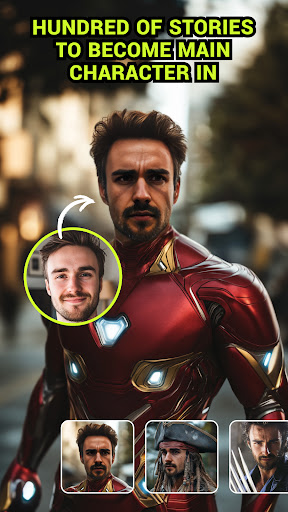
Welcome to Diffuse: AI Video Generator, the app that turns your wildest imaginations into reality. Diffuse makes it incredibly easy to create personalized, high-quality videos with just a few taps.
Create Videos from Text Descriptions:
Imagine a character, setting, and action, then watch as Diffuse brings it all to life in a vivid, dynamic video.
Perfect for storytellers, content creators, and anyone with a vivid imagination.
Personalized Videos:
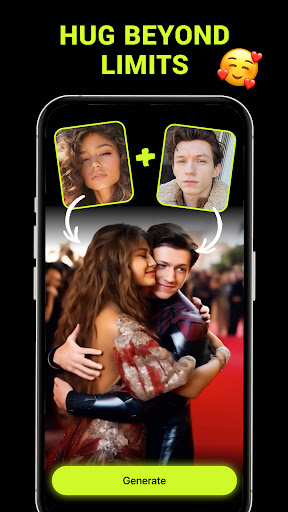
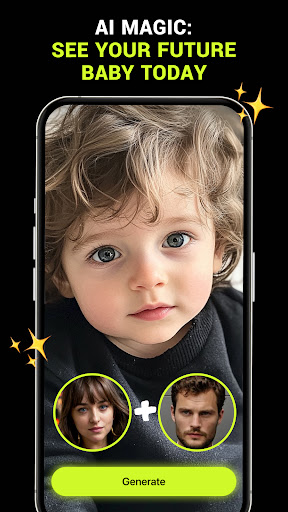
Transform into any character in videos by simply uploading a photo.
Star in your own adventure, romantic scene, or thrilling action sequence effortlessly.
Face in Memes and GIFs:
Add a personal touch to your communication by inserting your face into popular memes and GIFs.
Share hilarious, custom-made content with friends and family across social media and messaging platforms.
Diffuse AI has intuitive interface that makes video creation fun and accessible for everyone. Enjoy high-resolution videos that look professional and engaging. With endless possibilities, you can create anything from cinematic stories to funny clips with your face in them.
Download Diffuse: AI Video Generator now and start creating videos that captivate, amuse, and amaze!
और दिखाएं

1. MEmu इंस्टॉलर को डाउनलोड करें और इंस्टॉलेशन को पूरा करें

2. MEmu शुरू करें फिर होमपेज पर Google Play खोलें

3. Google Play में Diffuse - AI Video Generator खोजें
Install
4. Diffuse - AI Video Generator डाउनलोड कर इंस्टॉल करें
5. इंस्टॉल पूरा होने पर आइकन दबाएं

6. MEmu का उपयोग करके अपने कंप्यूटर पर Diffuse - AI Video Generator का अनुभव करें
MEmu Play सबसे बेहतरीन मुफ़्त Android एमुलेटर है और 5 करोड़ लोग पहले ही इसके शानदार Android ऐप अनुभव का आनंद ले चुके हैं। MEmu 9 वर्चुअलाइज़ेशन तकनीक आपको अपने PC पर हज़ारों Android ऐप्स, यहाँ तक कि सबसे ज़्यादा ग्राफ़िक्स वाले ऐप्स भी, आसानी से चलाने की सुविधा देती है।
असीमित बैटरी या मोबाइल डेटा के साथ बेहतर ग्राफिक्स के साथ बड़ी स्क्रीन; लंबी अवधि।
कीबोर्ड और माउस या गेमपैड के उत्तम नियंत्रण के लिए संपूर्ण कीमैपिंग का समर्थन करता हैं।
एक ही पीसी पर मल्टी-इंस्टेंस मैनेजर के साथ एक समय में कई गेम खाते या कार्य कर सकते हैं।
Use Diffuse - AI Video Generator on PC by following steps: