
Famelack
अपडेट किया गया
वर्तमान वर्शन
3.6
संसाधन

Famelack पर अपनी मोबाइल डेटा सीमा पार करने को अलविदा कहें और छोटी स्क्रीन की सीमाओं से मुक्त होकर बड़े डिस्प्ले के लाभों का अनुभव करें। अब, आप अपने कीबोर्ड और माउस का उपयोग करके फुल-स्क्रीन मोड में टॉपर्स क्लैन की शक्ति का अनुभव कर सकते हैं। MEmu Play में वे सभी बेहतरीन सुविधाएँ हैं जिनकी आप अपेक्षा करते हैं: त्वरित इंस्टॉलेशन और आसान सेटअप, सहज नियंत्रण, बैटरी की आवश्यकता नहीं, और कोई डेटा या कॉल समय सीमा नहीं। नया MEmu 9 आपके कंप्यूटर पर Famelack का उपयोग करने के लिए सबसे अच्छा विकल्प है। हमारा मालिकाना मल्टी-इंस्टेंस मैनेजर एक साथ दो या अधिक खातों को चलाने का समर्थन करता है। इससे भी महत्वपूर्ण बात यह है कि हमारा अनूठा इम्यूलेशन इंजन आपके कंप्यूटर के प्रदर्शन का पूरा उपयोग करता है, जिससे एक सहज और निर्बाध अनुभव मिलता है।
और दिखाएं
MEmu Play के साथ PC पर Famelack इस्तेमाल करने के शानदार अनुभव का आनंद लें। यह एक शक्तिशाली मुफ़्त Android एमुलेटर है जो आपको डेस्कटॉप वर्ज़न के लिए हज़ारों Android ऐप्स उपलब्ध कराता है। दोस्तों से जुड़ने और अपने काम को और भी बेहतर बनाने का आनंद लें! Famelack – Watch Live Sports, News and TV ShowsFamelack is the hub for watching live TV, sports, and news from all around the world in regional and foreign languages.
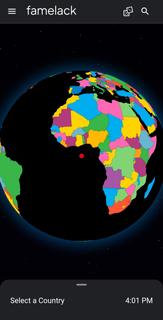
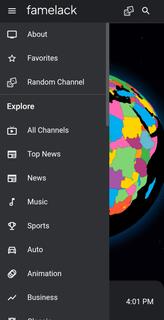
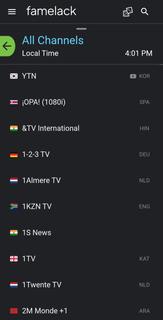
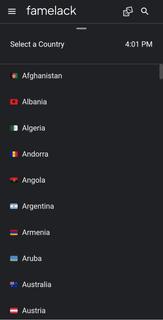
Famelack – Watch Live Sports, News and TV ShowsFamelack is the hub for watching live TV, sports, and news from all around the world in regional and foreign languages. It has a neatly organized library that contains the list of more than 1000 live TV channels in high quality, with minimal buffering or lag issues.With 130+ countries and HD TV channels, Famelack has one of the largest databases of streamable TV channels, and it draws attention to the eyes of millions of people. All you need is to install the Famelack, and you’re all set to choose your favourite TV channels from the thousands it has to offer to watch your beloved live sports or TV programs.There are various sections, such as Kids for those under 13, and adults can watch movies, sports, news, TV series, reality shows, and whatnot.Even though there are thousands of channels, it never feels complicated finding the desired one, as the app has a smart search functionality with filter options, allowing you to easily locate a TV channel simply by searching its name. A new favourite list option has been introduced in the Famelack to add the channels you watch the most, so that next time you can easily find them.Download Famelack APK for Android and enjoy 4K quality TV channels streaming across all genres with a feature-rich built-in media player!
और दिखाएं

1. MEmu इंस्टॉलर को डाउनलोड करें और इंस्टॉलेशन को पूरा करें

2. MEmu शुरू करें फिर होमपेज पर Google Play खोलें

3. Google Play में Famelack खोजें
Install
4. Famelack डाउनलोड कर इंस्टॉल करें
5. इंस्टॉल पूरा होने पर आइकन दबाएं

6. MEmu का उपयोग करके अपने कंप्यूटर पर Famelack का अनुभव करें
MEmu Play सबसे बेहतरीन मुफ़्त Android एमुलेटर है और 5 करोड़ लोग पहले ही इसके शानदार Android ऐप अनुभव का आनंद ले चुके हैं। MEmu 9 वर्चुअलाइज़ेशन तकनीक आपको अपने PC पर हज़ारों Android ऐप्स, यहाँ तक कि सबसे ज़्यादा ग्राफ़िक्स वाले ऐप्स भी, आसानी से चलाने की सुविधा देती है।
असीमित बैटरी या मोबाइल डेटा के साथ बेहतर ग्राफिक्स के साथ बड़ी स्क्रीन; लंबी अवधि।
कीबोर्ड और माउस या गेमपैड के उत्तम नियंत्रण के लिए संपूर्ण कीमैपिंग का समर्थन करता हैं।
एक ही पीसी पर मल्टी-इंस्टेंस मैनेजर के साथ एक समय में कई गेम खाते या कार्य कर सकते हैं।
Use Famelack on PC by following steps: