HeyJoy
अपडेट किया गया
वर्तमान वर्शन
1.1.71
संसाधन

HeyJoy पर अपनी मोबाइल डेटा सीमा पार करने को अलविदा कहें और छोटी स्क्रीन की सीमाओं से मुक्त होकर बड़े डिस्प्ले के लाभों का अनुभव करें। अब, आप अपने कीबोर्ड और माउस का उपयोग करके फुल-स्क्रीन मोड में टॉपर्स क्लैन की शक्ति का अनुभव कर सकते हैं। MEmu Play में वे सभी बेहतरीन सुविधाएँ हैं जिनकी आप अपेक्षा करते हैं: त्वरित इंस्टॉलेशन और आसान सेटअप, सहज नियंत्रण, बैटरी की आवश्यकता नहीं, और कोई डेटा या कॉल समय सीमा नहीं। नया MEmu 9 आपके कंप्यूटर पर HeyJoy का उपयोग करने के लिए सबसे अच्छा विकल्प है। हमारा मालिकाना मल्टी-इंस्टेंस मैनेजर एक साथ दो या अधिक खातों को चलाने का समर्थन करता है। इससे भी महत्वपूर्ण बात यह है कि हमारा अनूठा इम्यूलेशन इंजन आपके कंप्यूटर के प्रदर्शन का पूरा उपयोग करता है, जिससे एक सहज और निर्बाध अनुभव मिलता है।
और दिखाएं
MEmu Play के साथ PC पर HeyJoy इस्तेमाल करने के शानदार अनुभव का आनंद लें। यह एक शक्तिशाली मुफ़्त Android एमुलेटर है जो आपको डेस्कटॉप वर्ज़न के लिए हज़ारों Android ऐप्स उपलब्ध कराता है। दोस्तों से जुड़ने और अपने काम को और भी बेहतर बनाने का आनंद लें! Looking for fun games to play anytime, anywhere?
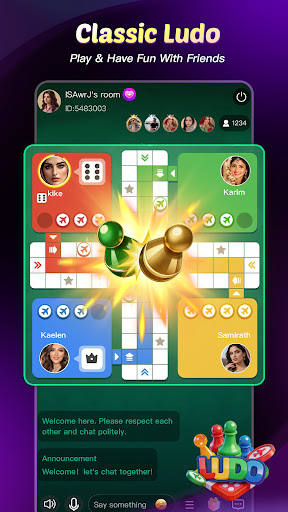
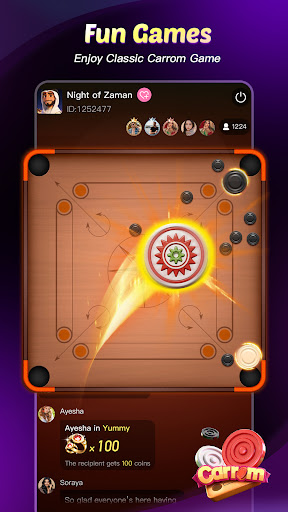


Looking for fun games to play anytime, anywhere? Welcome to HeyJoy!
Play more, have more fun
Enjoy a collection of classic and casual games loved by players around the world, including Ludo, 8 Ball Pool, Match-3, Carrom, Domino, Jackaroo, and more.
Whether you’re looking for a quick game during your free time or an exciting match with others, HeyJoy has something fun for you. The games are easy to learn, enjoyable to play, and perfect for casual entertainment.
Fun features, even better games
Make every game more exciting with fun emojis, interactive reactions, and colorful virtual gifts.
You can also invite friends to join multiplayer games, chat by voice, share music, and enjoy the game together in real time.
Your casual gaming playground
HeyJoy is built for fun, relaxation, and entertainment. We’re constantly adding new and creative games so you always have something new to discover and enjoy.
Download HeyJoy now, choose your favorite game, team up, and enjoy the fun!
और दिखाएं

1. MEmu इंस्टॉलर को डाउनलोड करें और इंस्टॉलेशन को पूरा करें

2. MEmu शुरू करें फिर होमपेज पर Google Play खोलें

3. Google Play में HeyJoy खोजें
Install
4. HeyJoy डाउनलोड कर इंस्टॉल करें
5. इंस्टॉल पूरा होने पर आइकन दबाएं

6. MEmu का उपयोग करके अपने कंप्यूटर पर HeyJoy का अनुभव करें
MEmu Play सबसे बेहतरीन मुफ़्त Android एमुलेटर है और 5 करोड़ लोग पहले ही इसके शानदार Android ऐप अनुभव का आनंद ले चुके हैं। MEmu 9 वर्चुअलाइज़ेशन तकनीक आपको अपने PC पर हज़ारों Android ऐप्स, यहाँ तक कि सबसे ज़्यादा ग्राफ़िक्स वाले ऐप्स भी, आसानी से चलाने की सुविधा देती है।
असीमित बैटरी या मोबाइल डेटा के साथ बेहतर ग्राफिक्स के साथ बड़ी स्क्रीन; लंबी अवधि।
कीबोर्ड और माउस या गेमपैड के उत्तम नियंत्रण के लिए संपूर्ण कीमैपिंग का समर्थन करता हैं।
एक ही पीसी पर मल्टी-इंस्टेंस मैनेजर के साथ एक समय में कई गेम खाते या कार्य कर सकते हैं।
Use HeyJoy on PC by following steps:





![티비핫 [TVHOT] :: 티비위키 시즌 2 PC](https://dl.memuplay.com/new_market/img/com.tvhot.tvhot.icon.2025-01-16-10-12-57.png)