Radar2
अपडेट किया गया
वर्तमान वर्शन
2.1.0
संसाधन

Radar2 पर अपनी मोबाइल डेटा सीमा पार करने को अलविदा कहें और छोटी स्क्रीन की सीमाओं से मुक्त होकर बड़े डिस्प्ले के लाभों का अनुभव करें। अब, आप अपने कीबोर्ड और माउस का उपयोग करके फुल-स्क्रीन मोड में टॉपर्स क्लैन की शक्ति का अनुभव कर सकते हैं। MEmu Play में वे सभी बेहतरीन सुविधाएँ हैं जिनकी आप अपेक्षा करते हैं: त्वरित इंस्टॉलेशन और आसान सेटअप, सहज नियंत्रण, बैटरी की आवश्यकता नहीं, और कोई डेटा या कॉल समय सीमा नहीं। नया MEmu 9 आपके कंप्यूटर पर Radar2 का उपयोग करने के लिए सबसे अच्छा विकल्प है। हमारा मालिकाना मल्टी-इंस्टेंस मैनेजर एक साथ दो या अधिक खातों को चलाने का समर्थन करता है। इससे भी महत्वपूर्ण बात यह है कि हमारा अनूठा इम्यूलेशन इंजन आपके कंप्यूटर के प्रदर्शन का पूरा उपयोग करता है, जिससे एक सहज और निर्बाध अनुभव मिलता है।
और दिखाएं
MEmu Play के साथ PC पर Radar2 इस्तेमाल करने के शानदार अनुभव का आनंद लें। यह एक शक्तिशाली मुफ़्त Android एमुलेटर है जो आपको डेस्कटॉप वर्ज़न के लिए हज़ारों Android ऐप्स उपलब्ध कराता है। दोस्तों से जुड़ने और अपने काम को और भी बेहतर बनाने का आनंद लें! Radar2 is an Android app that can be used while flying on ultralight or microlight aircraft (LSA with or without engine, three-axle, hang gliders, paragliders, etc.
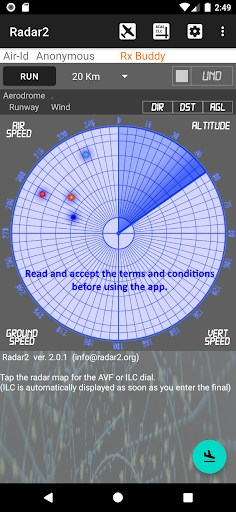
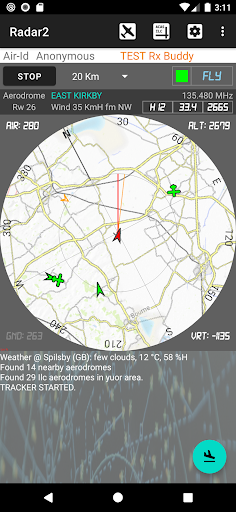
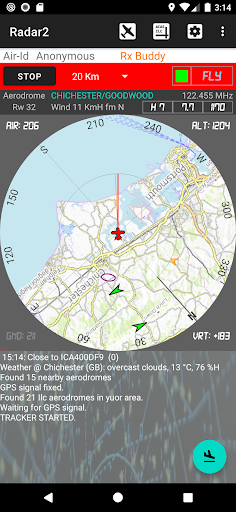
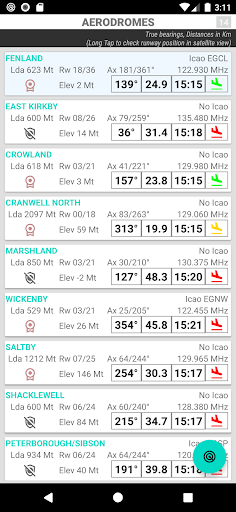
Radar2 is an Android app that can be used while flying on ultralight or microlight aircraft (LSA with or without engine, three-axle, hang gliders, paragliders, etc.) or on GA aircraft flying VFR. It provides real-time information on the position and trajectory of others aircraft operating in the surrounding airspace and using the same application or compatible systems.
Depending on the type of flight, basic or advanced VFR, the app provides indications on respecting the altitude and the airspace involved.
The app is equipped with automatic detection of potential collisions in flight (ACAS) with voice alerts that communicate alarm situations.
For all the aerodromes managed in the app, the following are available: a Real-time Report, the Automatic Vector Finder (AVF) function and the Instrumental Landing Controller (ILC). The ILC is automatically activated when entering the final approach to the aerodrome and provides indications on the correct glide path.
The main functions of the app can also remain active in the background while using other apps during the flight. The use of Radar2 therefore constitutes a valid support for VFR flights, increasing their safety.
The app uses the GPS and internet connection (3G, 4G or 5G) of the device for its operation. It connects to the Open Glider Network (OGN community project) to exchange position data with other aircraft that use the same Radar2 app or interoperable systems (FLARM, OGN Trackers, etc.). Additional positions of commercial aircraft equipped with ADS-B, flying at a compatible altitude, may also be received.
The app can be used anonymously or by entering the ICAO or OGN hexadecimal code of your aircraft (for OGN registrations go to https://ddb.glidernet.org). When the app is used anonymously, the transmitted data are not considered reliable by the OGN network but will still be visible for the Radar2 apps and for sites that provide for the display of anonymous aircraft.
Before using the app, it is necessary to read and accept the "Terms and Conditions" document and the "Instructions for Use" (items in the app menu).
The app must be started (Start button) a few minutes before take-off in order to stabilize the GPS reception and acquire the correct data on airspaces, aerodromes and local weather conditions.
Using the app allows the aircraft to be tracked on a map on authorized remote sites and terminals (PCs, smartphones or avionics devices).
The app is still in preliminary distribution. It is available for free download for pilots who request the access password via email. Suggestions and reports of any bugs will be welcome, specifying the context, the type of smartphone and the type of aircraft used.
और दिखाएं

1. MEmu इंस्टॉलर को डाउनलोड करें और इंस्टॉलेशन को पूरा करें

2. MEmu शुरू करें फिर होमपेज पर Google Play खोलें

3. Google Play में Radar2 खोजें
Install
4. Radar2 डाउनलोड कर इंस्टॉल करें
5. इंस्टॉल पूरा होने पर आइकन दबाएं

6. MEmu का उपयोग करके अपने कंप्यूटर पर Radar2 का अनुभव करें
MEmu Play सबसे बेहतरीन मुफ़्त Android एमुलेटर है और 5 करोड़ लोग पहले ही इसके शानदार Android ऐप अनुभव का आनंद ले चुके हैं। MEmu 9 वर्चुअलाइज़ेशन तकनीक आपको अपने PC पर हज़ारों Android ऐप्स, यहाँ तक कि सबसे ज़्यादा ग्राफ़िक्स वाले ऐप्स भी, आसानी से चलाने की सुविधा देती है।
असीमित बैटरी या मोबाइल डेटा के साथ बेहतर ग्राफिक्स के साथ बड़ी स्क्रीन; लंबी अवधि।
कीबोर्ड और माउस या गेमपैड के उत्तम नियंत्रण के लिए संपूर्ण कीमैपिंग का समर्थन करता हैं।
एक ही पीसी पर मल्टी-इंस्टेंस मैनेजर के साथ एक समय में कई गेम खाते या कार्य कर सकते हैं।
Use Radar2 on PC by following steps: