VN Video Editor Lite
अपडेट किया गया
वर्तमान वर्शन
1.15.1
संसाधन

VN Video Editor Lite पर अपनी मोबाइल डेटा सीमा पार करने को अलविदा कहें और छोटी स्क्रीन की सीमाओं से मुक्त होकर बड़े डिस्प्ले के लाभों का अनुभव करें। अब, आप अपने कीबोर्ड और माउस का उपयोग करके फुल-स्क्रीन मोड में टॉपर्स क्लैन की शक्ति का अनुभव कर सकते हैं। MEmu Play में वे सभी बेहतरीन सुविधाएँ हैं जिनकी आप अपेक्षा करते हैं: त्वरित इंस्टॉलेशन और आसान सेटअप, सहज नियंत्रण, बैटरी की आवश्यकता नहीं, और कोई डेटा या कॉल समय सीमा नहीं। नया MEmu 9 आपके कंप्यूटर पर VN Video Editor Lite का उपयोग करने के लिए सबसे अच्छा विकल्प है। हमारा मालिकाना मल्टी-इंस्टेंस मैनेजर एक साथ दो या अधिक खातों को चलाने का समर्थन करता है। इससे भी महत्वपूर्ण बात यह है कि हमारा अनूठा इम्यूलेशन इंजन आपके कंप्यूटर के प्रदर्शन का पूरा उपयोग करता है, जिससे एक सहज और निर्बाध अनुभव मिलता है।
और दिखाएं
डाउनलोड करें VN Video Editor Lite पीसी पर MEmu एंड्रॉयड एमुलेटर के साथ बड़े पर्दे पर खेलने का आनंद लें। VN, Best FREE HD Video Editor and Video Maker with all features, trim & cut video/movie/footage, blur the background and crop add music, sticker, multi-layer timeline, chroma key, green screen and video effects!
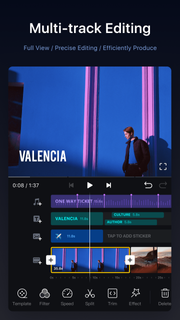
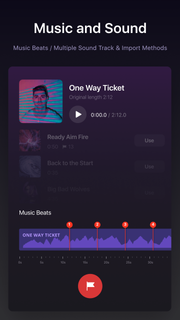
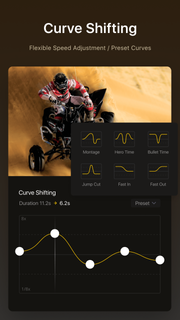
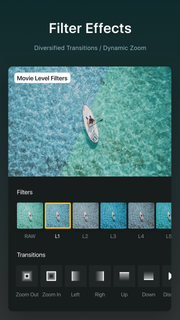
VN, Best FREE HD Video Editor and Video Maker with all features, trim & cut video/movie/footage, blur the background and crop add music, sticker, multi-layer timeline, chroma key, green screen and video effects! Simple, but powerful as a desktop editor, VN is suitable for both beginners and professional users. VN - top movie maker and HD pro video editor with music, helps you create a video with ease, edit video for YouTube, Instagram, Tik Tok, Facebook, Messenger, Whatsapp, Twitter, etc.Features:Easy* Zoom in/out the timeline* Tap to split, drag, delete, and duplicate video clips* Save draft whenever you need a breakProfessional* multi-layer timeline* Curve speed* Green Screen/Chroma key* Keyframe Animation* MaskCustomize Background Music/Soundtrack* Add your own music into VN* Mark the music rhythm* Support multiple soundtracks and adjust the duration;* Free Diverse style musicCool Video Effects* Supports changing video speed freely* 21 transitions between video clips* More than 60 filtersPowerful Subtitle Tool* Add title slides, text overlays in the timeline* Change font, color, size of subtitles* Adjust the subtitle durationEasily Share and Save Original Video* Save your original videos to your camera roll* Instantly sharing to YouTube, Twitter, Facebook, and others with a weblinkVN Video Editor helps you easily make the video and share a better life.If you have any questions, please contact us via the following methods.YouTube: https://www.youtube.com/c/vnvideoeditorappDiscord: https://discord.com/channels/727359554928771092Instagram: @vnvideoeditorFacebook: @vnvideoeditorappEmail: [email protected]Telegram: @vnvideoeditorappOfficial website: https://vlognow.me/
और दिखाएं

1. MEmu इंस्टॉलर को डाउनलोड करें और इंस्टॉलेशन को पूरा करें

2. MEmu शुरू करें फिर होमपेज पर Google Play खोलें

3. Google Play में VN Video Editor Lite खोजें
Install
4. VN Video Editor Lite डाउनलोड कर इंस्टॉल करें
5. इंस्टॉल पूरा होने पर आइकन दबाएं

6. MEmu का उपयोग करके अपने कंप्यूटर पर VN Video Editor Lite का अनुभव करें
MEmu Play सबसे बेहतरीन मुफ़्त Android एमुलेटर है और 5 करोड़ लोग पहले ही इसके शानदार Android ऐप अनुभव का आनंद ले चुके हैं। MEmu 9 वर्चुअलाइज़ेशन तकनीक आपको अपने PC पर हज़ारों Android ऐप्स, यहाँ तक कि सबसे ज़्यादा ग्राफ़िक्स वाले ऐप्स भी, आसानी से चलाने की सुविधा देती है।
असीमित बैटरी या मोबाइल डेटा के साथ बेहतर ग्राफिक्स के साथ बड़ी स्क्रीन; लंबी अवधि।
कीबोर्ड और माउस या गेमपैड के उत्तम नियंत्रण के लिए संपूर्ण कीमैपिंग का समर्थन करता हैं।
एक ही पीसी पर मल्टी-इंस्टेंस मैनेजर के साथ एक समय में कई गेम खाते या कार्य कर सकते हैं।
Use VN Video Editor Lite on PC by following steps: