
VN Video Editor Lite
อัปเดตเมื่อ
เวอร์ชันปัจจุบัน
1.15.1
ให้บริการโดย

เมื่อใช้ VN Video Editor Lite บนโทรศัพท์ของคุณไม่ต้องกังวลกับการชาร์จไฟมากเกินไปปลดปล่อยตัวคุณเองจากหน้าจอขนาดเล็กและสนุกกับการใช้แอพนี้บนหน้าจอขนาดใหญ่ จากนี้ไปรับประสบการณ์เต็มหน้าจอของแอปพลิเคชันของคุณด้วยคีย์บอร์ดและเมาส์ MEmu มีคุณสมบัติที่น่าแปลกใจที่คุณคาดหวัง: การติดตั้งที่รวดเร็วและการตั้งค่าที่ง่ายควบคุมได้ง่ายไม่ จำกัด แบตเตอรี่ข้อมูลมือถือและการโทรที่รบกวน MEmu 9 ใหม่ล่าสุดเป็นตัวเลือกที่ดีที่สุดสำหรับการใช้ Meitu – โปรแกรมแก้ไขภาพแนวธรรมชาติ บนคอมพิวเตอร์ของคุณ ด้วยรหัสการดูดซึมของเราผู้จัดการหลายอินสแตนซ์ทำให้สามารถเปิดบัญชี 2 บัญชีขึ้นไปในเวลาเดียวกันได้ และที่สำคัญที่สุดเอ็นจิ้นจำลองพิเศษของเราสามารถปลดปล่อยศักยภาพของPCของคุณและทำให้ทุกอย่างราบรื่นและสนุกสนาน
แสดงเพิ่มเติม
ดาวน์โหลด VN Video Editor Lite บน PC ด้วย MEmu Android Emulator สนุกกับการเล่นบนหน้าจอขนาดใหญ่ VN, Best FREE HD Video Editor and Video Maker with all features, trim & cut video/movie/footage, blur the background and crop add music, sticker, multi-layer timeline, chroma key, green screen and video effects!
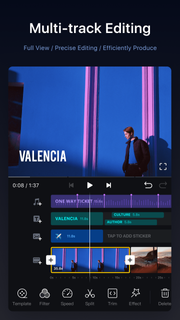
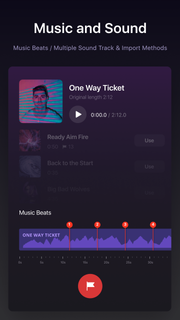
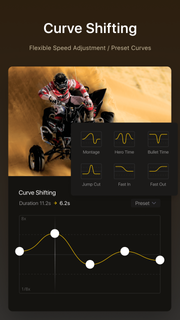
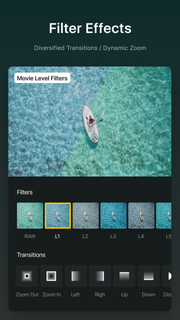
VN, Best FREE HD Video Editor and Video Maker with all features, trim & cut video/movie/footage, blur the background and crop add music, sticker, multi-layer timeline, chroma key, green screen and video effects! Simple, but powerful as a desktop editor, VN is suitable for both beginners and professional users. VN - top movie maker and HD pro video editor with music, helps you create a video with ease, edit video for YouTube, Instagram, Tik Tok, Facebook, Messenger, Whatsapp, Twitter, etc.Features:Easy* Zoom in/out the timeline* Tap to split, drag, delete, and duplicate video clips* Save draft whenever you need a breakProfessional* multi-layer timeline* Curve speed* Green Screen/Chroma key* Keyframe Animation* MaskCustomize Background Music/Soundtrack* Add your own music into VN* Mark the music rhythm* Support multiple soundtracks and adjust the duration;* Free Diverse style musicCool Video Effects* Supports changing video speed freely* 21 transitions between video clips* More than 60 filtersPowerful Subtitle Tool* Add title slides, text overlays in the timeline* Change font, color, size of subtitles* Adjust the subtitle durationEasily Share and Save Original Video* Save your original videos to your camera roll* Instantly sharing to YouTube, Twitter, Facebook, and others with a weblinkVN Video Editor helps you easily make the video and share a better life.If you have any questions, please contact us via the following methods.YouTube: https://www.youtube.com/c/vnvideoeditorappDiscord: https://discord.com/channels/727359554928771092Instagram: @vnvideoeditorFacebook: @vnvideoeditorappEmail: [email protected]Telegram: @vnvideoeditorappOfficial website: https://vlognow.me/
แสดงเพิ่มเติม

1. ดาวน์โหลดตัวติดตั้ง MEmu และสิ้นสุดการติดตั้ง

2. เริ่ม MEmu จากนั้นเปิด Google Play บนหน้าแรก

3. ค้นหา VN Video Editor Lite ใน Google Play
Install
4. ดาวน์โหลดและติดตั้ง VN Video Editor Lite
5. เมื่อติดตั้งเสร็จให้คลิกที่ไอคอนเพื่อเริ่มใช้งาน

6. ใช้ MEmu เพื่อสัมผัสประสบการณ์ VN Video Editor Lite บนคอมพิวเตอร์ของคุณ
MEmu Play คือโปรแกรมจำลอง Android ที่ดีที่สุด มีผู้ใช้มากกว่า 50 ล้านคน มอบประสบการณ์การใช้งานแอป Android ขั้นสุดยอดให้กับคุณ เทคโนโลยีจำลองเสมือนของ MEmu ช่วยให้คุณรันแอป Android หลายพันแอปบนคอมพิวเตอร์ได้อย่างราบรื่น แม้แอปที่กินทรัพยากรเครื่องสูงที่สุด
จอใหญ่และกราฟฟิกสวยกว่า; เล่นได้นาน, ไม่ต้องใช้แบตเตอรี่โทรศัพท์หรือเน็ตโทรศัพท์.
ระบบปรับแต่งปุ่มคีย์บอร์ดและเม้าส์ตามที่คุณเลือก
เล่นมากกว่าหนึ่งเกมบน PC ในเวลาเดียวกันด้วยระบบหลายจอหรือ Multi-Instance manager.
Use VN Video Editor Lite on PC by following steps: