
1 in 8 Billion: Life Simulator
Updated
Current Version
1.0.7
Offered By

With your passion for 1 in 8 Billion: Life Simulator, you shouldn’t have to limit yourself to the small screen of a phone. Play like a pro and take full control of the game using a keyboard and mouse. MEmu gives you everything you’re looking for. Download and play 1 in 8 Billion: Life Simulator on PC. Play as long as you want — no more worries about battery life, mobile data, or unexpected calls. The all-new MEmu 9 is the best way to play 1 in 8 Billion: Life Simulator on PC. With our expertly designed keymapping system, 1 in 8 Billion: Life Simulator feels just like a real PC game. The MEmu multi-instance manager lets you run two or more accounts on the same device at the same time. Most importantly, our exclusive emulation engine unlocks your PC’s full potential, delivering smooth and seamless performance.
Show more
Download 1 in 8 Billion: Life Simulator on PC with MEmu Android Emulator. Enjoy playing on big screen. Out of eight billion people, whose life will you live this time?
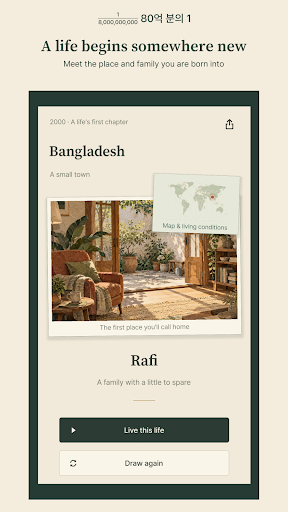
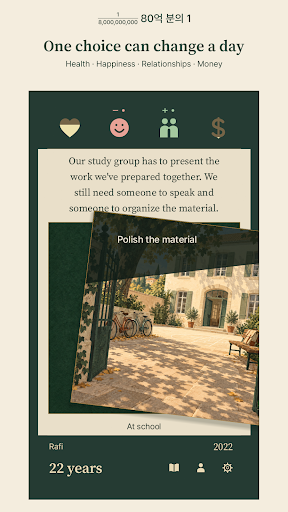
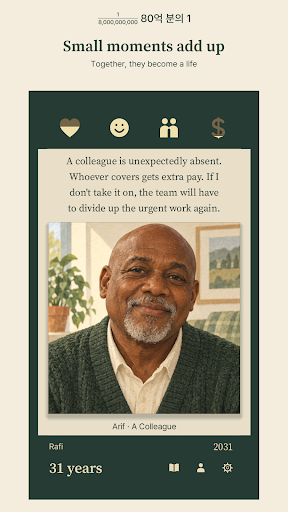
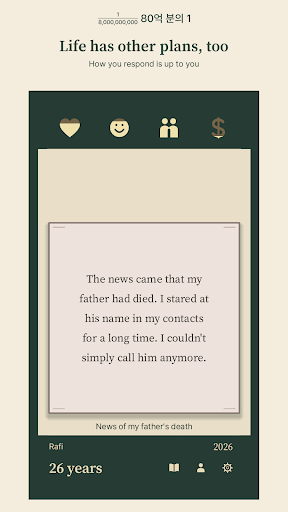
Out of eight billion people, whose life will you live this time?
1 in 8 Billion is an offline card game that follows a life from birth to its last memories. Small decisions shape your health, happiness, relationships and money—and the story you leave behind.
A beginning you did not choose
Start a new life in one of 220 countries and territories. Meet your family and the people around you, find your way through school and work, and discover the place you call home.
Two choices, many possible lives
Swipe a card to choose your next step. There is room for kindness and ordinary pleasures, but luck, loss and difficult decisions can change your plans. Read what follows and see where your choices take you.
What remains at the end
Look back on the moments that mattered, then answer one last question. Keep a life card in your collection and save it as an image. Export your full record as an illustrated HTML book or a text file. Another life offers another beginning.
At your own pace
Random lives are free to play offline without signing up. Your progress and records stay on your device. The app uses the internet to check versions; once an update is confirmed as required, you must install it to keep playing.
Your own beginning and the shop
Random lives remain free. Spend 10 gems to choose a name, gender, country and four starting stats. Keep your chosen country and use the dice to randomize the rest. If you need gems, you can choose to watch a rewarded ad or buy a gem pack.
Ads and accounts
A full-screen ad may appear between completed lives, and a banner may appear in a separate area at the bottom, away from cards and controls. The optional one-time ad-removal purchase removes full-screen and banner ads; optional rewarded ads remain available. Prices are shown by the store. Accounts, gems, ads, purchases and restoration require internet access. You can buy ad removal and gems without linking a game account, and restore ad removal using the same store account. Linking a game account is optional; link the same game account on another device to access the same gem balance. Game progress and records stay on your device and are not synced to your account.
Optional usage statistics
Sharing usage statistics to improve the app is off by default. You can turn it on or off in Settings. When enabled, usage statistics are sent over the internet. You can play without sharing them.
About the stories
Characters and events are fictional. Real countries, territories and selected statistics provide context, not predictions about anyone's future. Random starting locations are weighted by the population of the supported countries and territories; this is not a model of actual birth probabilities.
Stories include illness, accidents, bereavement, crime and fictional lottery play. Nothing is posted online automatically. Export any memories you want to keep before deleting the app or changing devices.
Show more

1. Download MEmu installer and finish the setup

2. Start MEmu then open Google Play on the desktop

3. Search 1 in 8 Billion: Life Simulator in Google Play
Install
4. Download and Install 1 in 8 Billion: Life Simulator
5. On install completion click the icon to start

6. Enjoy playing 1 in 8 Billion: Life Simulator on PC with MEmu
MEmu Play is the best Android emulator and 100 million people already enjoy its superb Android gaming experience. The MEmu virtualization technology empowers you to play thousands of Android games smoothly on your PC, even the most graphic-intensive ones.
Bigger screen with better graphics; Long duration, without limitation of battery or mobile data.
Full Keymapping support for precise control of keyboard and mouse or gamepad.
Multiple game accounts or tasks on single PC at one time with Multi-Instance manager.
Play 1 in 8 Billion: Life Simulator on PC by following steps:















































