
5555xEmber
Updated
Current Version
1.0.1
Offered By

With your passion for 5555xEmber, you shouldn’t have to limit yourself to the small screen of a phone. Play like a pro and take full control of the game using a keyboard and mouse. MEmu gives you everything you’re looking for. Download and play 5555xEmber on PC. Play as long as you want — no more worries about battery life, mobile data, or unexpected calls. The all-new MEmu 9 is the best way to play 5555xEmber on PC. With our expertly designed keymapping system, 5555xEmber feels just like a real PC game. The MEmu multi-instance manager lets you run two or more accounts on the same device at the same time. Most importantly, our exclusive emulation engine unlocks your PC’s full potential, delivering smooth and seamless performance.
Show more
Download 5555xEmber on PC with MEmu Android Emulator. Enjoy playing on big screen. Shape a path through a quiet dragon sanctuary.
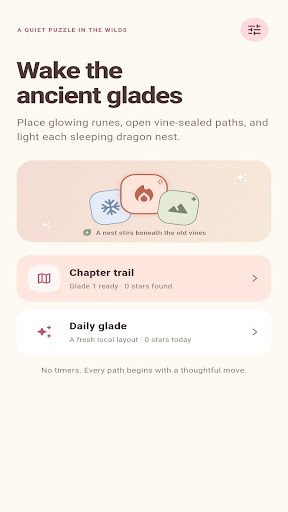
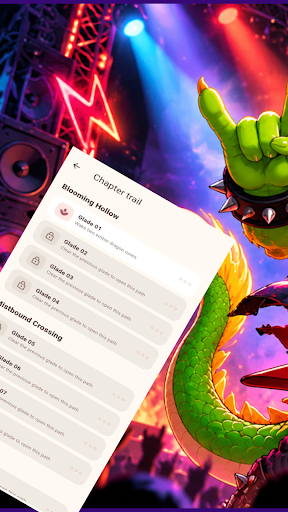

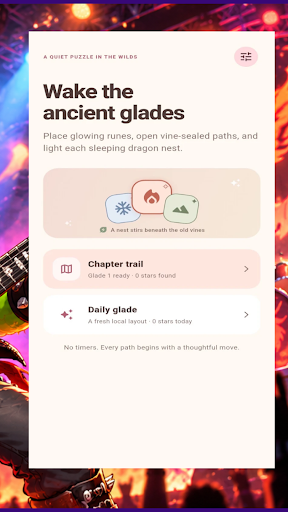
Shape a path through a quiet dragon sanctuary. Place each rune with care, join matching symbols, and bring the sleeping nests back to life.
PLAN EACH PLACEMENT
Work across a 6 × 6 board with ember, mist, and stone runes. Drag a rune into an empty space. Three or more matching runes connected up, down, left, or right merge into one rune of the next tier. Three tier-two runes become a dragon rune. Reach two tier-three runes of the displayed goal element before your 30 placements run out.
OPEN THE SEALED PATHS
Vine-wrapped stone seals block selected spaces. Their locations and one or two layers are visible from the start. A merge beside a seal weakens it; remove its layers to open that space. Each glade changes the seal layout and rune arrangement, inviting a different route through the board.
USE EACH TOOL WITH PURPOSE
One hint highlights a useful landing space without placing a rune for you. One clearing charm removes up to two randomly selected lowest-tier runes to ease a crowded board. Occasionally, a marked Starfire rune can be assigned to ember, mist, or stone before it is placed.
If a glade is lost, one optional continue clears up to two lowest-tier runes and adds five placements. It does not require a purchase, an account, or a network connection. You can also replay any open glade and plan a different route.
FOLLOW THE CHAPTER TRAIL
Restore three chapters of four glades each. Complete a glade to open the next and earn up to three stars based on your remaining placements and whether you used a continue. A daily glade offers a date-based layout and a local star record.
The first visit includes a short, skippable drag-and-merge demonstration. Sound effects are off by default and can be enabled in Settings. Chapter progress, sound preference, and daily records are stored on your device. The puzzle can be played offline.
Show more

1. Download MEmu installer and finish the setup

2. Start MEmu then open Google Play on the desktop

3. Search 5555xEmber in Google Play
Install
4. Download and Install 5555xEmber
5. On install completion click the icon to start

6. Enjoy playing 5555xEmber on PC with MEmu
MEmu Play is the best Android emulator and 100 million people already enjoy its superb Android gaming experience. The MEmu virtualization technology empowers you to play thousands of Android games smoothly on your PC, even the most graphic-intensive ones.
Bigger screen with better graphics; Long duration, without limitation of battery or mobile data.
Full Keymapping support for precise control of keyboard and mouse or gamepad.
Multiple game accounts or tasks on single PC at one time with Multi-Instance manager.
Play 5555xEmber on PC by following steps: