Arcade Archives Wiz
Updated
Current Version
Offered By

With your passion for Arcade Archives Wiz, you shouldn’t have to limit yourself to the small screen of a phone. Play like a pro and take full control of the game using a keyboard and mouse. MEmu gives you everything you’re looking for. Download and play Arcade Archives Wiz on PC. Play as long as you want — no more worries about battery life, mobile data, or unexpected calls. The all-new MEmu 9 is the best way to play Arcade Archives Wiz on PC. With our expertly designed keymapping system, Arcade Archives Wiz feels just like a real PC game. The MEmu multi-instance manager lets you run two or more accounts on the same device at the same time. Most importantly, our exclusive emulation engine unlocks your PC’s full potential, delivering smooth and seamless performance.
Show more
Download Arcade Archives Wiz on PC with MEmu Android Emulator. Enjoy playing on big screen. Arcade Archives Wiz is intended for players who want to revisit an older arcade title with its original style and structure.
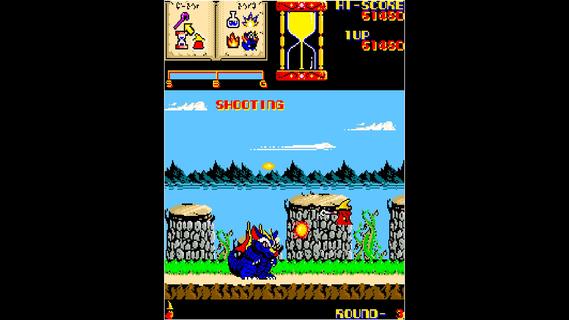
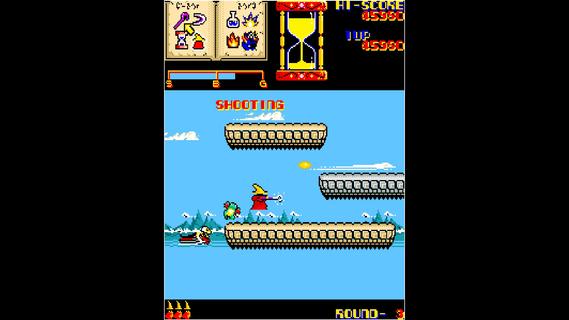
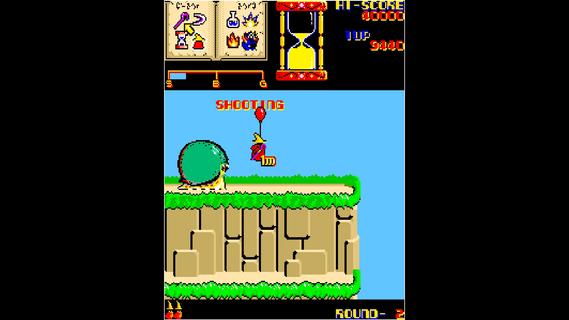
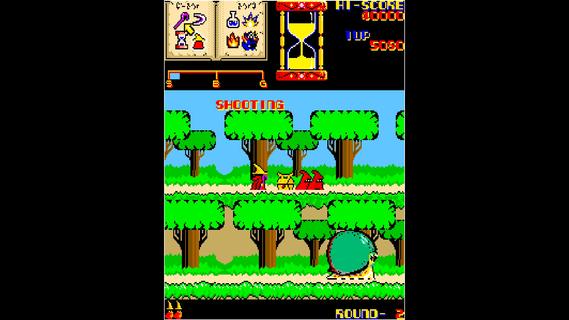
Arcade Archives Wiz is intended for players who want to revisit an older arcade title with its original style and structure. It follows Wiz, a wizard on a journey through a fantasy world filled with monsters and dangerous areas. The game comes from the Arcade Archives series, which focuses on reproducing classic arcade releases rather than redesigning them as modern games. If you want to download Arcade Archives Wiz, expect an experience centered on the original 1985 release.Arcade Archives Wiz featuresMagic based action across three realmsArcade Archives Wiz puts you in control of Wiz, who can use eight different types of Magic against enemies. You travel through the Depths and the Land Realm before reaching the Sky Realm. Each area leads toward the final encounter with a dragon.Original arcade game structureArcade Archives Wiz recreates the action game released by SEIBU KAIHATSU in 1985. The focus remains on the original arcade progression, enemy encounters, and fantasy setting. This makes it suitable for players who want the structure of an older arcade game rather than a new interpretation of Wiz.Settings for controls and displayIn ORIGINAL MODE, you can adjust the difficulty and display settings before playing. Arcade Archives Wiz also lets you remap buttons, enable rapid fire, and use multiple save files. These options can help you set up controls that match how you play on your Android device.Rewind for previous movesYou can rewind gameplay when you want to undo a recent move. This is useful after a missed attack or an unwanted step into danger. Instead of ending the attempt immediately, you can return to an earlier moment and continue from there.Score and time based modesArcade Archives Wiz includes HI SCORE MODE and CARAVAN MODE for score focused play. Both modes support Online Rankings, so players can compare results with others. Arcade Archives 2 Wiz also adds TIME ATTACK MODE, which measures how quickly you complete the game instead of focusing on score.Arcade Archives Wiz editions and language optionsArcade Archives Wiz is available as the standard Arcade Archives release, while Arcade Archives 2 Wiz includes the additional TIME ATTACK MODE and VRR support. VRR support is intended to improve accuracy to the original arcade presentation where supported. Both editions include ORIGINAL MODE, HI SCORE MODE, and CARAVAN MODE.The game supports one or two players. Its menu and manual language options include Japanese, English, French, Italian, German, and Spanish. This is useful to check before starting if you prefer to read game information in a specific language.How to play Arcade Archives WizArcade Archives Wiz starts with choosing a mode and checking the available game options. The Arcade Archives Wiz APK includes settings that let you prepare the controls before entering the arcade action. Once a session begins, progress through each realm while managing enemies and Magic attacks.Open Arcade Archives Wiz and choose the mode you want to play, such as ORIGINAL MODE for the standard arcade experience.Before starting, open the options to set the difficulty, display preferences, button layout, and rapid fire setting if needed.Begin the game as Wiz and use the available Magic types to deal with monsters as you move through the Depths.Continue through the Land Realm and then the Sky Realm, keeping track of enemy patterns and your position during combat.Use the rewind function after a mistake, or save progress in ORIGINAL MODE when you want to return to a later session.Get started with WizArcade Archives Wiz preserves the 1985 arcade action game with configurable controls, save files, score modes, and a route to the final dragon battle. Check Arcade Archives Wiz latest version details before installing if you want access to the current available edition and its mode options. Currently, there's no confirmed package. When the game is officially out, you can download Arcade Archives Wiz APK from APKPure.
Show more

1. Download MEmu installer and finish the setup

2. Start MEmu then open Google Play on the desktop

3. Search Arcade Archives Wiz in Google Play
Install
4. Download and Install Arcade Archives Wiz
5. On install completion click the icon to start

6. Enjoy playing Arcade Archives Wiz on PC with MEmu
MEmu Play is the best Android emulator and 100 million people already enjoy its superb Android gaming experience. The MEmu virtualization technology empowers you to play thousands of Android games smoothly on your PC, even the most graphic-intensive ones.
Bigger screen with better graphics; Long duration, without limitation of battery or mobile data.
Full Keymapping support for precise control of keyboard and mouse or gamepad.
Multiple game accounts or tasks on single PC at one time with Multi-Instance manager.
Play Arcade Archives Wiz on PC by following steps: