
Black Border 3
Updated
Current Version
3.4.5
Offered By

With your passion for Black Border 3, you shouldn’t have to limit yourself to the small screen of a phone. Play like a pro and take full control of the game using a keyboard and mouse. MEmu gives you everything you’re looking for. Download and play Black Border 3 on PC. Play as long as you want — no more worries about battery life, mobile data, or unexpected calls. The all-new MEmu 9 is the best way to play Black Border 3 on PC. With our expertly designed keymapping system, Black Border 3 feels just like a real PC game. The MEmu multi-instance manager lets you run two or more accounts on the same device at the same time. Most importantly, our exclusive emulation engine unlocks your PC’s full potential, delivering smooth and seamless performance.
Show more
Download Black Border 3 on PC with MEmu Android Emulator. Enjoy playing on big screen. Step into the inspection booth in Black Border 3, a thrilling dystopian border simulation game.
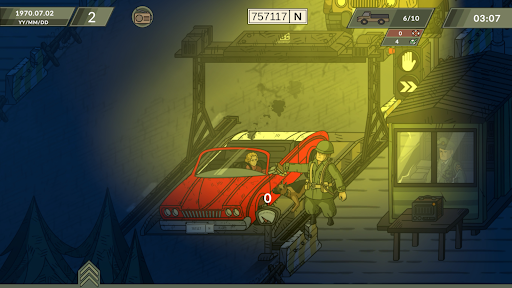
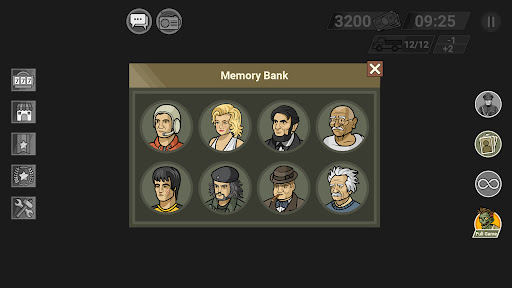
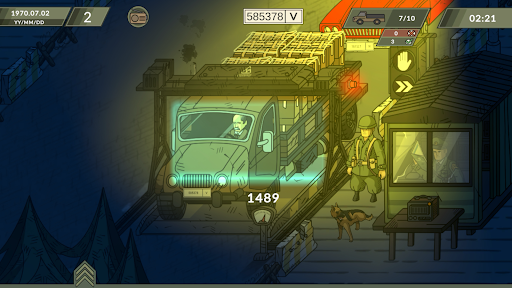
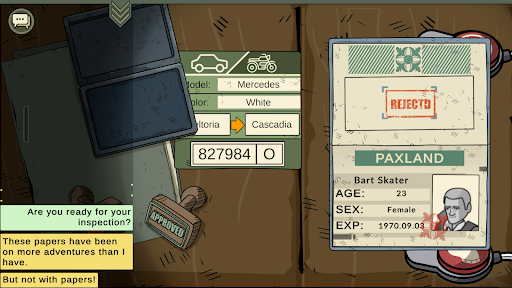
Step into the inspection booth in Black Border 3, a thrilling dystopian border simulation game. Review complex documents, interrogate suspicious travelers, and uncover clever smuggling plots.
Check passports, work passes, and entry permits against the constantly changing daily rulebook. Keep a sharp eye out for mismatched dates, forged seals, and altered photographs. The criminals are getting smarter, and you will need to cross-reference multiple documents to catch them in a lie.
Survive the Darkness
Daytime rules no longer apply. You cannot simply trust your eyes in the pitch black. Use your tactical flashlight to illuminate faces, verify identities, and ensure the person standing before you matches their paperwork. If they don't, you are the only thing standing between a smuggler and the border.
Exclusive Night Shift Features:
Tactical Flashlight: You can't trust your eyes in the dark. Use your flashlight to illuminate faces, verify identities, and ensure the person in front of you matches their papers.
Interactive Dialogue Events: Engage in deep, branching conversations. Your choices in these dialogues will shape the course of your shift and the fate of the travelers.
Live Radio Calls: Stay connected to HQ. Receive urgent intel, real-time updates, and high-priority orders via your radio to stay one step ahead of the chaos.
Advanced Perk System: Earn medals and trade them for powerful passive upgrades. Sharpen your skills to survive the 50-night grind and become the ultimate officer.
Professional Voice Acting: The border has never felt more alive. For the first time, every character has a voice! Hear the lies, the fear, and the stories behind every passport.
The Supply Shop: Spend your hard-earned credits on tactical consumables. From scanners to speed boosts, buy the tools you need to finish your shift in record time.
High-Stakes Jackpot: Feeling lucky? Spin the wheel for a chance to win cash, items, or the Legendary Fragments. Collect them all for the "Perfect Stamp" power-up!
Moral Choices & Historical Figures: Encounter unique characters and famous historical figures. Your decisions to approve or reject them lead to multiple endings recorded in your Memory Bank.
Silence or Chaos? It’s Your Call.
This is not an ordinary workday. It’s a high-risk simulator where a single mistake can trigger a diplomatic incident.
Are you ready to handle the pressure and become the ultimate Night Hero?
Download Black Border 3 today and show your skills when the sun goes down!
Show more

1. Download MEmu installer and finish the setup

2. Start MEmu then open Google Play on the desktop

3. Search Black Border 3 in Google Play
Install
4. Download and Install Black Border 3
5. On install completion click the icon to start

6. Enjoy playing Black Border 3 on PC with MEmu
MEmu Play is the best Android emulator and 100 million people already enjoy its superb Android gaming experience. The MEmu virtualization technology empowers you to play thousands of Android games smoothly on your PC, even the most graphic-intensive ones.
Bigger screen with better graphics; Long duration, without limitation of battery or mobile data.
Full Keymapping support for precise control of keyboard and mouse or gamepad.
Multiple game accounts or tasks on single PC at one time with Multi-Instance manager.
Play Black Border 3 on PC by following steps: