Boxville
Updated
Current Version
1.32
Offered By

With your passion for Boxville, you shouldn’t have to limit yourself to the small screen of a phone. Play like a pro and take full control of the game using a keyboard and mouse. MEmu gives you everything you’re looking for. Download and play Boxville on PC. Play as long as you want — no more worries about battery life, mobile data, or unexpected calls. The all-new MEmu 9 is the best way to play Boxville on PC. With our expertly designed keymapping system, Boxville feels just like a real PC game. The MEmu multi-instance manager lets you run two or more accounts on the same device at the same time. Most importantly, our exclusive emulation engine unlocks your PC’s full potential, delivering smooth and seamless performance.
Show more
Download Boxville on PC with MEmu Android Emulator. Enjoy playing on big screen. Boxville is 2-in-1: an animated film and a puzzle game.
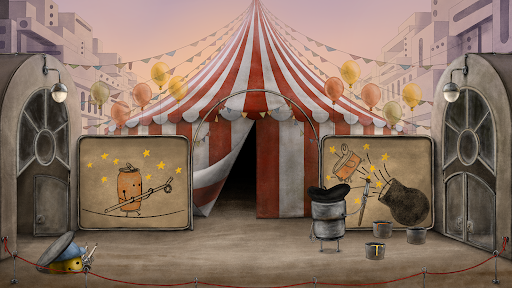
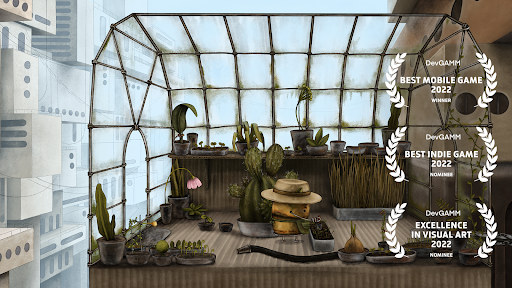
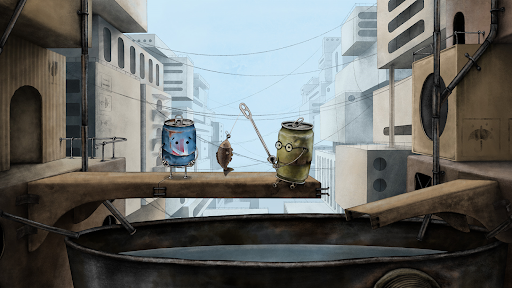
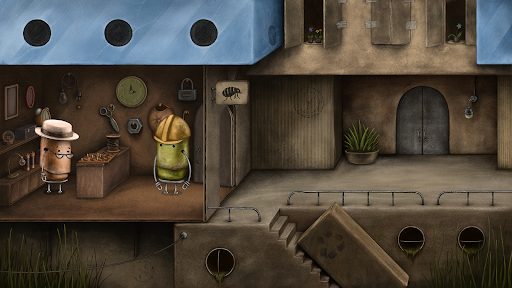
Boxville is 2-in-1: an animated film and a puzzle game.
Boxville is an adventure puzzle game about speechless cans living in the city of boxes and drawing doodles on cardboards to tell the stories.
Boxville is good for playing alone to dive into the atmosphere and challenge your brain with sophisticated logic puzzles and riddles, or playing with a friend or family to share unique audio-visual experiences and solve the puzzles together.
Design
The core idea of the game is that it’s not just a game - but also an animated film that you can watch and play at the same time.
We designed Boxville’s gameplay with the purpose of taking away your anxiety and stress. You can explore and observe the world without rushing and pressure.
The game is full of environmental quests and logical puzzles that we have carefully picked from among hundreds of options.
Story
Boxville is a city of boxes populated with old cans. They live quiet and happy lives with their everyday routines and habits. But one day, unexplained earthquakes disturbed their idyll...
Blue Can (our hero) lost his best friend because of that. He started his search but it is not so easy to move through the city after earthquakes. He has to find a way to move forward, return the friend back home and discover the real reason for all those earthquakes. There are many adventures, new friends and it’s not only friends that are waiting for him on the way.
He has to be curious, inventive, careful, and to help others, to reach his goal.
What you can expect to see and hear in Boxville:
- Hand-drawn graphics — all backgrounds and characters are carefully drawn by our artists.
- Every animation and sound is created especially for each interaction.
- Unique music track was created for every scene to accomplish the atmosphere of the game.
- Tens of logical puzzles and mini-games are tightly incorporated into the story of the game.
- There are no words in the game — all characters communicate via cartoony speechbubbles.
Show more

1. Download MEmu installer and finish the setup

2. Start MEmu then open Google Play on the desktop

3. Search Boxville in Google Play
Install
4. Download and Install Boxville
5. On install completion click the icon to start

6. Enjoy playing Boxville on PC with MEmu
MEmu Play is the best Android emulator and 100 million people already enjoy its superb Android gaming experience. The MEmu virtualization technology empowers you to play thousands of Android games smoothly on your PC, even the most graphic-intensive ones.
Bigger screen with better graphics; Long duration, without limitation of battery or mobile data.
Full Keymapping support for precise control of keyboard and mouse or gamepad.
Multiple game accounts or tasks on single PC at one time with Multi-Instance manager.
Play Boxville on PC by following steps: