Bus Go! Car Traffic Jam
Updated
Current Version
1.0.39
Offered By

With your passion for Bus Go! Car Traffic Jam, you shouldn’t have to limit yourself to the small screen of a phone. Play like a pro and take full control of the game using a keyboard and mouse. MEmu gives you everything you’re looking for. Download and play Bus Go! Car Traffic Jam on PC. Play as long as you want — no more worries about battery life, mobile data, or unexpected calls. The all-new MEmu 9 is the best way to play Bus Go! Car Traffic Jam on PC. With our expertly designed keymapping system, Bus Go! Car Traffic Jam feels just like a real PC game. The MEmu multi-instance manager lets you run two or more accounts on the same device at the same time. Most importantly, our exclusive emulation engine unlocks your PC’s full potential, delivering smooth and seamless performance.
Show more
Download Bus Go! Car Traffic Jam on PC with MEmu Android Emulator. Enjoy playing on big screen. Welcome to Bus Go - a FREE, fun, and brain-challenging bus escape traffic jam puzzle game!

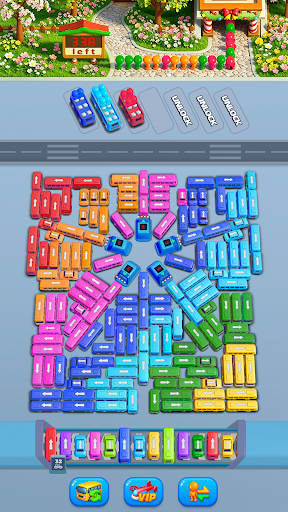
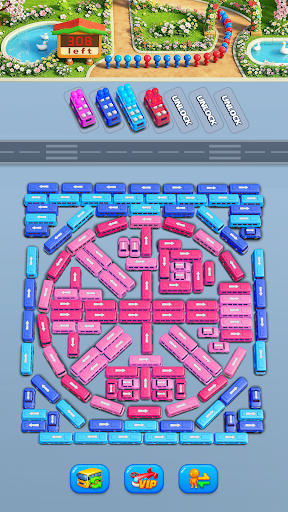
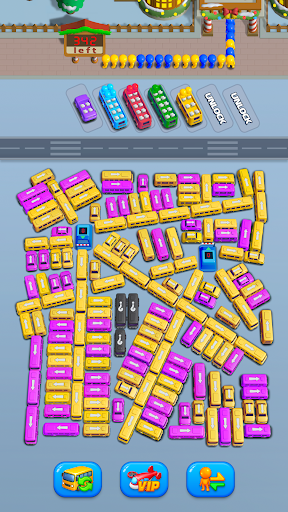
Welcome to Bus Go - a FREE, fun, and brain-challenging bus escape traffic jam puzzle game!
Stuck in a chaotic bus jam or a crowded car parking lot? It’s time to plan your moves, clear the traffic jam, and help every bus escape safely.
Bus Go is a unique traffic jam puzzle game that combines bus escape, car jam, and parking games into one highly addictive experience. Designed for fans of bus games, car parking games, and logic puzzle games, Bus Go! Car Traffic Jam challenges you to think ahead, sort passengers, and solve increasingly complex parking puzzles. Easy to pick up but hard to master, this driving puzzle game is perfect for quick breaks or long play sessions.
⭐ GAME FEATURES
Bus Escape & Car Jam Puzzles
Navigate crowded parking lots and solve tricky traffic jam situations.
Unique Sorting Game play
Match passengers to the correct bus and avoid deadlocks.
Challenging Levels
Puzzles start simple and quickly evolve into complex parking puzzle games that test your strategy.
Play Offline Anytime
No internet? No problem. Enjoy this offline bus game anytime, anywhere.
Fun for All Ages
Simple controls with deep strategy—great for kids, adults, and puzzle lovers alike.
Power-Ups & Boosters
Stuck in a tough bus escape traffic jam? Use special tools to clear the path.
HOW TO PLAY BUS GO
1. Tap to move vehicles—each car can move in one direction only
2. Plan carefully, as parking spaces are limited
3. Make sure every passenger boards the matching bus
4. Use power-ups to solve difficult car jam puzzles
Think ahead, avoid blocking paths, and escape the jam!
Bus Go! Car Traffic Jam blends the best parts of bus escape, traffic jam puzzles, and car parking games into one smooth and satisfying experience. If you enjoy games like mini motorways, vehicle masters, or car match, you’ll love the strategic depth of Bus Go! Car Traffic Jam. Each level is a brand-new logic puzzle, requiring smart planning and precise moves. Clear the jam, organize the parking lot, and become a true bus escape master.
Prove you have what it takes to master the ultimate Parking, Sorting, and Strategy Challenge! Step into a world where every move matters and every decision tests your mind. This addictive parking and traffic jam puzzle game challenges your IQ, strategy, and sorting skills as you untangle crowded parking lots and chaotic traffic jams. Plan, sort vehicles and passengers correctly, and use a smart strategy to clear each parking challenge without causing more gridlock.
Designed for puzzle lovers and brain-game fans, each level delivers a fresh sorting challenge that pushes your logic and problem-solving abilities. From simple parking puzzles to complex traffic jam scenarios, the difficulty ramps up steadily—keeping your mind engaged and your IQ skills sharp. If you enjoy thinking ahead, mastering smart strategies, and conquering satisfying parking puzzles, this is the ultimate challenge you don’t want to miss.
Ready to Escape the Jam?
Can you solve every bus jam without causing more chaos? Jump into the ultimate traffic jam puzzle game, challenge your brain, and prove your skills.
Download Bus Go! Car Traffic Jam now and start your bus escape adventure today!
Show more

1. Download MEmu installer and finish the setup

2. Start MEmu then open Google Play on the desktop

3. Search Bus Go! Car Traffic Jam in Google Play
Install
4. Download and Install Bus Go! Car Traffic Jam
5. On install completion click the icon to start

6. Enjoy playing Bus Go! Car Traffic Jam on PC with MEmu
MEmu Play is the best Android emulator and 100 million people already enjoy its superb Android gaming experience. The MEmu virtualization technology empowers you to play thousands of Android games smoothly on your PC, even the most graphic-intensive ones.
Bigger screen with better graphics; Long duration, without limitation of battery or mobile data.
Full Keymapping support for precise control of keyboard and mouse or gamepad.
Multiple game accounts or tasks on single PC at one time with Multi-Instance manager.
Play Bus Go! Car Traffic Jam on PC by following steps: