Cerita Kelasku
Updated
Current Version
1.1.8
Offered By

With your passion for Cerita Kelasku, you shouldn’t have to limit yourself to the small screen of a phone. Play like a pro and take full control of the game using a keyboard and mouse. MEmu gives you everything you’re looking for. Download and play Cerita Kelasku on PC. Play as long as you want — no more worries about battery life, mobile data, or unexpected calls. The all-new MEmu 9 is the best way to play Cerita Kelasku on PC. With our expertly designed keymapping system, Cerita Kelasku feels just like a real PC game. The MEmu multi-instance manager lets you run two or more accounts on the same device at the same time. Most importantly, our exclusive emulation engine unlocks your PC’s full potential, delivering smooth and seamless performance.
Show more
Download Cerita Kelasku on PC with MEmu Android Emulator. Enjoy playing on big screen. Welcome to "My Classroom Story," an adventurous interactive visual novel for kids and families!
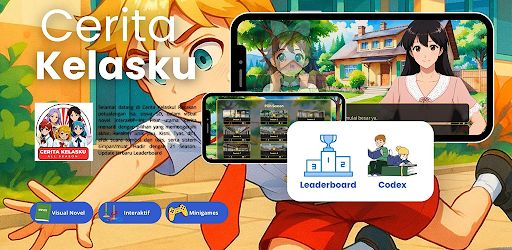
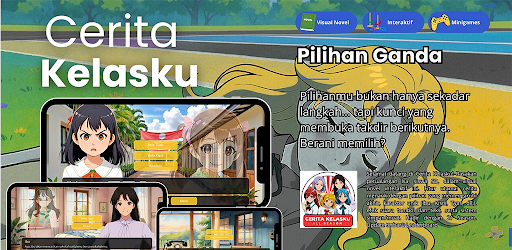
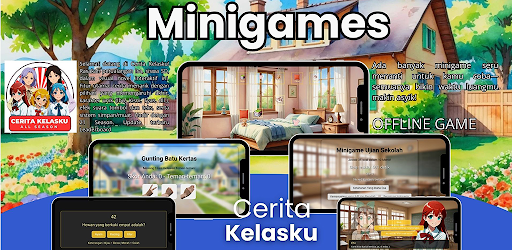
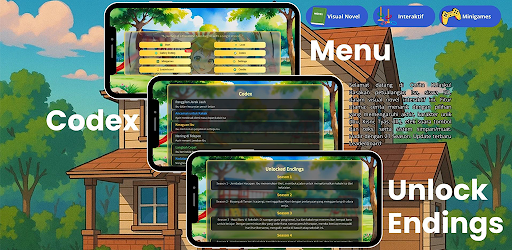
Welcome to "My Classroom Story," an adventurous interactive visual novel for kids and families! Follow Isa, an enthusiastic elementary school student, as she navigates her days at a new school. In this game, you'll make decisions that impact the story, play exciting minigames, and build friendships with classmates. Suitable for children 13 and under, "My Classroom Story" offers a safe, educational, and entertaining experience.
Key Features:
- Interactive Story: Choose Isa's actions, such as helping a friend or completing a challenge, which lead to different endings. Each decision unlocks a new adventure!
- Fun Minigames: Enjoy minigames like "Run to Class," "Find the Lost Item," and "Help Mrs. As Sing" integrated into the story, adding to the excitement and challenge.
- Unique Characters: Meet Isa, Ibu, Kisni, Tyas, Tasya, Angga, Novan, and Mrs. As—each with their own unique personalities and stories.
- Sound Effects: Hear button sounds when selecting and text sounds as the story progresses, creating a more immersive experience.
- Save and Load Progress: Use three save slots to continue your adventure at any time, all saved on your device.
- Multi-Season: Play Seasons 1 through 4, with a focus on Season 4: "My Classroom Story," which is full of school stories and minigames.
- Responsive Design: A modern interface with dynamic backgrounds and expressive characters, optimized for landscape mode.
Season 21 - "My Classroom Story":
In this season, Isa begins her first day at a new school. From leaving with her mother to meeting friends like the friendly Kisni, the teasing Tyas, and the cheerful Tasya, you'll help Isa build relationships. Play minigames like "Run to Class" to get there on time, "Find the Lost Item" to find a pencil, or "Help Mrs. As Sing" to the national anthem. Choose to go home with Kisni or Tyas and Tasya, and experience different endings, such as "Kisni Strong" or "Kisni Goodbye," filled with lessons about friendship.
Kid-Safe:
"My Classroom Stories" is designed for children under 13. We do not collect personal information such as name, email, or location. Game progress and minigame scores are stored only on your device, not sent to our servers. This game is ad- and tracker-free, so parents can rest assured. In compliance with COPPA, we guarantee a safe and enjoyable gaming experience.
Privacy Policy Brief:
We do not collect personal data. Game progress is stored locally on your device. See our Privacy Policy at: [https://docs.google.com/document/d/1234]. Questions? Contact ceritakelasku@gmail.com.
How to Play:
- Rotate your device to landscape mode for the best experience.
- Choose story options or play minigames by pressing buttons, complete with interactive sounds.
- Save your progress and continue at any time.
Why Choose "My Class Story"?
This game combines an educational story with entertaining minigames, teaching values like friendship and teamwork. With simple yet engaging graphics, immersive sound effects, and relatable adventures, "My Class Story" is a great choice for kids and families.
Download now and help Isa explore her school! Send feedback to ceritakelasku@gmail.com.
Note:
- For children ages 6-12.
- Landscape mode only.
- Size: 50 MB.
Have fun playing in Isa's classroom!
Show more

1. Download MEmu installer and finish the setup

2. Start MEmu then open Google Play on the desktop

3. Search Cerita Kelasku in Google Play
Install
4. Download and Install Cerita Kelasku
5. On install completion click the icon to start

6. Enjoy playing Cerita Kelasku on PC with MEmu
MEmu Play is the best Android emulator and 100 million people already enjoy its superb Android gaming experience. The MEmu virtualization technology empowers you to play thousands of Android games smoothly on your PC, even the most graphic-intensive ones.
Bigger screen with better graphics; Long duration, without limitation of battery or mobile data.
Full Keymapping support for precise control of keyboard and mouse or gamepad.
Multiple game accounts or tasks on single PC at one time with Multi-Instance manager.
Play Cerita Kelasku on PC by following steps: