Colony Flow!
Updated
Current Version
1.0.76
Offered By

With your passion for Colony Flow!, you shouldn’t have to limit yourself to the small screen of a phone. Play like a pro and take full control of the game using a keyboard and mouse. MEmu gives you everything you’re looking for. Download and play Colony Flow! on PC. Play as long as you want — no more worries about battery life, mobile data, or unexpected calls. The all-new MEmu 9 is the best way to play Colony Flow! on PC. With our expertly designed keymapping system, Colony Flow! feels just like a real PC game. The MEmu multi-instance manager lets you run two or more accounts on the same device at the same time. Most importantly, our exclusive emulation engine unlocks your PC’s full potential, delivering smooth and seamless performance.
Show more
Download Colony Flow! on PC with MEmu Android Emulator. Enjoy playing on big screen. Welcome to Colony Flow — a relaxing ant colony puzzle where every tiny ant has a job to do!
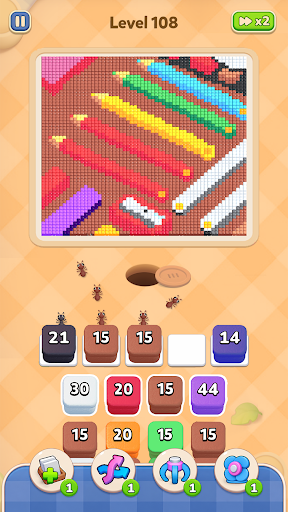
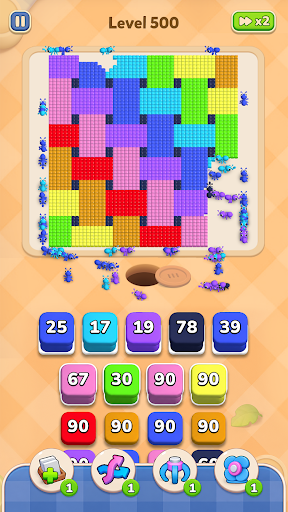
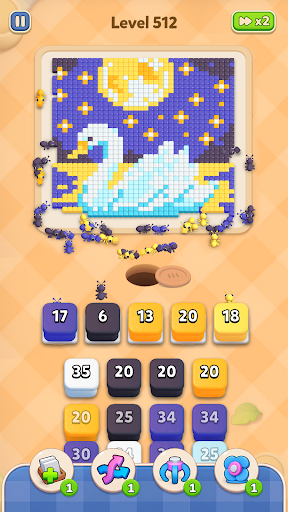
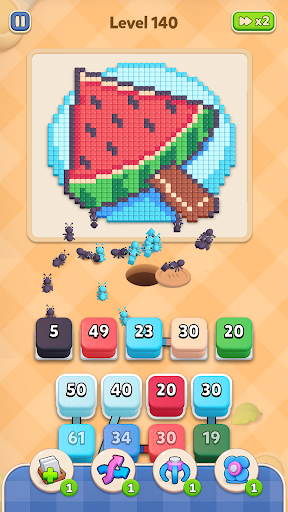
Welcome to Colony Flow — a relaxing ant colony puzzle where every tiny ant has a job to do! Tap a box, watch the workers pour out, and send them marching up to the pixel picture to carry colorful blocks back to the nest, one busy trip at a time.
Each level gives you a stack of ant boxes and just five open slots. Tap a box and it slides into a slot, releasing a swarm of ants in that color — they'll haul away every matching block in the picture. Clear a box and the slot frees up for the next one.
That's where the thinking starts. Open a color that has nothing left to carry and that slot stays clogged. Fill all five and your colony grinds to a halt. Read the picture, count what's left, and choose your boxes in the right order to keep the ants flowing.
COMMAND YOUR COLONY
Tap a box to send its ants marching
Watch workers haul matching blocks back to the nest
Manage your five slots — don't let them clog
Unlock the boxes buried further down the stack
Clear every block to finish the puzzle
EASY TO LEARN, SATISFYING TO SOLVE
One-tap controls — start playing in seconds
Puzzles that grow from cozy to genuinely clever
⏳ No timers, no lives, no pressure — take as long as you like
Watch trails of ants stream across the board as your plan pays off
Every solved board reveals the picture hiding underneath
DISCOVER PIXEL ART
Complete hundreds of colorful levels with themes like animals , fruit , food , flowers , nature , festivals , toys , rockets , castles , and plenty more surprises. Every puzzle you finish adds another piece of pixel art to your collection, so there's always one more picture waiting to be uncovered.
With adorable ants, satisfying animations, soothing music, and no time pressure, Colony Flow is easy to pick up and gentle to play — the kind of game that fits into a coffee break, a commute, or a quiet evening on the couch. But clearing every level will take some clever planning.
Tap the right boxes, guide your ants, clear the blocks, and uncover beautiful pixel art. Your colony is waiting!
Show more

1. Download MEmu installer and finish the setup

2. Start MEmu then open Google Play on the desktop

3. Search Colony Flow! in Google Play
Install
4. Download and Install Colony Flow!
5. On install completion click the icon to start

6. Enjoy playing Colony Flow! on PC with MEmu
MEmu Play is the best Android emulator and 100 million people already enjoy its superb Android gaming experience. The MEmu virtualization technology empowers you to play thousands of Android games smoothly on your PC, even the most graphic-intensive ones.
Bigger screen with better graphics; Long duration, without limitation of battery or mobile data.
Full Keymapping support for precise control of keyboard and mouse or gamepad.
Multiple game accounts or tasks on single PC at one time with Multi-Instance manager.
Play Colony Flow! on PC by following steps: