Billiard Hero™️: Rescue Shot
Updated
Current Version
1.0.29
Offered By

With your passion for Billiard Hero™️: Rescue Shot, you shouldn’t have to limit yourself to the small screen of a phone. Play like a pro and take full control of the game using a keyboard and mouse. MEmu gives you everything you’re looking for. Download and play Billiard Hero™️: Rescue Shot on PC. Play as long as you want — no more worries about battery life, mobile data, or unexpected calls. The all-new MEmu 9 is the best way to play Billiard Hero™️: Rescue Shot on PC. With our expertly designed keymapping system, Billiard Hero™️: Rescue Shot feels just like a real PC game. The MEmu multi-instance manager lets you run two or more accounts on the same device at the same time. Most importantly, our exclusive emulation engine unlocks your PC’s full potential, delivering smooth and seamless performance.
Show more
Download Billiard Hero™️: Rescue Shot on PC with MEmu Android Emulator. Enjoy playing on big screen. Billiard Hero: Rescue Shot — a fun and thrilling game where you play pool, win rewards, and rescue the girls in danger!
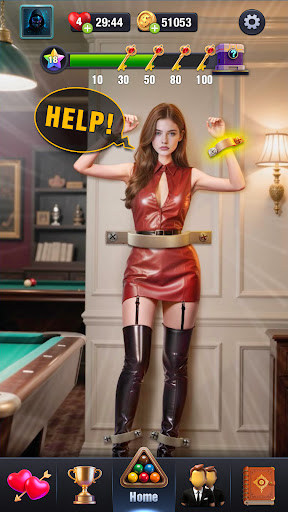
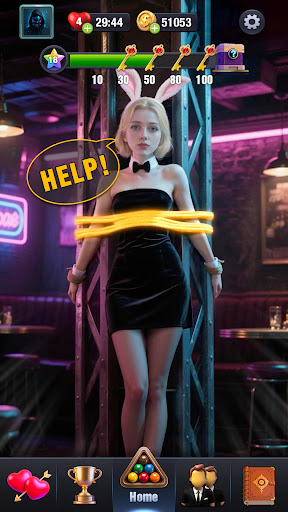
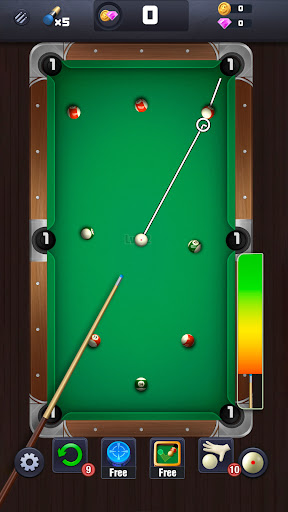
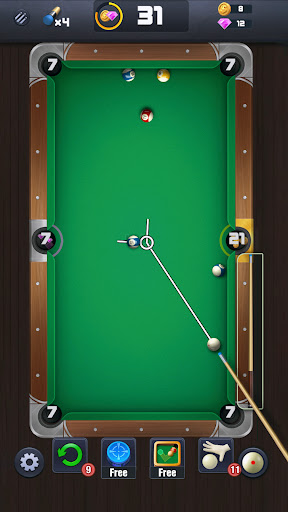
Billiard Hero: Rescue Shot — a fun and thrilling game where you play pool, win rewards, and rescue the girls in danger!
Each level gives you only limited shots. Make them count — every accurate strike brings you closer to saving her!
With levels you pass, you’ll rescue new girsl with unique style and personality.
They’re trapped, waiting for your pool skills to bring them back to safety.
And once you save her?
She’ll thank you with a custom cue stick — a reward and a badge of your billiards mastery!
Features:
- Limited-Shot Gameplay
Each level gives you only a few chances. Can you clear the table within that limit? Precision aiming + smart cue control — this is your stage to shine!
- Immersive Visuals & Audio
Enjoy the most realistic pool table vibes. From polished visuals to true-to-life ball sounds, it’s all here to pull you in.
- Solo-Friendly, Stress-Free Progression
No internet? No timers? No problem. Start a level anytime, whether you're in the mood to relax or ready to challenge yourself.
- Girl Rescue System
Each girl is stuck somewhere unique, and only your gameplay can bring her out. Save her and earn her special cue — plus something precious more!
- Gift & Affection System
After rescue, you can interact with her! Send her gifts, raise her affection, and unlock outfits, voice lines, and more personal touches!
- Cue Collection Matches Your Style
Each girl gifts you a cue with a special look and feel. Collect them all and find your favorite way to play — in both style and strategy!
Whether you're a seasoned pool player or just learning how to aim, this game welcomes you to pick up your cue and start shooting.
Clear the balls within limited shots, unlock heartfelt girls with moments, and build a collection of awesome cues along the way.
It’s a game of skill, of connection — and yes, someone special is waiting for your next move.
Take your cue in hand, your next shot will be her last hope!
Show more

1. Download MEmu installer and finish the setup

2. Start MEmu then open Google Play on the desktop

3. Search Billiard Hero™️: Rescue Shot in Google Play
Install
4. Download and Install Billiard Hero™️: Rescue Shot
5. On install completion click the icon to start

6. Enjoy playing Billiard Hero™️: Rescue Shot on PC with MEmu
MEmu Play is the best Android emulator and 100 million people already enjoy its superb Android gaming experience. The MEmu virtualization technology empowers you to play thousands of Android games smoothly on your PC, even the most graphic-intensive ones.
Bigger screen with better graphics; Long duration, without limitation of battery or mobile data.
Full Keymapping support for precise control of keyboard and mouse or gamepad.
Multiple game accounts or tasks on single PC at one time with Multi-Instance manager.
Play Billiard Hero™️: Rescue Shot on PC by following steps: