
Crystal of Atlan
Updated
Current Version
1.0.5
Offered By

With your passion for Crystal of Atlan, you shouldn’t have to limit yourself to the small screen of a phone. Play like a pro and take full control of the game using a keyboard and mouse. MEmu gives you everything you’re looking for. Download and play Crystal of Atlan on PC. Play as long as you want — no more worries about battery life, mobile data, or unexpected calls. The all-new MEmu 9 is the best way to play Crystal of Atlan on PC. With our expertly designed keymapping system, Crystal of Atlan feels just like a real PC game. The MEmu multi-instance manager lets you run two or more accounts on the same device at the same time. Most importantly, our exclusive emulation engine unlocks your PC’s full potential, delivering smooth and seamless performance.
Show more
Download Crystal of Atlan on PC with MEmu Android Emulator. Enjoy playing on big screen. Crystal of Atlan is a Magicpunk MMO Action RPG where you can immerse yourself in a Magicpunk world.

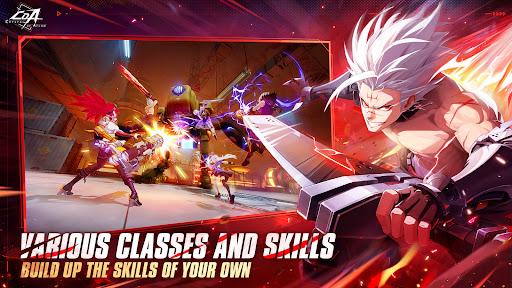


Crystal of Atlan is a Magicpunk MMO Action RPG where you can immerse yourself in a Magicpunk world. Build your skills, fight and uncover the secrets of this world with your allies! Time to embark on a wondrous journey of Magic and Machinery!
- MULTIPLE CLASSES TO CHOOSE FROM, COMBOS OF YOUR OWN
Over 10 classes to choose from, all unlocked from the start, each with over 20 skill combinations, providing ample room for players to experiment.
- SMOOTH COMBAT PERFECTED WITH DYNAMIC AIR COMBOS
Take fights into the air and pull off stylish air combos! In addition to the X/Y axis focus of mainstream 3D games, Crystal of Atlan puts an emphasis on utilizing the Z-axis in combat, offering a refined aerial combat experience that innovates the traditional MMORPG combat style. Effortless style on your enemies with refined and fluid controls over skill casts and character movement!
- CHALLENGING TEAM BATTLES
You can experience various multiplayer elements, including co-op dungeons and a guild fleet system, allowing you to connect with like-minded friends.
- FAIR, SKILL-BASED PVP
Enjoy competitive PvP with 3v3 and 1v1 modes, where everything from attributes to skill damage/cooldown is perfectly balanced. In this arena, skill is the only factor determining the outcome
- DISTINCT DUNGEONS AND BOSSES
Along your journey, you will venture into various locations and dungeons, such as ancient Atlan Ruins, Black Street, and the Sewers. At the end of each dungeon is a unique boss with special mechanics that will put your skills to the test. Explore the dungeons, overcome all obstacles, and get stronger in the process!
- A UNIQUE MAGICPUNK WORLD
Embark on an epic journey through a fantastical world where magic and technology intertwine. As a free-spirited adventurer, uncover the secrets of ancient Atlan ruins and confront powerful factions!
Facebook Page: https://www.facebook.com/CrystalofAtlan
Discord: https://discord.com/invite/tWEcmGhWgv
YouTube: https://www.youtube.com/@CoA_Global
X: https://twitter.com/CoA_Global
Twitch: https://www.twitch.tv/crystalofatlan_official
Instagram: https://www.instagram.com/crystal_of_atlan/
TikTok: https://www.tiktok.com/@crystalofatlan.en
Show more

1. Download MEmu installer and finish the setup

2. Start MEmu then open Google Play on the desktop

3. Search Crystal of Atlan in Google Play
Install
4. Download and Install Crystal of Atlan
5. On install completion click the icon to start

6. Enjoy playing Crystal of Atlan on PC with MEmu
MEmu Play is the best Android emulator and 100 million people already enjoy its superb Android gaming experience. The MEmu virtualization technology empowers you to play thousands of Android games smoothly on your PC, even the most graphic-intensive ones.
Bigger screen with better graphics; Long duration, without limitation of battery or mobile data.
Full Keymapping support for precise control of keyboard and mouse or gamepad.
Multiple game accounts or tasks on single PC at one time with Multi-Instance manager.
Play Crystal of Atlan on PC by following steps: